ASSA ABLOY ACCENTRA G Electric Dogging for 7000 Series Instructions_80-9477-0780-000
Open the original PDF document
View PDFExit Devices with Electric
Dogging ("G") and/or Monitors
Installation Instructions
Electric Dogging "G" Function
a. INSTALL SYSTEM PERIPHERAL COMPONENTS (781N or 782 Electric Latch Retraction Controller, Controlling Switches, Power Transfer Hinge(s), etc.) AND RACEWAYS:
DO NOT CONNECT POWER UNTIL ALL COMPONENTS ARE INSTALLED
| WIRES FROM POWER SUPPLY TO DEVICE | |
|---|---|
| (Minimum Gauge of Two-Conductor Cable) | |
| Up to 40 Feet of Wire | 16 Gauge |
| Up to 60 Feet of Wire | 14 Gauge |
| Up to 100 Feet of Wire | 12 Gauge |
INTEGRAL POWER SUPPLY - Connect Wires from Power Transfer Hinge, Controlling Switch(es) Console and Power (120 VA) input to 781N or 782 Electric Latch Retraction Controller as described in the controller installation instructions.
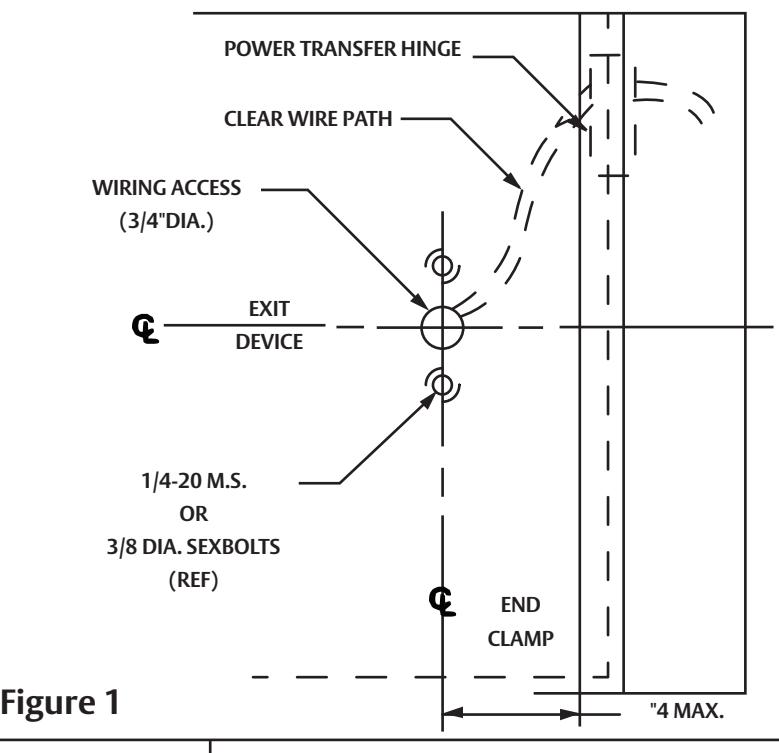
POWER TRANSFER HINGE - Follow Manufacturer's installation instructions. DOOR LEAF WIRES MUST EXIT THROUGH DOOR ACCESS HOLE UNDERNEATH DEVICE END CLAMP.
b. INSTALL DEVICE (and TRIM, if used):
Follow the installation instructions for device (and trim). Install the device less End Clamp and End Cap.
c. CHECK DEVICE ACTION:
Actuate device by touchbar (and by trim). Door and device should operate properly. Door should open freely and close securely.
d. PREPARE WIRING ACCESS HOLE:
Drill a 3/4" (19mm) diameter hole in center of Device End Clamp. See Figure 1.
e. CONNECT DEVICE ELECTRIC DOGGING WIRES:
Two Black wires from inactive (hinge) end of device connect to DEV 1 on the 781N or 782. Wire nuts not supplied.
f. CONNECT MONITORS (if used):
See "MONITORS" section. Connect as shown. Wire nuts not supplied.
g. TWO DEVICE ZONES:
When two devices are hooked to the same 781N or 782, repeat steps b. through d. and connect the second device to DEV 2.
h. TEST SYSTEM:
WITH POWER DISCONNECTED VERIFY THROUGHOUT THAT THERE ARE NO SHORT CIRCUITS. APPLY POWER TO CONSOLE (if used), THEN TO INTEGRAL POWER SUPPLY. Test Device: bolt should retract when controlling switch closes contacts, extend when switch contacts open. Momentary or continued operation, device status will correspond to switch contact status. WHEN NEEDED, FOLLOW TROUBLESHOOTING GUIDE.

WARNING
This product can expose you to lead which is known to the state of California to cause cancer and birth defects or other reproductive harm. For more information go to www.P65warnings.ca.gov.

WARNING
Attention Installer: Any retrofit or other field modification to a fire rated opening can potentially impact the fire rating of the opening, and ASSA ABLOY makes no representations or warranties concerning what such impact may be in any specific situation. When retrofitting any portion of an existing fire-rated opening, or specifying and installing a new fire-rated opening, please consult with a code specialist or local code official (Authority Having Jurisdiction) to ensure compliance with all applicable codes and ratings.
80-9477-0780-000 01/24
TROUBLESHOOTING GUIDE MONITORS
A) Identify problem.
B) Follow numbered solutions, in sequence given. PROBLEM SOLUTION
• Device does not work 1,2,3,6,8
• Touchbar does not stay
depressed. 2,4,5,6,7,8,9
2,6,8
• Bar hot (not warm).
• Bolt(s) hangs retracted. 5,7
• Bolt(s) not retracting in full. 5,7,9
• Intermittent action. 1,4,5,6,8,9
SOLUTION
- 1. Check remote switch(es).
- 2. Check circuit continuity.
- 3. Check fuses.
- 4. Check door (must swing freely).
- 5. Check manual device action (must work properly).
- 6. Check wiring (connections and insulation).
- 7. Check for foreign materials (device should be free from obstructions.
- 8. Check circuit board operation.
- 9. Check wires to device (Gauge vs. Length).
CONNECT AS SHOWN BELOW TO DEVICE SPECIFIED ON SYSTEM SCHEMATIC. Discard unused lead (seal end with wire nut). "B" MONITOR-Touchbar actuated SPDT switch to indicate egress in progress.
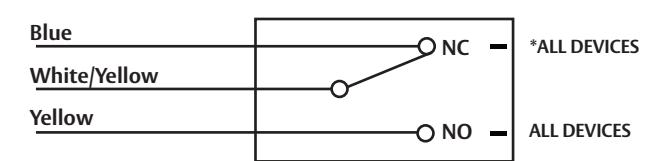
"O" MONITOR- Device actuated SPDT switch to indicate door open from outside.
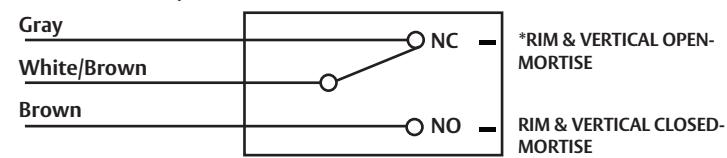
"S" MONITOR- Slider actuated SPDT switch to indicate bolt(s) extended-retracted.
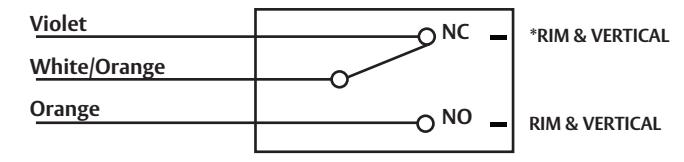
*SWITCH POSITION WITH DOOR SECURE AND DEVICE LATCH ENGAGED.
80-9477-0780-000 01/24