ASSA ABLOY ACCENTRA Accentra BLE End User Instructions_80-8150-0037-010
Open the original PDF document
View PDFHow to Start Using Your Mobile Device to Unlock Your Door
1. Installing the ASSA ABLOY ACCENTRA™ App
Your facility administrator has sent you an email with the links to download the ASSA ABLOY ACCENTRA™ app from the App Store or on Google Play. Use the appropriate link to get the ACCENTRA app and install it on your mobile device.

2. Linking Your Mobile Device
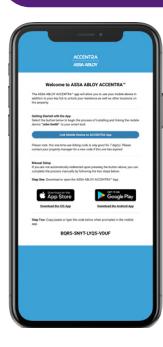
1.) From the email, click Link Mobile Device to the ACCENTRA App. If the ACCENTRA app is not installed, you will be directed to the appropriate location to download the app. If the ACCENTRA app is installed, the app opens and the welcome screen appears.
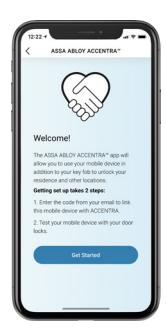
- 2.) Tap Get Started at the bottom of the screen to start the linking process.
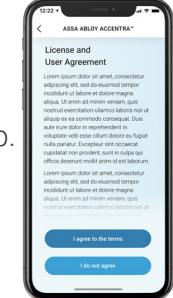
- 3.) An End User License Agreement appears. Accept the agreement to use the app.
4.) The linking code in the email should automatically appear on the screen. If it does not, copy and paste the code in the space provided. Tap Link Mobile Device. NOTE: The linking code is good only for a limited time. If your code does not work, contact your facility administrator.
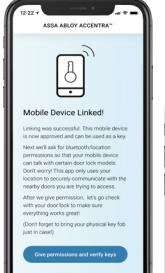
5.) The Mobile Device Linked screen appears. Tap Give Permissions and Verify Keys.
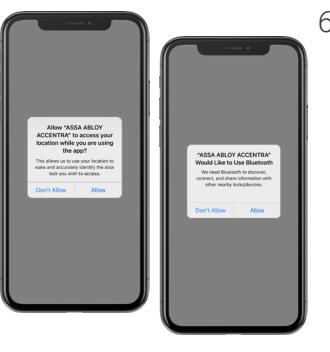
- 6.) If the Location Access pop-up appears, tap Allow to give the app permisson to use your location on your mobile device. If the Bluetooth use pop-up appears, tap Allow to give the app permission to use the device Bluetooth function. Follow the instructions on the screen to continue set up.
- 7.) If your facility administrator has granted you access to the Resident Managed Access™ features, a Resident Managed Access™ Available screen appears. Tap Log into Resident Managed Access™ to set up those features. Tap I'll set this up later if you do not want to do setup now.
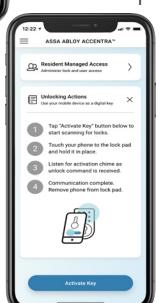
The Home page appears. You are now ready to start unlocking your doors using your mobile device!
If you have any trouble connecting your device to the Multi-Family Management System, contact your facility administrator.