ASSA ABLOY ACCENTRA 626F Trim Installation Instructions_80-8470-0626-000
Open the original PDF document
View PDF626F
Exit Device Trim
Installation Instructions
For use with all ASSA ABLOY 7000, 2100, 1800 and 1500 Series Exit Devices (Wood and Metal Doors) Rim Cylinder Escutcheon Assembly Lever is handed, RHR (shown) or LHR. Note: Lever return spring is universal for easy field handing. See page 5 to change handing. Wave Washer (when required) 2 STUDS TOWARDS LOCK EDGE (2) 1/4-20 Pan Head Machine Screws Packed with device. Cylinder Housing Assembly (*** For Double Cylinder Device see below detail) Cylinder Housing Cam (2) Cylinder Mounting Screws Clutch Lever Trim Spindle Assembly (2) 1/4-20 Oval Head (2) #14 Finishing Washers (2) Cylinder Mounting Screws Connector Bar *** - Double Cylinder Housing Assembly Supplied with Exit Device 2 STUDS AWAY FROM LOCK EDGE Cylinder Collar (when required)

This product can expose you to lead which is known to the state of California to cause cancer and birth defects or other reproductive harm. For more information go to www.P65warnings.ca.gov.

Attention Installer: Any retrofit or other field modification to a fire rated opening can potentially impact the fire rating of the opening, and ASSA ABLOY makes no representations or warranties concerning what such impact may be in any specific situation. When retrofitting any portion of an existing fire-rated opening, or specifying and installing a new fire-rated opening, please consult with a code specialist or local code official (Authority Having Jurisdiction) to ensure compliance with all applicable codes and ratings.
80-8470-0626-000 11/23
626F
Exit Device Trim Installation Instructions
Installation Instructions
- 1. Assemble trim. See page 4 for components and instructions.
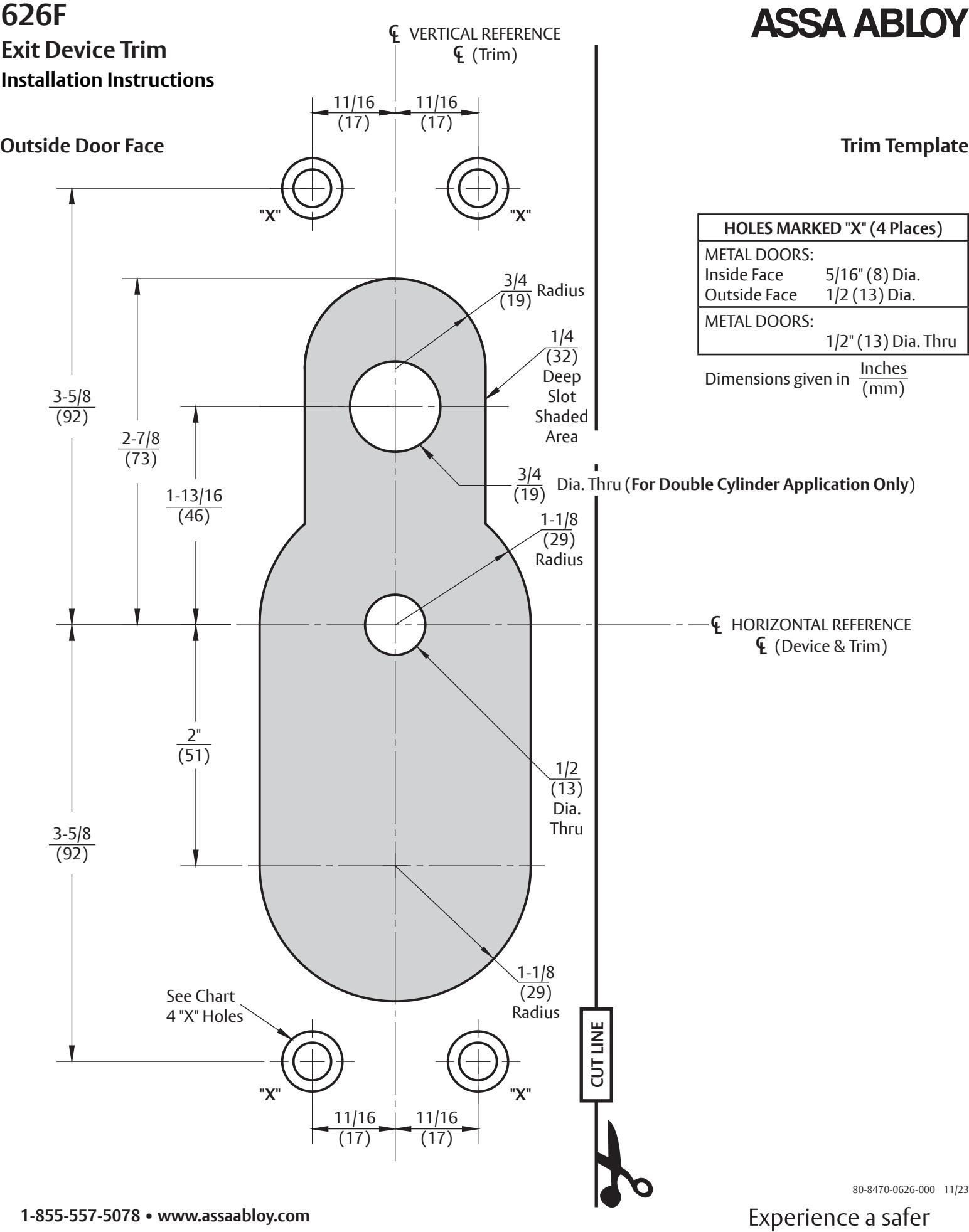
- 2. After marking door inside face for device location (Device Instructions) transfer Vertical Reference Centerline from inside to outside door face. Follow steps 2a and 2b on the right.
- 3. Transfer Horizontal Reference Centerline from inside to outside door face.
- 4. Align trim template and tape to outside door face. CAUTION: Office copiers and facsimile machines may change the size of a drawing and make the template inaccurate to use as a door marker. If this is not the original template packed with the trim, use only the dimensions written on the template to locate the holes on the door. (Do not use the template as a door marker)
- 5. Spot holes and prepare door for trim.
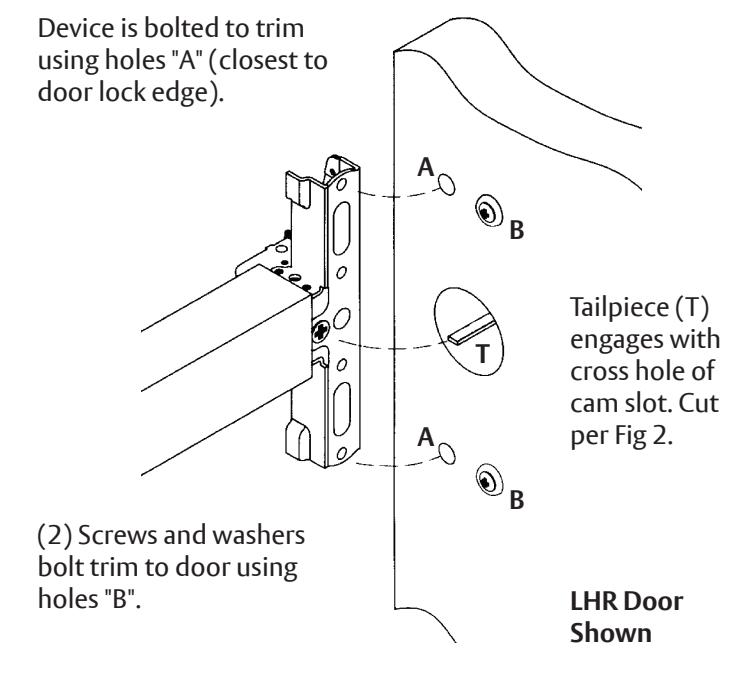
- 6. Mount trim to door thru holes "B". Fasten finger tight only with 2 screws and washers seating on door as shown in Figure 1 .
- 7. Cut trim tailpiece as shown in Figure 2 .
- 8. Seat device so that trim tailpiece penetrates cam slot as shown in Figure 1 . Continue as shown in device instructions.
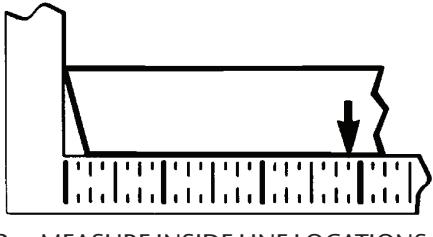
2a. MEASURE INSIDE LINE LOCATIONS
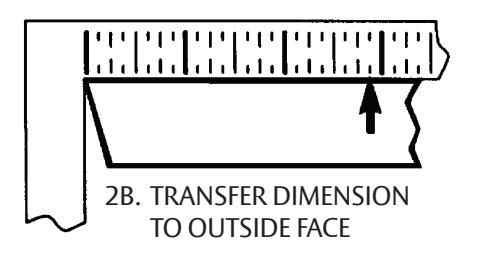
Figure 1 Figure 2
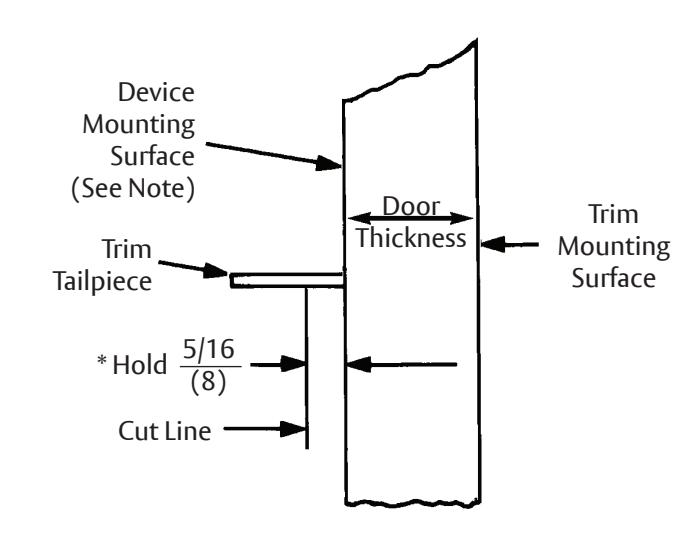
NOTE : Measure from device mounting surface (door face or shim surface). Trim must be in un-locked position.
80-8470-0626-000 11/23
626F
Exit Device Trim Installation Instructions
Trim Assembly Instructions
- 1. Check cylinder components. NOTE: Cylinders longer than 1-1/4" (32) will require collars. Refer to ASSA ABLOY cylinder collar chart, below.
- 2. When required, cut cylinder tailpiece.
- 3. Assemble cylinder. Insert cylinder housing prongs into matching notches of escutcheon. Pass cylinder tailpiece thru cylinder collar (when required) and slot in cylinder housing cam. Fasten cylinder using (2) mounting screws. DO NOT OVER TIGHTEN SCREWS.
- 4. Check cylinder action. Rotate cylinder tailpiece to cam the clutch lever down. This depresses the trim spindle assembly which disengages the trim spindle from the lever handle, putting the trim in a free-wheeling, locked mode.
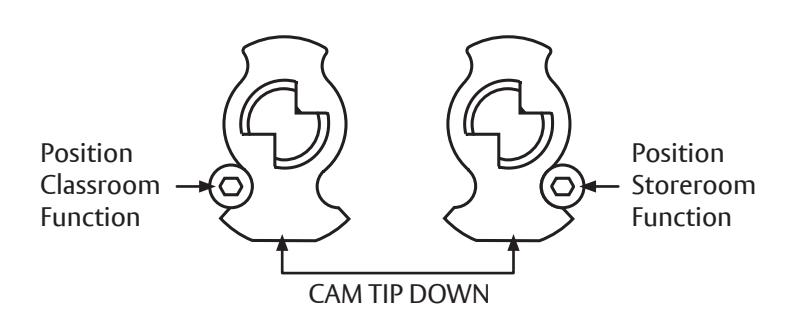
- 5. To Change Trim Function: Rotate cam tip to down position (locked mode). Move function screw as shown.
Function Screw Position
| ASSA ABLOY Cylinder Collar Chart | |
| Cylinder Length | Collar |
| 1-1/8" (29) | None |
| 1-1/4" (32) | None |
| 1-1/2" (38) | 1765.250** |
** Specify finish
How to Change Handing
626F, 627F, 628F, 690F and 691F Series Exit Device Trim
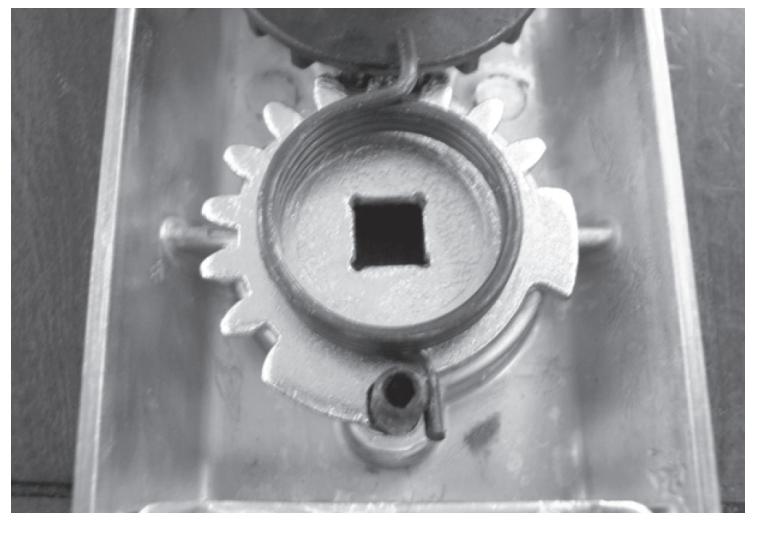
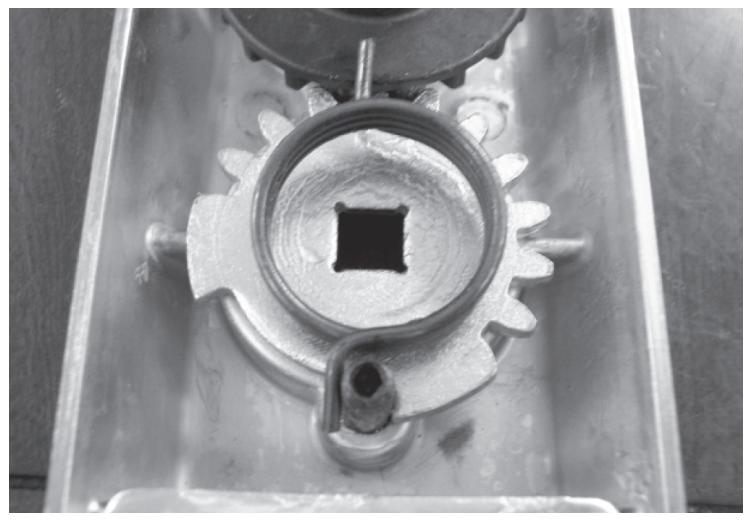
Left Hand Reverse Gear & Spring Orientation Right Hand Reverse Gear & Spring Orientation
Notes:
- 1. During change ensure black driven gear does not rotate.
- 2. Please wear safety glasses and be aware of spring tension on spring hub upon removal and assembly.
- 3. Light lubrication is recommended under flat gear, white lithium grease can be used.
626F Exit Device Trim
Installation Instructions
To Change Hands:
Tools Needed: Needle Nose pliers, Crescent wrench.
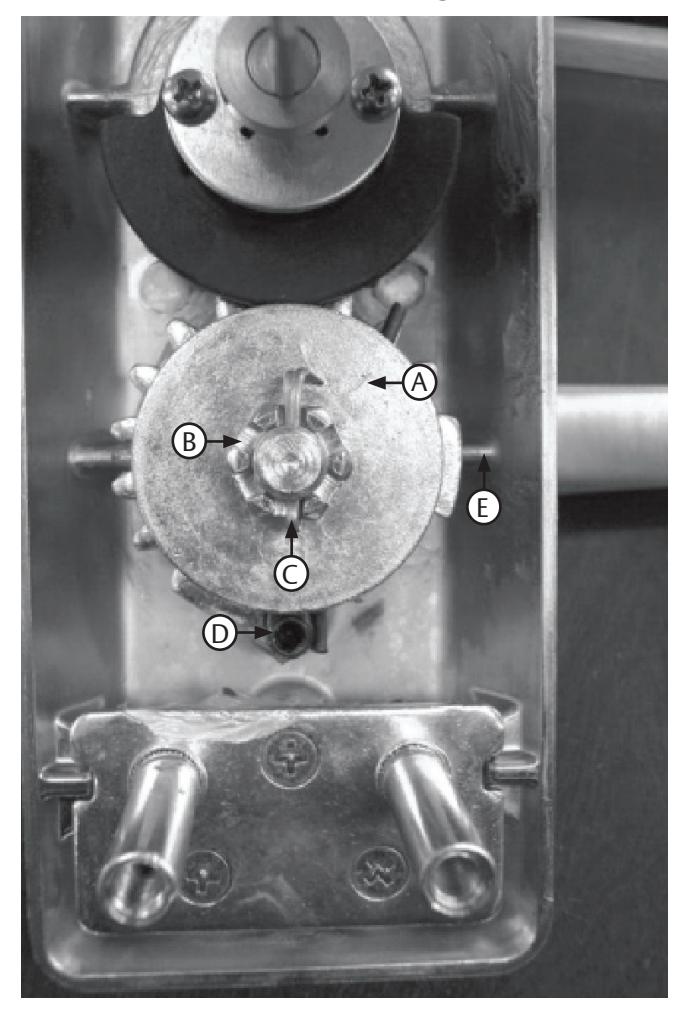
A. Spring Hub B. Castle Nut C. Cotter Pin D. Stop Post E. Flat Gear
LEFT HAND REVERSE RIGHT HAND REVERSE
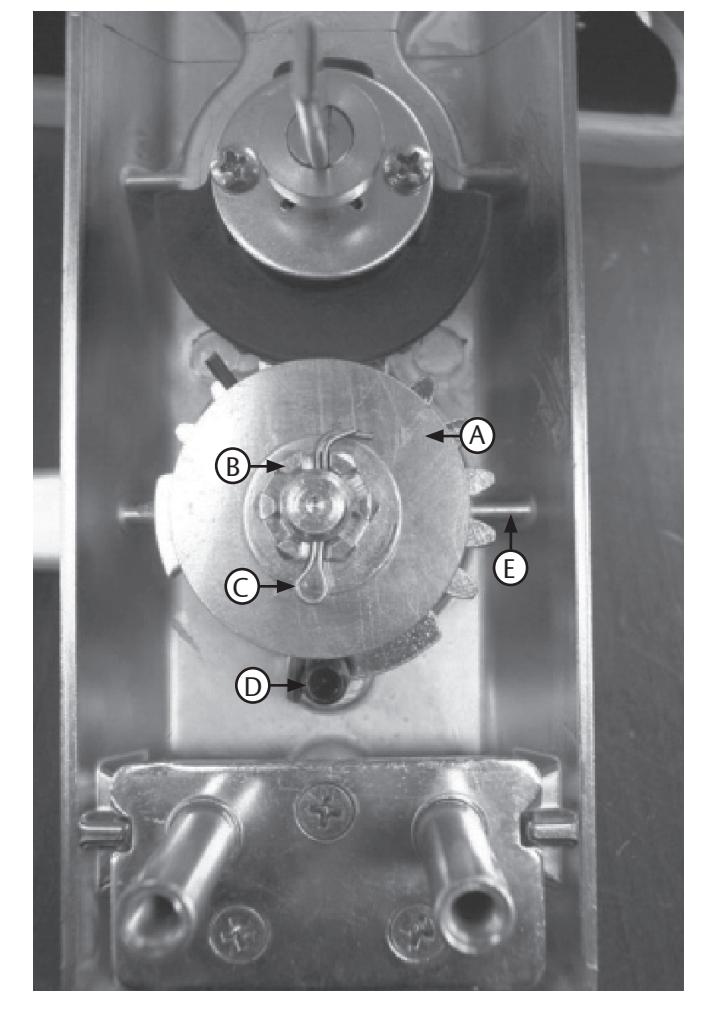
- 1. Remove cotter pin.
- 2. Remove castle nut.
- 3. Remove washer.
- 4. Carefully pull up on spring hub to
- 5. Remove spring and note orientation.
- 6. Remove lever handle.
- 7. Pick-up flat gear, flip and orient stop on opposite side of stop post. See pictures for orientation.
- 8. Install spring upside down from original orientation and place spring leg on opposite side of stop post from original installation orientation. See pictures for orientation.
- 9. Install lever 180 degrees from original position.
- 10. Install spring hub with stamped number in the 6 o'clock position.
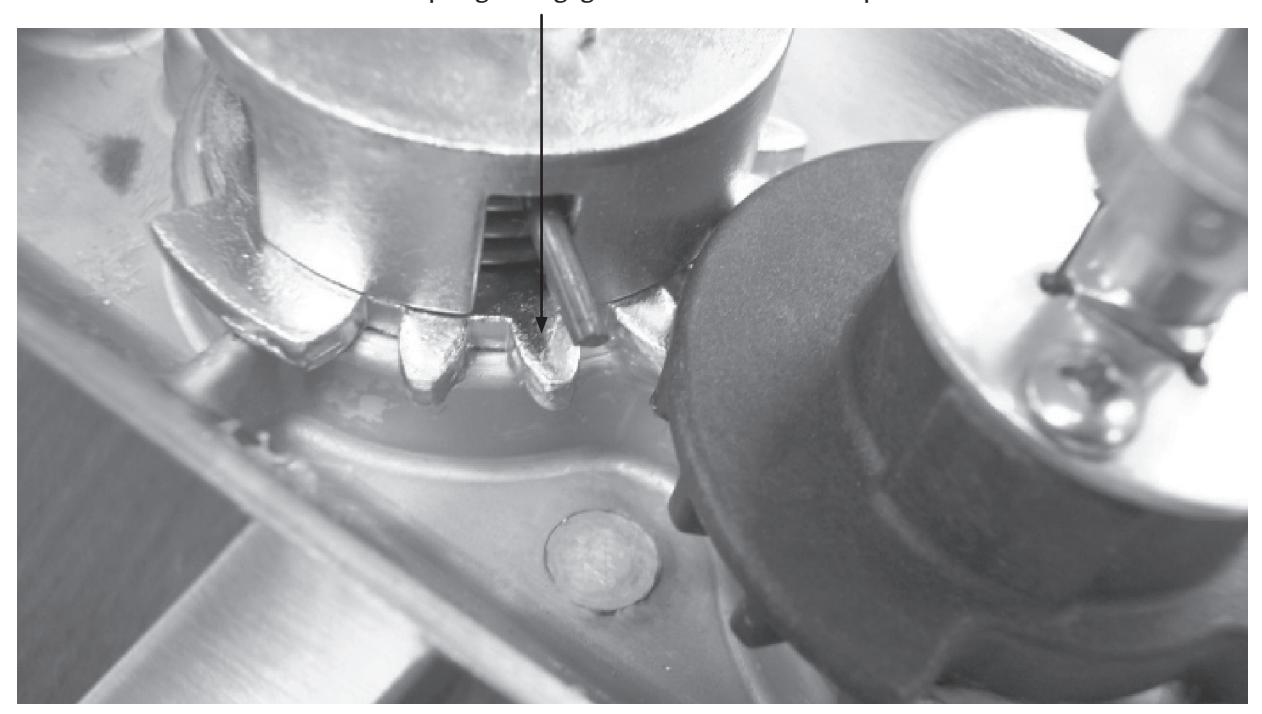
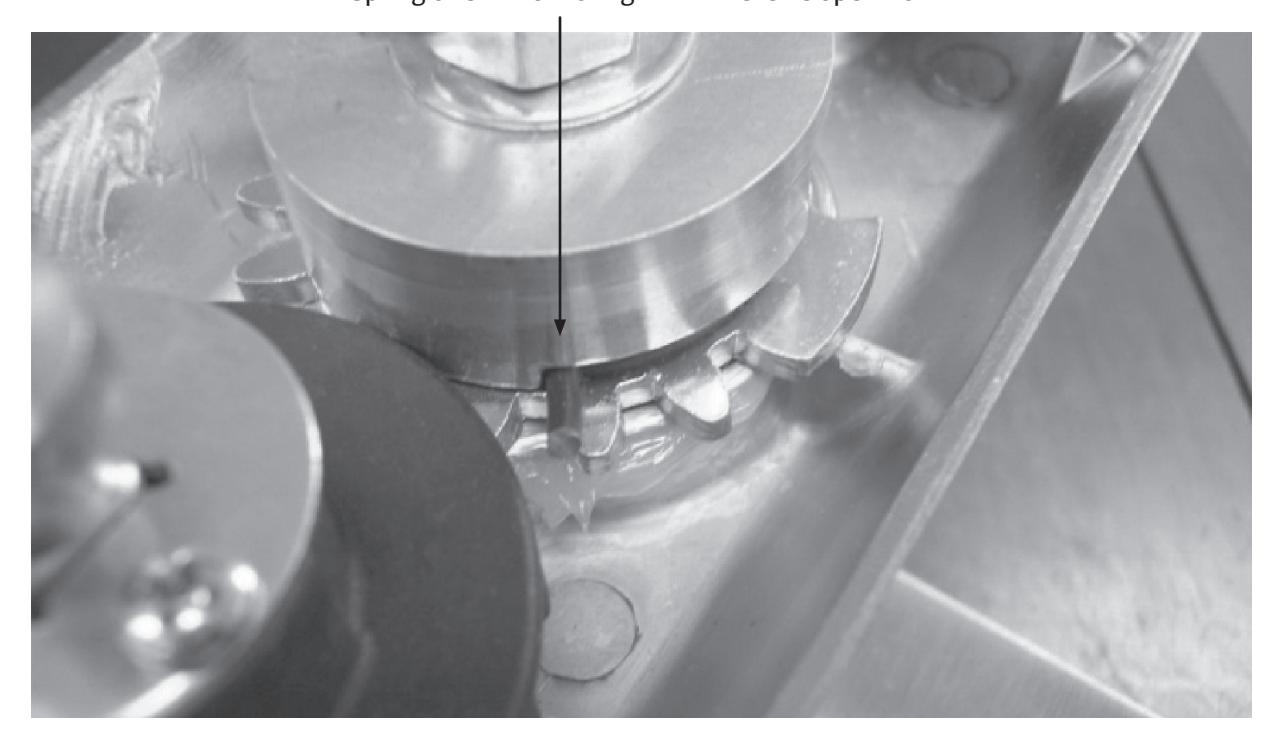
- 11. Rotate spring leg around with needle nose pliers to engage notch in spring hub, refer to pictures for reference position. Press down on spring hub to ensure complete engagement.
- 12. Install washer.
- 13. Install castle nut, do not over tighten, verify by insuring lever returns horizontally on its own.
- 14. Install cotter pin.
80-8470-0626-000 11/23
Exit Device Trim Installation Instructions
Notch for spring to engage for left hand reverse operation
Spring orientation for right hand reverse operation
626F Exit Device Trim Installation Instructions
