921P Series Digital Keypad with Prox and Controller Installation Instructions
Open the original PDF document
View PDF801 Avenida Acaso, Camarillo, Ca. 93012 • (805) 494-0622 • www.sdcsecurity.com • E-mail: service@sdcsecurity.com
INSTALLATION INSTRUCTIONS 921P EntryCheck TM
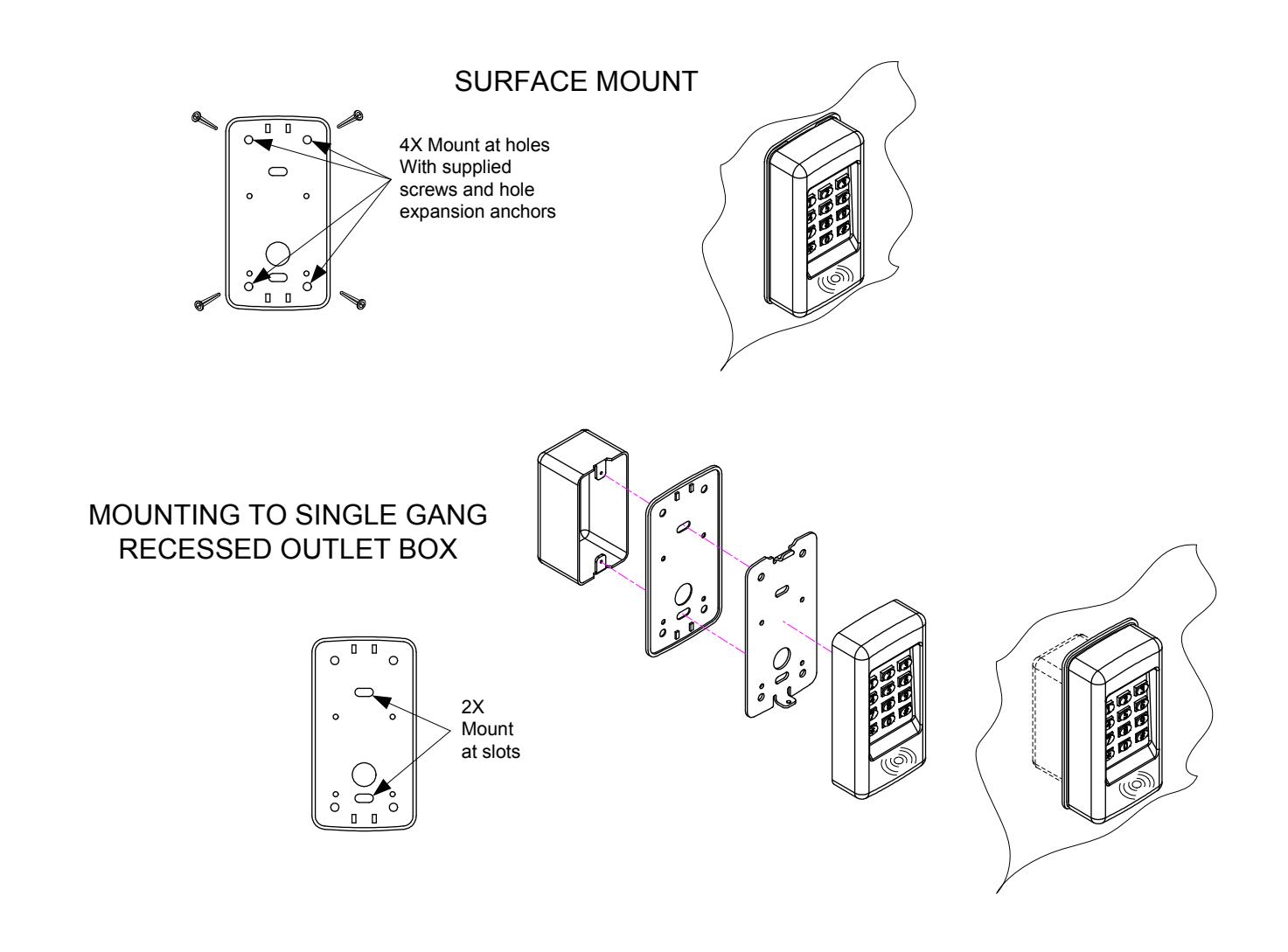
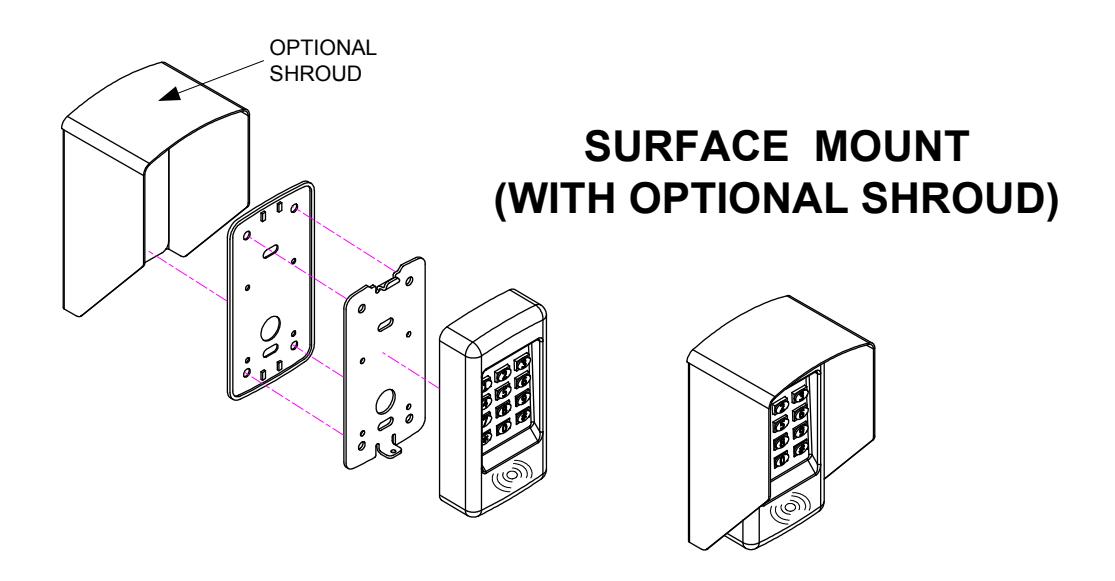
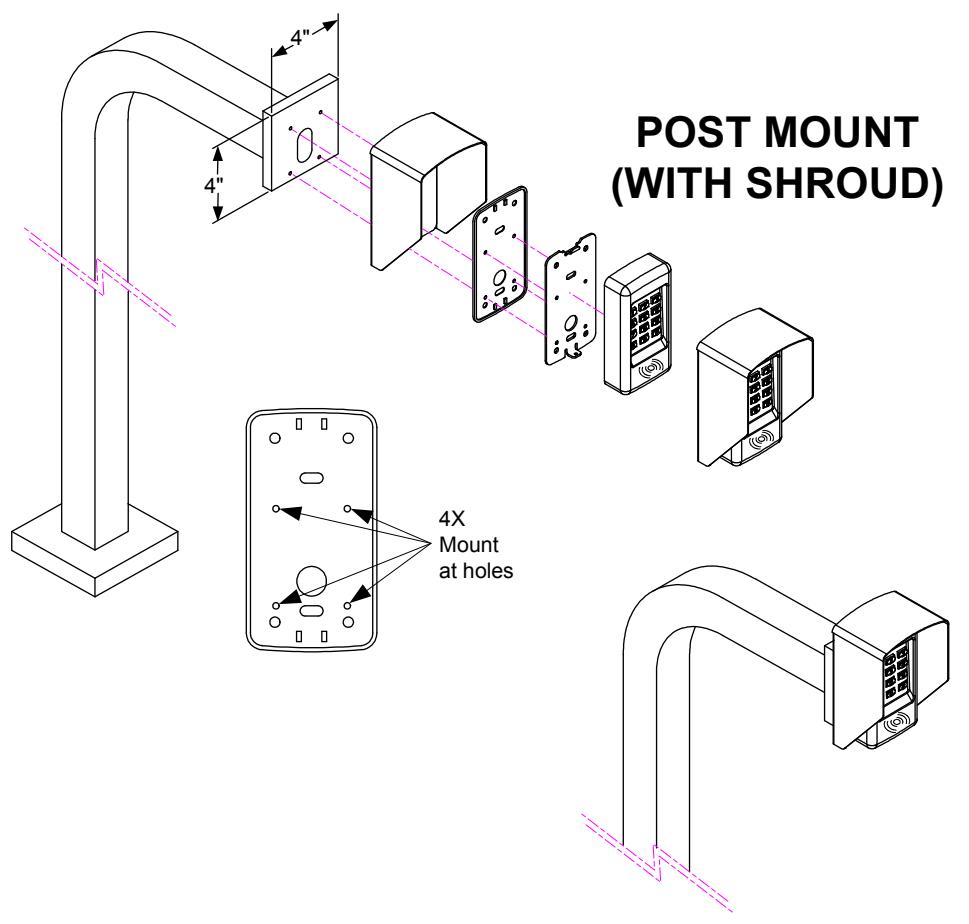
The EntryCheck ™ 921P Indoor/Outdoor Keypad is a surface mount digital keyless entry system designed for access control applications. The backlit keys are bright and, easy-to-read. A heavy cast vandal resistant housing design with mounting plate allows the 921P to be mounted on a rugged surface or on a standard single-gang electrical box. The control electronics are housed in a separate enclosure for added security. This helps to prevent unauthorized access to the electronics of the keypad.
The 921P has a capacity of 500 users. Users can be assigned to use 4 to 6 digit PIN codes and or access cards. An authenticated access can be programmed to activate one, or both of the relay outputs.
The timed "anti-passback" feature prevents using the same credentials twice before a programmed waiting period has elapsed.
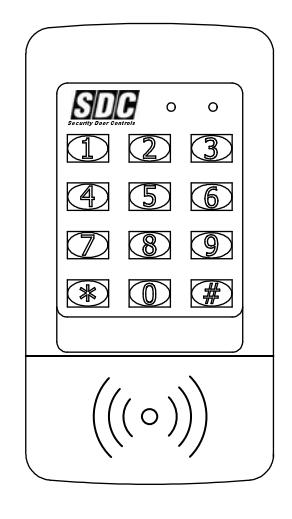
Two long lasting solid state LED indicators show the status of the system. The left bi-color indicator lights red to indicate power, then green when a relay is active (e.g., an access grant, etc.). The right indicator flashes yellow to indicate that the keypad is in programming mode.
An internal sounder can be programmed to beep each time a key is pressed or when an output is activated. An internal jumper sets the sounder volume high or low
The SENSE input can be configured two ways through programming . When configured for "Door Sense", the input is wired to a normally closed door position switch to detect when the door is opened or closed. Forced entry or door ajar situations can then be detected. The "Auto-relock" feature can also be used to turn off the Main Relay output immediately when the door is closed after access has been granted to prevent "tailgating". When the SENSE input is configured for "Inhibit", the input can be wired to a normally open "service" switch or automatic timer that will disable access while the switch is closed.
The REQUEST-TO-EXIT input can be wired to a normally open pushbutton to provide codeless activation of the Main Relay, Auxiliary Relay, Output #3 or Output #4 (programmable).
The ALARM SHUNT signal is available when access is granted. This signal can be programmed to activate any of the relays or solid state outputs to shunt alarm contacts on the access door/gate preventing the triggering of an alarm when an authorized access occurs.
The 921P EntryCheck ™ is powered from a 12-24V AC or DC source. The non-volatile EEPROM memory retains entry codes and programming when power is removed. An internal jumper is provided to reset the master code. The Main Relay has a 5 Amp capacity. The Auxiliary Relay has a 2 Amp capacity. Two solid state outputs, capable of sinking 100 mA to common are programmable for alarm shunting, or to signal forced entry, door ajar, keypad lockout, request-to-exit, and keypad active conditions.
Features
- Keypad programmable
- 500 user codes
- 3 User Modes PIN or Card Card Only Card and PIN
- 4 to 6 digit user codes
- 4 independent outputs
- 4 independent timers
- 2 Form C relay contacts
- 2 solid state open collector outputs
- Program entry codes to activate one or two relays
- Disable input
- Door sense input
- Request-to-exit/enter input
- Keypad tamper lockout
- Timed anti-passback
- Anti-tailgate
- Two LED status indicators
- Tactile key feel
- Audible code entry verification
- Control electronics separate from keypad for added security.
- 12V or 24V, AC or DC operation
SPECIFICATIONS
Mechanical
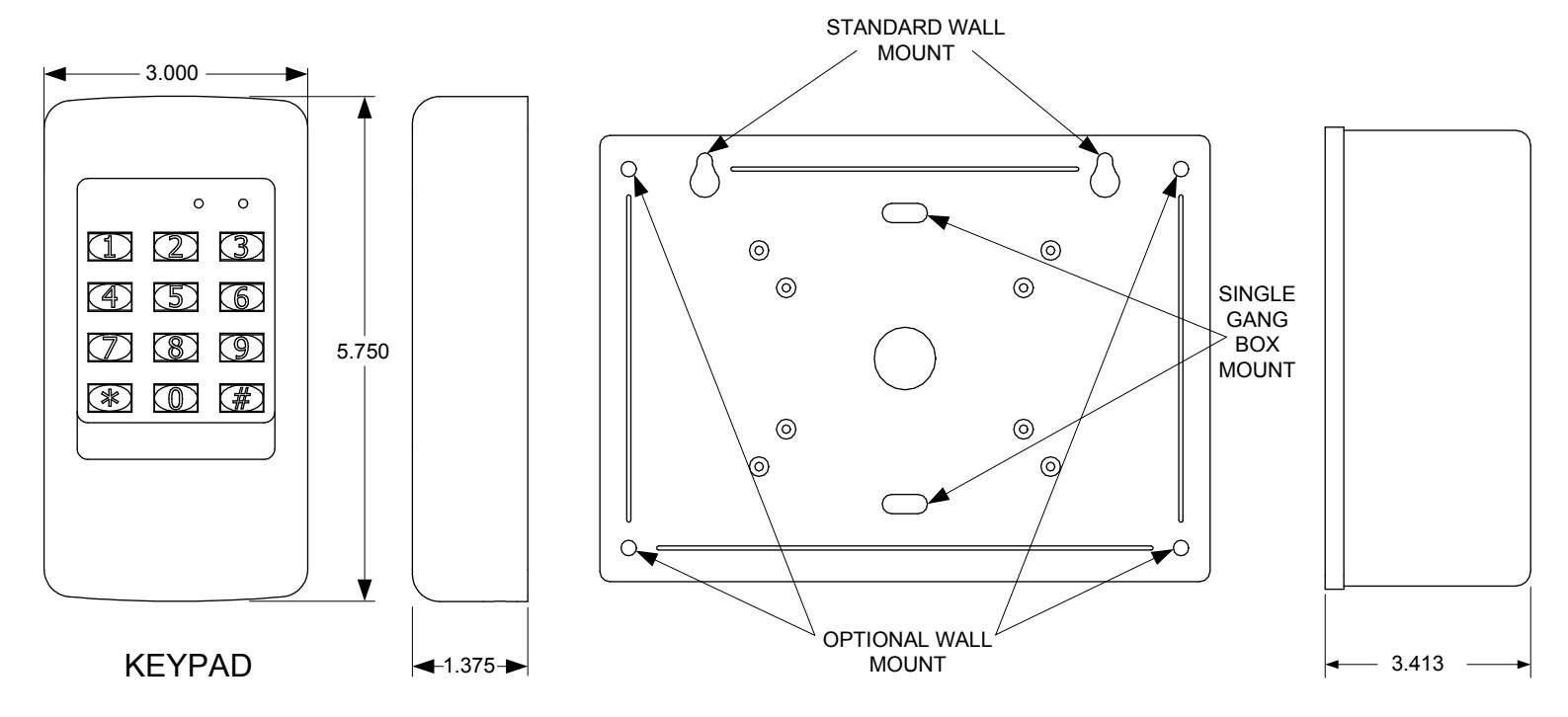
Keypad Dim: 3.00" W x 5.75" H x 1.375" D
(1.4375" wall projection)
Ext. Controller Dim: 7.75" W x 5.75" H x 3.70" D
Electrical
Input Voltage: 12/24 Volts AC or DC
Operating Current: 30 mA typical, 150 mA max
Output Ratings
Main Relay: Form "C" 5 Amps @ 28 Volts max Auxiliary Relay: Form "C" 2 Amp @ 28 Volts max Type: Solid state outputs (Outputs #3 & #4) Short-to-common 100 mA @ 24 VDC maximum
Environmental
Temperature: -22°F to 149°F (-30°C to 65°C) Humidity: 5% to 95% non-condensing
QuickStart Programming
You must first enter programming mode to perform any function. The yellow indicator will blink slowly showing that the 921P EntryCheck™ is in programming mode. Use the option codes to program each function. After the new data entry is complete for each function , the yellow indicator will flash quickly while the data is being stored and the green indicator will light briefly if the programming has been accepted. The red indicator will light if any programming data is entered incorrectly or the function is rejected. If a red indicator is seen, the entire function (option code + data) will have to be fully re-entered. The keypad will remain in programming mode until # is pressed or after 30 seconds of inactivity. **
Set default parameters (first time use)
Step 1. Enter: #9# 123456# Enter the program mode (default master code)
Step 2. Enter: 03# 4# Set the entry code length to 4 digits
Step 3. Enter: 21# 5# Set the main relay activation time for 5 sec.
Step 4. Enter: # Exit programming mode **
Assign a user (Card & PIN only)
Step 1. Enter: #9# 123456# Enter programming mode (default master code)
Step 2. Enter: 06# 002# 9876# 9876# 1# (Present card) Assign card to User 002 with a PIN code of '9876'. Activate
the main relay when validated.
RED/GREEN POWER/ACCESS INDICATOR
YELLOW "PROGRAM MODE" INDICATOR
KEYPAD
PROX Antenna
Step 3. Repeat Step 2 to enter another unique user & card, or continue to Step 4.
Step 4. Enter: # Exit programming mode. **
Assign a user (PIN only)
Step 1. Enter: #9# 123456# Enter programming mode (default master code)
Step 2. Enter: 01# 003# 2580# 2580# 1# Assign User 003 with a PIN code of '2580'.
Activate the main relay when entered.
Step 3. Repeat Step 2 to enter another unique user & PIN or continue to Step 4.
Step 4. Enter: # Exit programming mode **
Test your new user
Present your card or enter an authorized PIN code + #. The green indicator should illuminate and the main relay should activate, unlocking the door for 5 seconds.
Deleting a user code
Step 1. Enter: #9# 123456# Enter the program mode (default master code)
Step 2. Enter: 02# 002# 002# User 2 has been deleted. Step 3. Enter: # Exit programming mode **
FRONT
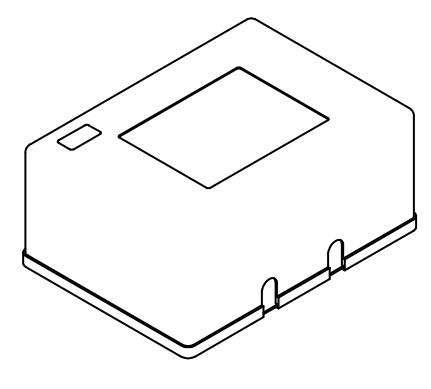
EXTERNAL CONTROLLER

IF THE UNIT IS AC POWERED, MAKE SURE THAT THE SECONDARY OF THE SYSTEM IS ISOLATED FROM EARTH GROUND
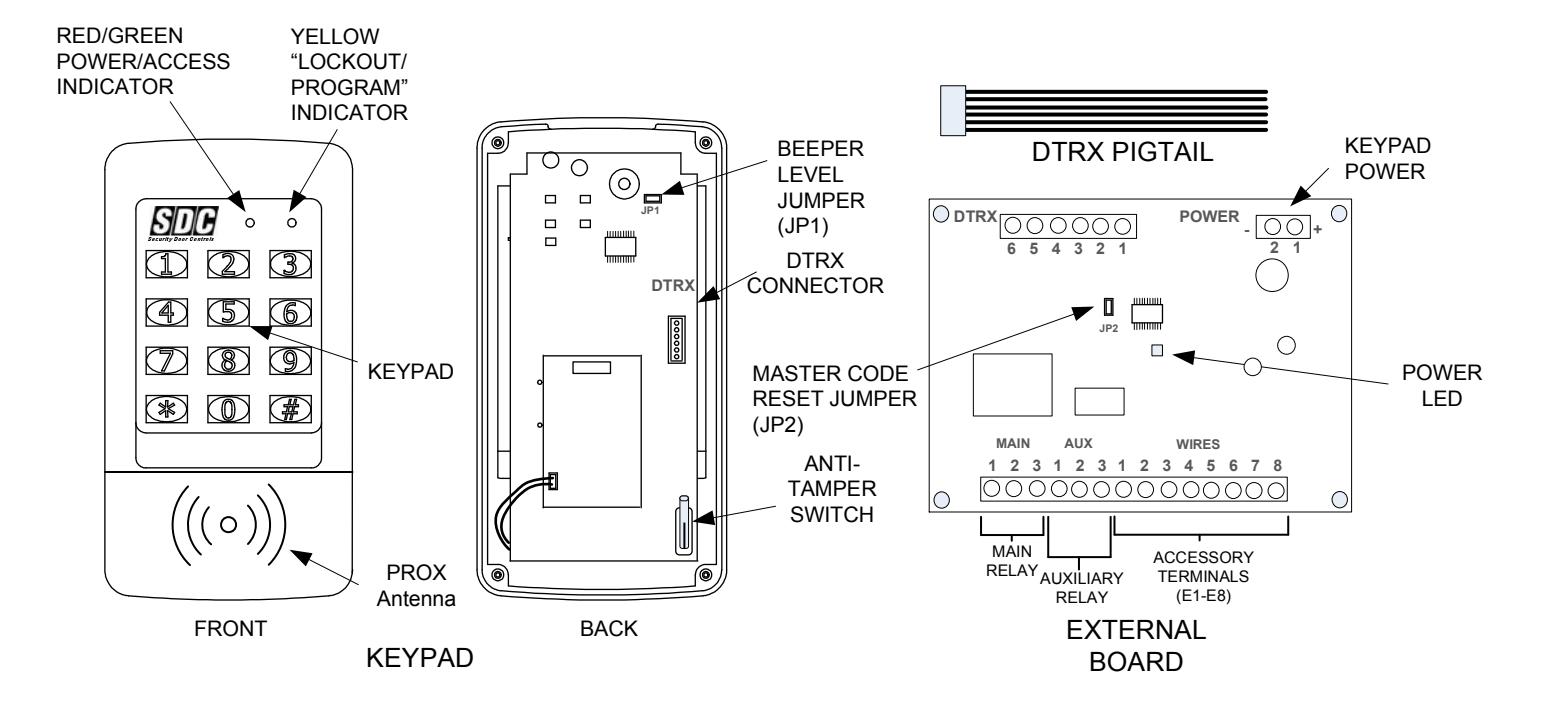
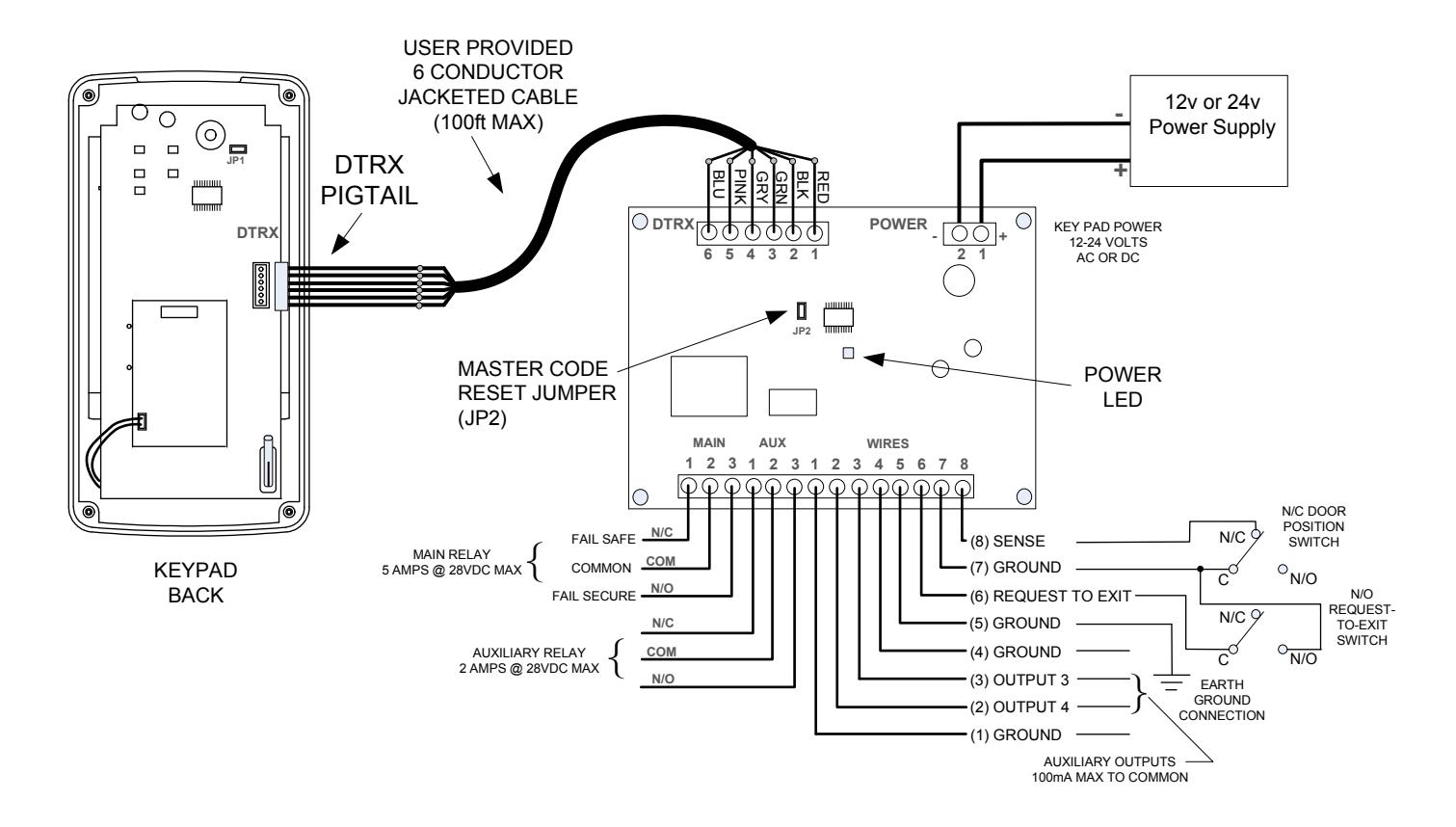
Fig. 2 Typical Wiring

IF THE UNIT IS AC POWERED, MAKE SURE THAT THE SECONDARY OF THE SYSTEM IS ISOLATED FROM EARTH GROUND
KEYPAD WIRING
See Fig. 3 for an example of a basic door installation. The keypad is mounted adjacent to the door. An electric door strike is mounted in the door jamb to release the door lock. A magnetic switch is mounted on top of the door jamb for detecting when the door is open.
Use the following steps to wire the keypad. Refer to the wiring diagram shown in Fig. 4 to assist in the wiring.
Note: Up to 500 feet of 18 AWG wire can be run for power, use larger wire for longer runs. Use 22 AWG or larger (depending on load) for other connections.
<u>Output</u>
- Install a low voltage fail-secure electric door strike for unlocking the door.
- □ Route two wires between the door strike and the external controller.
- Connect a MOV or varistor across the coil wires of the strike.
- Connect the (+) door strike wire to the keypad's MAIN RELAY N.O. terminal. Connect the other door strike wire to the keypad's PWR (-) terminal. Connect a wire between the keypad's PWR (+) terminal and the MAIN RELAY COM terminal.
<u>Power</u>
- ☐ Choose a location for the DC power supply or AC transformer.
- Connect the power supply's output terminals to the keypad's PWR (+) and (-) terminal. Observe wiring polarity if using DC. If AC is being used, polarity does not mater.
Caution: If the unit is AC powered, make sure the secondary of the system transformer is isolated from earth ground.
Earth Ground
□ To avoid damage to the unit from static discharges, connect the EARTH GROUND to E1, E4, E5 or E7 to a good earth grounding point. Suggested wiring size is 18 AWG for earth ground.
Sense Input
RE Note: The SENSE input (E8) can be programmed for either a door sense or inhibit input. <u>Both features cannot be used at the same time.</u> If you are not using the sense input, program the input for inhibit.
- □ To use the door sense feature to detect forced entry or door ajar conditions, install a normally closed door switch on the door and route two wires from the switch to the external controller. Connect the door switch to the keypad's SENSE terminal (E8) and ground terminal. (Either E1, E4, E5, or E7)
- ☐ If an inhibit switch or timer is going to be used for temporarily disabling the keypad, route two wires from the switch or timer to the keypad box. Connect the inhibit switch/timer normally open terminals to the keypad's SENSE (E8) and ground (Either E1, E4, E5, or E7) terminal
Request-to-Exit Input (wiring shown Fig. 4)
☐ If a request-to-exit pushbutton is going to be used, route two wires from the keypad box to a normally open pushbutton mounted on the secure side of the door. Connect the wires to the pushbutton and to the keypad's REX (E6) and COM (Either E1, E4, E5 or E7) terminals.
Solid State Outputs
The two solid state outputs (Outputs #3 & #4) can be programmed to activate during various conditions. These outputs can be used to activate indicators or sounders. See Fig. 5 for wiring examples using the solid state outputs.
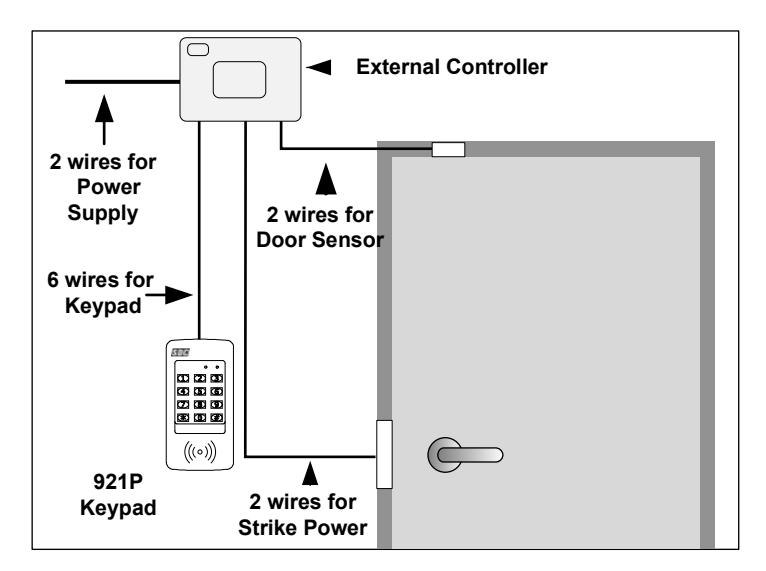
Fig. 3 Basic Door Installation
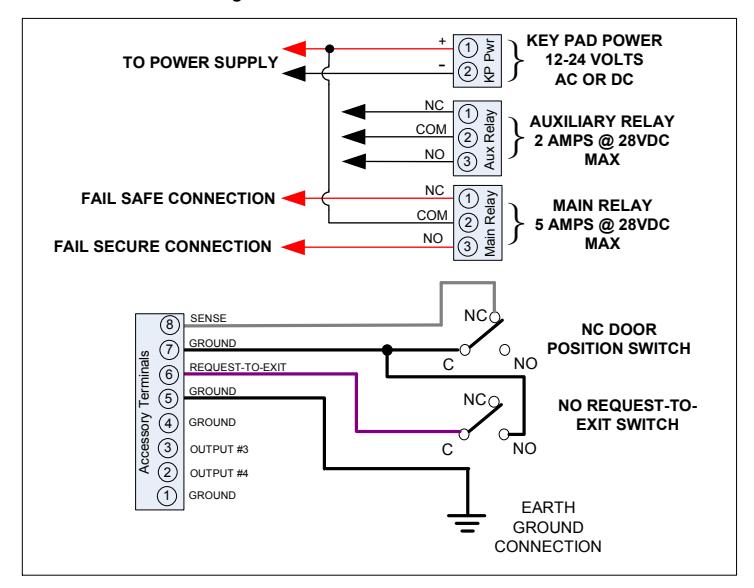
Fig. 4 Basic Door Installation Wiring
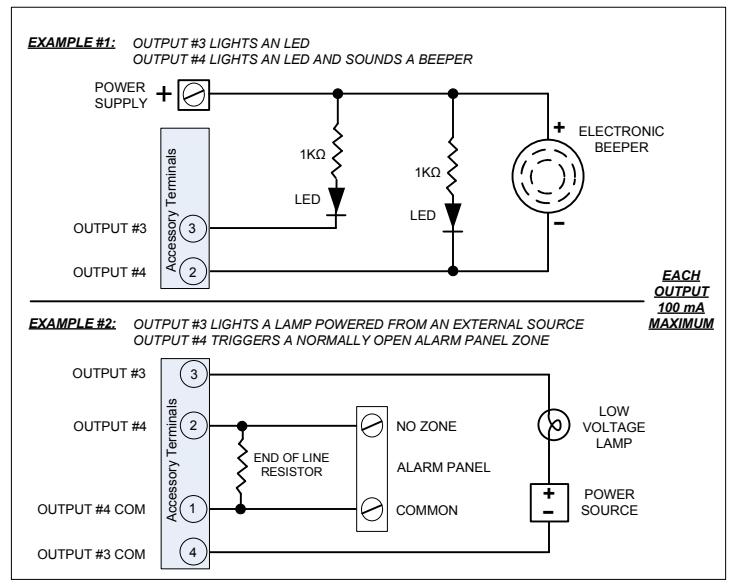
Fig. 5 Using Solid State Outputs
FACTORY DEFAULTS
| Master Programming Code | |
|---|---|
| Entry Code Length Entry Mode | |
| Request-to-exit Output Relay | |
| Alarm Shunt Output | - |
| Forced Entry Output | |
| Door Ajar Output | |
| Main Relay On Time | 02 Seconds |
| Auxiliary Relay On Time | |
| Solid State Output #3 On Time | |
| Solid State Output #4 On Time | |
| Door Sense/Inhibit Input | |
| Keypad Lockout Output | |
| Keypad Active Output | Disabled |
| Beeper Sounds When Key Pressed | Yes |
| Beeper Sounds During Relay #1 | No |
| Beeper Sounds During Relay #2 | |
| Beeper Sounds During Output #3 | No |
| Beeper Sounds During Output #4 | |
| Keypad Lockout Count | |
| Anti-Passback Time | |
| Auto-Relock | On |
BASIC PROGRAMMING
When the 921P EntryCheck™ is in Programming Mode the yellow indicator will blink slowly. After a programming command is selected, the yellow indicator will flash rapidly while the keypad is waiting for user input data. The green indicator will light if the data is accepted. The red indicator will light if any programming data is entered incorrectly, and the command will have to be fully reentered.
Entering Programming Mode
The 6-digit Master Programming Code (default = 123456) is used to enter Programming Mode.
Press: #9 # Master Code #
Master Code = the current 6-digit Master Programming Code
Exiting Programming Mode
Press: **#
The red indicator will light after exiting Programming Mode
Note: The 921P will automatically exit Programming Mode after two minutes of inactivity
Re-entering a Command After a Mistake
If the red indicator lights, signaling an incorrect entry, or an incorrect key is pressed during programming, to clear the keypad and re-enter the command:
Press: *9#
Setting Entry Code Length Default: 4 digits
Press: 03 # Length #
Length = 4-6 for entry code length
Note: If the Entry Code Length is going to be changed from the factory default of 4 digits, make this change first before programming any entry codes.
Select Entry Mode Default: Card or PIN
Sets the entry mode for the 921P.
Press: 05 # Mode # Mode=Operating Mode(1-3) 1=Card or PIN; 2=Card Only 3=Card and PIN
Adding a New User
User PIN Only Access (No Card)
Press: 01 # User # Code # Code # Relay #
---- Or ----
User Card and/or PIN Access
Press: 06 # User # Code # Code # Relay # Present Card
User =User number to be added: 001-500
Code=The new entry code: 1-999999, depending on code length
Relay=Relay output entry code will activate:
1=Main Relay 2=Auxiliary Relay 3=Both Relays
10=Relay #1, toggled 20=Relay #2, toggled 30=both Relays toggled
12=Relay #1 toggled; Relay #2 timed open
21=Relay #1 timed open; Relay #2 toggled
The yellow indicator will flash quickly while the 921P stores the new user information in memory. The green indicator will light when the new code and card are accepted. If the user number already exists or an entry error has been made, the red indicator will light. Delete the user and re-enter the new information again.
Note: Leading zeros (zeros before the code number, i.e.0001) do not need to be entered when programming a new code. The 921P will internally add any zeros to fill digits determined by the entry code length setting. Leading zeros will have to be entered by the user when entering their code to gain access.
Output Toggle Mode
When an output is programmed for Toggle Mode, the output alternates from OFF to ON or from ON to OFF each time it is accessed. When an output is toggled on, the green LED remains solid until toggled off.
The rules for a toggle output are:
If the output is OFF, it will turn ON and stay on until the next activation.
If the output is ON, it will turn OFF and stay off until the next activation.
An authorized PIN, Card, or REX input programmed to momentarily activate that same relay will reset the relay to its normal state.
Adding Multiple Sequential Cards
Press: 08 # 1<sup>st</sup> User # Code # Code # Relay # Number of users # Present 1<sup>st</sup> card
1<sup>st</sup> User =Starting user number to add Number of users = Total number of consecutive cards to add
The yellow indicator will flash quickly while the 921P erases the user from memory. The green indicator will light when the codes have been added.
Adding Multiple Non-Sequential Cards
Press: 07 # 1<sup>st</sup> User # Code # Code # Relay # Number of users # Present 1<sup>st</sup> card, Present 2<sup>nd</sup> card, ..., Present last card
1<sup>st</sup> User =Starting user number to add
Number of users = Total number of consecutive cards to add
The yellow indicator will flash quickly while the 921P erases the user from memory. The green indicator will light when the codes have been added.
Erasing a Single User
Press: 02 # User # User #
User =The user number to delete (001-500)
The yellow indicator will flash quickly while the 921P erases the user from memory. The green indicator will light when the code is erased.
(Typical Programming cont.)
See the following example that sets entry codes 1234 for normal and 5678 for toggle operation.
Press: 01 # User # 1 2 3 4 # 1 2 3 4 # 1 # 01=Programming Step; 1234=Entry Code; 1=Main Relay
Press: 01 # User # 5 6 7 8 # 5 6 7 8 # 20 #
01=Programming Step; 5678=Entry Code; 20=Auxiliary Relay toggle
Erasing Multiple Users (Sequential)
Press: 09 # 1st User # Number of users #
1st User =Starting user number to delete
Number of users = Total number of consecutive users to delete
The yellow indicator will flash quickly while the 921P erases the user from memory. The green indicator will light when the code is erased.
Erasing All Entry Codes
WARNING: PERFORMING THIS COMMAND WILL REMOVE ALL ENTRY CODES FROM THE MEMORY Press: 97 # 0 0 0 0 0 0 # 0 0 0 0 0 0 #
Note: The green indicator will light while the memory is being erased. This may take up to 15 seconds.
Configure Sense Input Default: Door Sense
The Sense Input (E8) can be programmed for either DOOR SENSE or INHIBIT.
Press: 10 # Input #
Input=0 for Door Sense; =1 for Inhibit
When programmed for DOOR SENSE, if an open condition on the input occurs before access is granted (with an entry code or with the request-to-enter input) a FORCED ENTRY output will occur. If an open condition remains 60 seconds after a relay activation for access, a DOOR AJAR output will occur. NOTE: Function 11 and/or 12 must also be enabled to use Door Sense.
When programmed for INHIBIT, a closed condition on the input will prevent Relay #1 from activating when access is requested with an entry code. This mode is typically used with an external timer to disable the access device at certain times.
Select Forced Entry Output Default: No Output
Sets which output activates if the DOOR SENSE input opens before access is granted. This output is timed and configured by the relay "On-time".
Press: 11 # Output #
Output=Output to Activate(0-4) 1=Main Relay; 2=Auxiliary Relay; 3=Output #3; 4=Output #4;
0=No Output
Select Door Ajar Output Default: No Output
Sets which output activates if the DOOR SENSE input stays open 60 seconds after access is granted (door ajar time is adjustable using Function 25). This output is not timed.
Press: 12 # Output #
Output=Output to Activate (0-4)
1=Main Relay; 2=Auxiliary Relay; 3=Output #3; 4=Output #4; 0=No Output
Select Keypad Lockout Output Default: No Output
Sets which output activates when the keypad is "locked out" after too many incorrect entry code attempts. The lockout time is 60 seconds.
Press: 13 # Output #
Output=Output to Activate (0-4)
1=Main Relay; 2 = Auxiliary Relay; 3=Output #3; 4=Output #4;
0=No Output / Lockout Disabled
Select Keypad Active Output Default: No Output
Sets which output activates when any keys are pressed. This output is timed. If toggle mode is selected for the output, the timer value defaults to 2 seconds.
Press: 14 # Output #
Output=Output to Activate(0-4)
1=Main Relay; 2=Auxiliary Relay; 3=Output #3; 4=Output #4; 0=No Output
Select Alarm Shunt Output Default: No Output
Sets which output activates during the time access is granted. (Use this output ot shunt alarm contacts attached to the access door.) This output may be timed or toggled.
Press: 15 # Output #
Output=Output to Activate(0-4)
1=Main Relay; 2=Auxiliary Relay; 3=Output #3; 4=Output #4; 0=No Output
Select Request-to-Exit Output Default: No Output
Sets which output activates when the Request-to-Exit input is grounded. This output may be timed or toggled.
Press: 16 # Output #
Output=Output to Activate(0-4)
1=Main Relay; 2=Auxiliary Relay; 3=Output #3; 4=Output #4; 0=No Output
REX input terminates toggle of Main Relay
Anti-Tamper Output Default: No Output
Sets which output activates when the Anti Tamper switch on the back of the keypad is activated.
Press: 17 # Output #
Output=Output to Activate(0-4)
0=No Output; 2=Auxiliary Relay; 3=Output #3; 4=Output #4;
Main Relay On-time Default: 02 Seconds
Sets the length of time the Main Relay activates when triggered. Green LED is on when Main Relay is active.
Press: 21 # Seconds #
Seconds=Output time in seconds (0-60)
Auxiliary Relay On-time Default: 02 Seconds
Sets the length of time the Auxiliary Relay activates when triggered.
Press: 22 # Seconds #
Seconds=Output time in seconds (0-60)
Solid-state Output #3 On-time Default: 02 Seconds
Sets the length of time Output #3 activates when triggered.
Press: 23 # Seconds #
Seconds=Output time in seconds (0-60), 99=Toggle Mode
Solid-state Output #4 On-time Default: 02 Seconds
Sets the length of time Output #4 activates when triggered.
Press: 24 # Seconds #
Seconds=Output time in seconds (0-60), 99=Toggle Mode
Door Ajar Timer Default: 60 Seconds
Sets the amount of time the door may be held open after an authorized access. The DOOR AJAR output will activate after the time expires.
Press: 25 # Seconds #
Seconds=Held open time in seconds (1-60)
Beep Sounds on Keystrokes Default: Yes
Selects whether or not the keypad beeps as each key is pressed.
Press: 40 # Sound # Sound=1 for Yes, =0 for No
Beep Sounds During Main Relay Default: No
Selects whether or not the keypad beeps during Main Relay activation.
Press: 41 # Sound # Sound=1 for Yes, =0 for No
Beep Sounds During Auxiliary Relay Default: No
Selects whether or not the keypad beeps during Auxiliary Relay activation.
Press: 42 # Sound # Sound=1 for Yes, =0 for No
Beep Sounds During Output #3 Default: No
Selects whether or not the keypad beeps during Output #3 activation.
Press: 43 # Sound # Sound=1 for Yes, =0 for No
Beep Sounds During Output #4 Default: No
Selects whether or not the keypad beeps during Output #4 activation.
Press: 44 # Sound # Sound=1 for Yes, =0 for No
Beep Sounds Anti-Tamper Activation Default: No
Selects whether or not the keypad beeps during Anti-Tamper switch activation.
Press: 45 # Sound # Sound=1 for Yes, =0 for No
Keypad Lockout Count Default: 3 Attempts
Sets the number or incorrect entry code attempts allowed before the keypad "locks out" for 60 seconds.
Press: 50 # Attempts #
Attempts=Number of attempts before lockout (2-7) * Refer to Option 13 to Enable Lockout Feature
Anti-Pass Back Time Default: No Anti-Pass Back
Sets the length of time an entry code will not function after it is used.
Press: 51 # Minutes #
Minutes=Time in minutes (2-4), 0=No Anti-passback
Selects mode for Keypad LED Backlight Default: 30 Seconds
Selects whether or not the keypad back light stays OFF, lights for 30 seconds when activated or stays ON.
Press: 52 # Output #
0 = Light always OFF 1 = 30 sec light when activated (default) 2 = Light always ON
Changing the Beeper Sound Level
The Keypad's beeper can be set to high or low level. Remove jumper JP1 to reduce beeper sound level.
Changing the 6-Digit Master Programming Code
Press: 98 # Master Code # Master Code # Master Code=The new 6-digit Master Programming Code
RESETTING KEYPAD
Master Reset
CAUTION: Performing a master reset will clear the entire memory of the 921P and return all programmable options to the factory default values. ALL ENTRY CODES WILL BE ERASED. NOTE: The Master Code will NOT be reset.
- STEP 1 Disconnect power from the 921P controller.
- STEP 2 Press and hold down the * and # keys on the keypad.
- STEP 3 Reconnect the controller power, continue holding the keys down until the red indicator starts flashing.
- STEP 4 Release the keys. The red and yellow indicators will remain lit until the process is complete, then the yellow indicator will go out.
Resetting the Master Code
- STEP 1 Remove the cover from the 921P controller box and disconnect power.
- STEP 2 Locate & Remove jumper at JP2. Reference page 3.
- STEP 3 Re-apply power. You will get a single beep and the yellow LED on the keypad will flash momentarily.
- STEP 4 Replace jumper on JP2.
THE MASTER PROGRAMMING CODE IS NOW 123456.
CONTROLLER HOUSING