6600-LR6600 Handing Instructions Template
Open the original PDF document
View PDFABH 6600/LR6600 MORTISE LOCK BODY HANDING INSTRUCTIONS
HANDING CHART
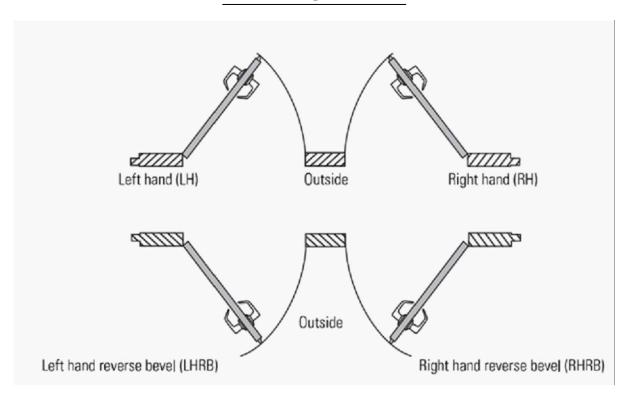
Changing Handing for the Mortise Case
The handing of an ABH 6600/LR6600 Series mortise case can be changed without opening the case. To change the hand, you need to rotate the latchbolt. For all lock functions except W and N, you also need to adjust the hub toggle positions. No steps are required for adjusting the bevel since the armored front on the mortise case automatically adjusts to the bevel of the door when the case is installed.
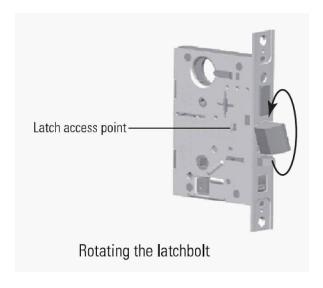
To Rotate the Latchbolt:
Confirm that you need to rotate the latchbolt to match the handing of the door.
NOTE: the angled surface of the latchbolt must contact the strike when the door closes
- 2. To rotate the latchbolt, insert a flat blade screwdriver into the latch access point approximately 1/2" into the case and press to extend the latch out of the case.
- 3. Rotate the latchbolt 180 degrees and allow it to retract.
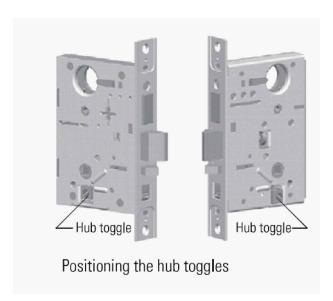
To Change the Position of the Hub Toggles:
4. Refer to the table below and determine the proper position for the hub toggles.
| FUNCTION | HUB TOGGLE POSITION |
|---|---|
|
6632, 6637, 6638, 6645,
6653, 6656, 6654, 6657 & 6658 |
Inside Down (always unlocked) & Outside Up (lockable) |
| 6641 | Both Up |
| 6610 | Both Down |
NOTE: For LH and LHRB doors, the inside os the back side of the mortise case and the outside is
the cover side of the case. For RH and RHRB doors, the inside is the cover of the case and
the outside is the backside of the case.
To change the position of a hub toggle, remove the toggle screw, move the toggle into the desired position, and re-tighten the screw.

www.abhmfg.com E-mail: abhinfo@abhmfg.com Architectural Builders Hardware Mfg., Inc. 1222 Ardmore Ave., Itasca, IL 60143 630.875.9900; FAX 800.9FAXABH (932.9224)
6600LR6600 HANDING INSTRUCTIONS.DWG 6600/LR6600 HANDING INSTRUCTIONS PAGE 1 OF 1 ISSUED 02-22-22