4501-4601 Installation Instructions – I-EA00052
Open the original PDF document
View PDF

Verbal Exit Instructions or Alarm Tone Only and Digital Countdown Display
- · Stop Employee Theft
- · Stop Retail Shoplifting
- · Restrict Airport Patrons
- · Restrict Wandering Patients
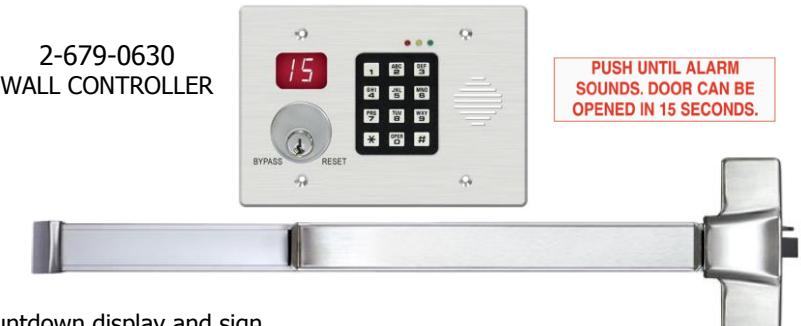
4500/4600 RIM MOUNT OR VERTICAL ROD* EXIT DEVICES
The integral verbal message, digital countdown display and sign provide comprehensive and clear instructions of the door operation for persons without prior knowledge of the exit delay, including the sight and hearing impaired.
The digital keypad eliminates the need to carry and locate keys for reset and bypass functions.
Features:
Egress Delay
- · 15 or 30 second exit delay
- · 1 or 2 second nuisance delay
Built-In 3 Function keypad
- · Alarm and lock reset
- · 1 to 30 second bypass
- · Sustained bypass
- · Additional keyswitch optional
Control Inputs
- · 1 to 30 second request-to-exit and bypass input with anti-tailgate and jumper selectable door prop alarm.
- · Reset
Trigger Modes
- · Egress alarm triggered by Push Bar
- · Trigger input from external device field selectable (N/O or N/C)
Code Compliance
- · IFC International fire Code
- · IBC International Building Code
- · NFPA 101 Life Safety Code
- · NFPA 1 Uniform Fire Code
- · California Building Code
- · Field selectable automatic or manual power up after emergency release or power loss. Use of manual power up complies with California Building Code (OSHPD) requirements.
Built-In Annunciation
- · Armed mode
- · Nuisance mode
- · Irreversible egress mode
- · Release mode
- · Digital countdown mode
- · Field selectable voice notification or tone
- · Field selectable male voice with security message or female voice with safety message
Monitoring Outputs
- · Armed mode
- · Egress initiation status
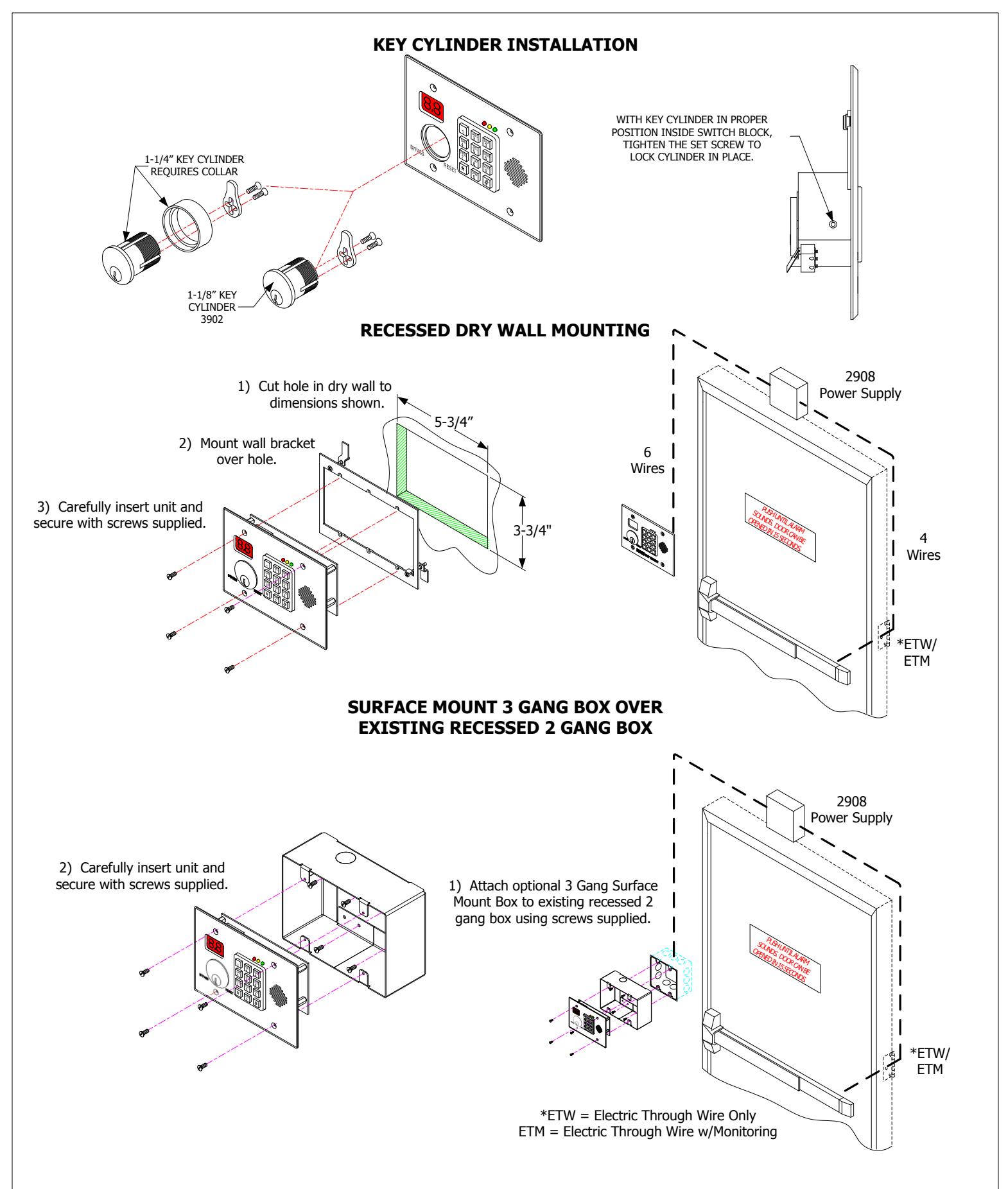
· Choice of Mounting · Recessed mounted
(3 gang metal plaster ring included)
· Surface mounted with optional 3 gang box (2-679-0641) · Optional shroud (2-679-0642) to be used with (2-679-0641) surface box.
· Released status
Application:
When unauthorized egress is initiated 4500 DE delays egress through the door for 15 seconds (or 30 seconds). Meanwhile, the person exiting must wait while personnel or security responds. The door unlocks after 15 seconds have elapsed permitting egress. When powered by a fire control supervised power supply, the lock will release immediately in an emergency.
* Note: If being used with a Surface Vertical Rod Exit Device, rod covers are required for security.
| SYSTEM SPECIFICATIONS | ||||
|---|---|---|---|---|
| INPUT VOLTAGE | INPUT VOLTAGE | |||
|
MAX CURRENT DRAW
(SINGLE) |
430mA @ 24 VDC | |||
| (TANDEM) | 680mA @ 24 VDC | |||
|
MONITOR RELAYS
CONTACT RATING |
1 AMP @ 12/24 VDC
(RESISTIVE) |
|||
| TEMPERATURE |
o
0 C – 70 Co |
|||
NOTE: Hager 2908 Power Supply required


RECOMMENDED MOUNTING PROCEDURE
USE 1-1/4" SCREWS SUPPLIED WITH WALL MOUNT FRAME TO HANG UNIT TEMPORARILY FOR WIRING PURPOSES
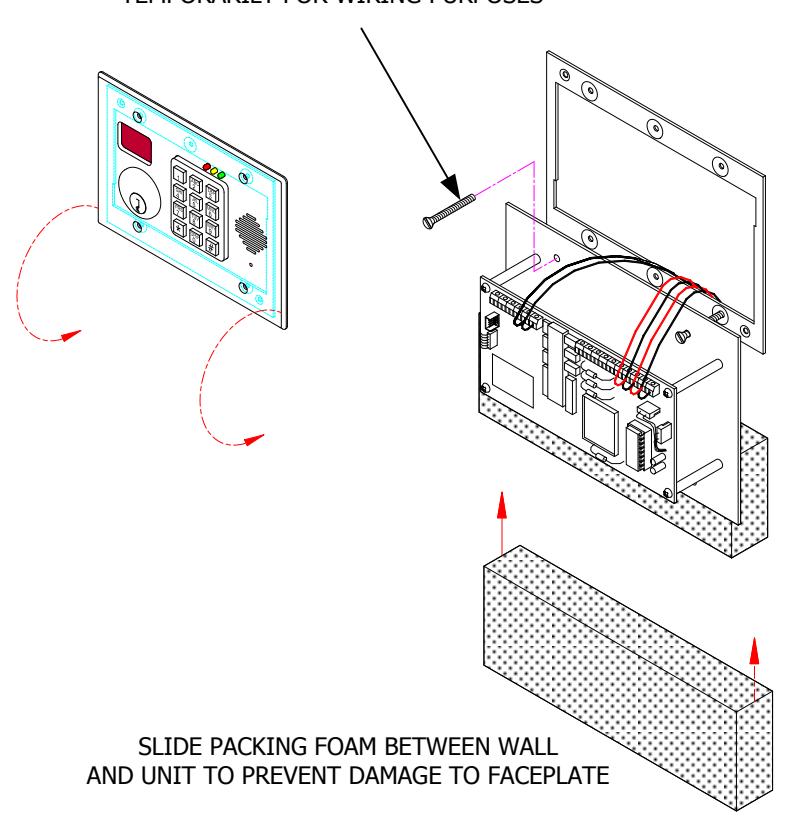
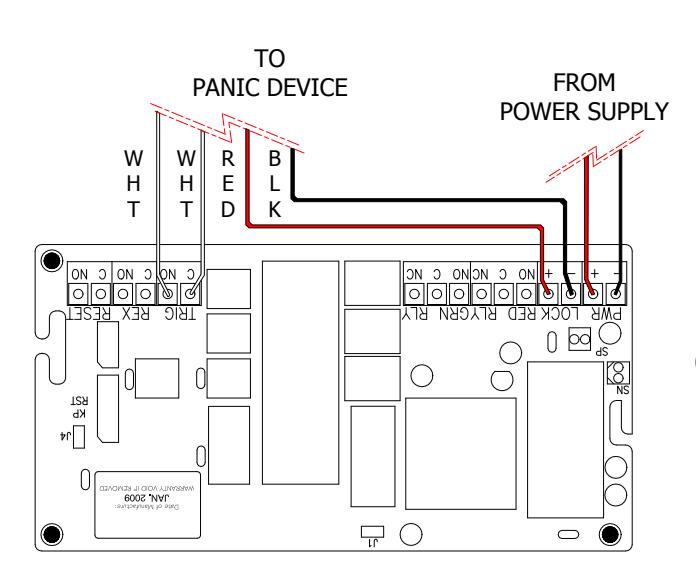
WIRE UNIT AS SHOWN (SHOWN WITH NO OPTIONS).

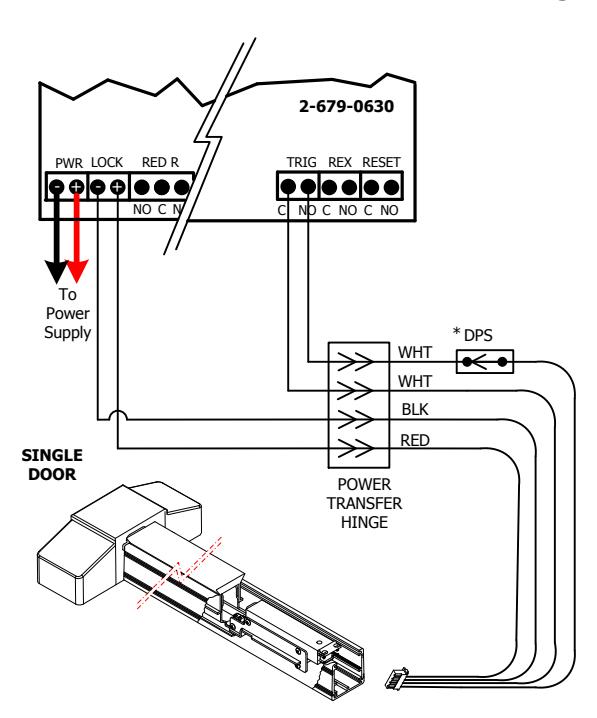
Wiring Diagrams and Options
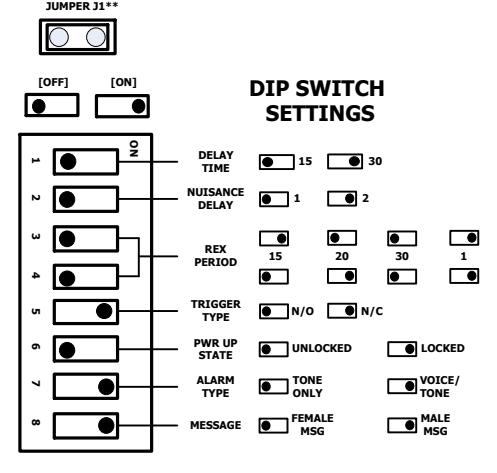
**JUMPER J1 (DOOR PROP)
INSTALLED: The 4500 DE will enter the alarm mode if the door is held open past the request to exit period.
REMOVED: The 4500 DE will remain unlocked if the door is held open past the request to exit period. No alarm will sound.
For the 4500 DE to relock and rearm upon closure of the door, DPS is required.
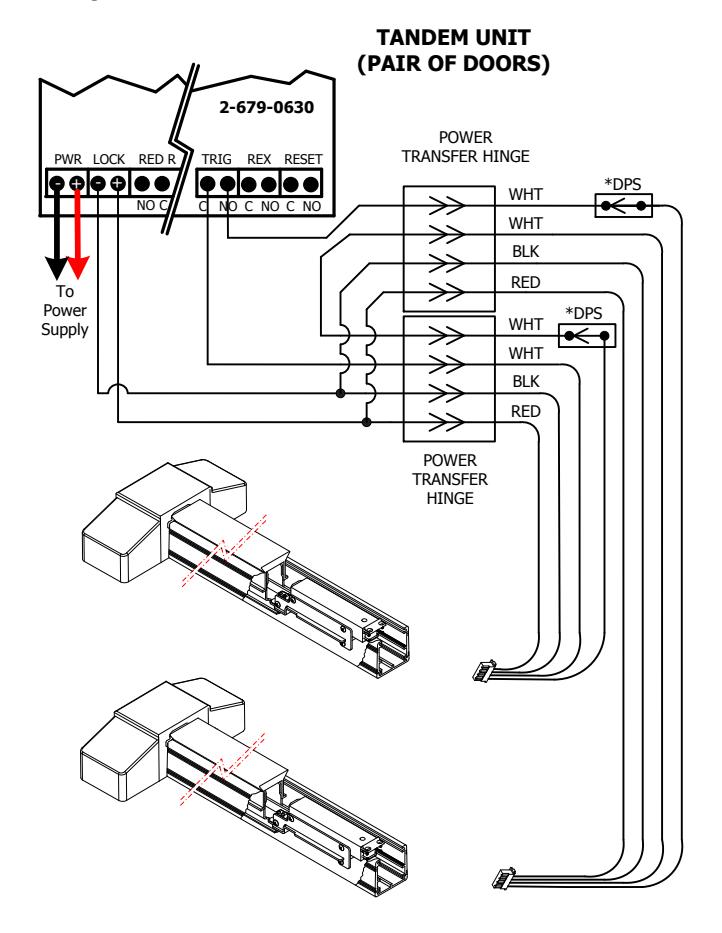
*Door Contact or Power Transfer Hinge by DPS required for Anti-Tailgate and Door Prop operation.
WARNING!
CONTACT THE AUTHORITY HAVING JURISDICTION FOR APPROVAL PRIOR TO SELECTING DELAY TIME OR PWR-UP SETTINGS
Optional Features
External Request to Exit: The REX TERMINAL is a wet 12/24VDC output to be used with a keypad such as a 2915.
External Reset: The RESET TERMINAL is a wet 12/24VDC output to be used with a keypad such as a 2915.
Lock/Unlock Monitoring: The GRN RLY TERMINAL is a dry relay that is activated when the LOCK output is activated.
Alarm Monitoring: The RED RLY TERMINAL is a dry relay that is activated when the Alarm is activated.

System Operation
POWER-UP UNLOCKED POWER-UP LOCKED The door is unlocked. To enter the The door is 15 or 30 Armed Mode, turn the keyswitch to locked and Reset or enter the Reset Code secure "11 * " on the keypad DELAYED EGRESS MODE The door is still locked and secure. The display is counting down with audible alarm/voice instructions. Once the display reaches "00", the door will unlock. ALARMED UNLOCKED [Alternating Display] The door is unlocked and the alarm The door is unlocked and is sounding. To return to Armed has been opened Mode, close the door and turn the key to Reset or enter the Reset Code "11*" on the keypad RESET [Armed] (Green LED solid) Keypad Code 11* The door is locked ( 15 ) or ( 30 and secure AUTHORIZED EGRESS [REX] (Green LED Solid) Keypad Code 22* Door Closed The door is unlocked until the REX timer has expired or until the door Door has been has been opened and then closed. opened BYPASS [Extended Unlock] (Green LED Flashing) Keypad Code 33* Door Closed The door is unlocked indefinitely. To return to
Armed Mode, turn the keyswitch to Reset or
enter the Reset Code "11* "on the keypad.
Returning the Keypad to Factory Default Settings
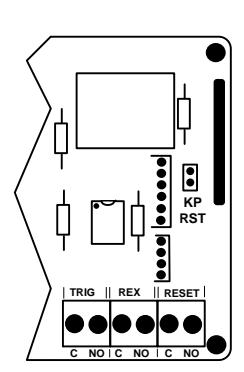
Short the KP RST terminal located on the main controller board.
Press 99# 1234 * 8# * to enter programming mode and erase all users.
Press 3#1#2#*. Sets the Output #1 (Reset) for 2 seconds. Press 3#2#2#*. Sets the Output #2 (Auth Exit) for 2 seconds. Press 3#3#0#*. Sets the Output #3 (Bypass) for latching.
Press 1#02#11#2#*. Adds user # 2 with a code of 11*. [Reset] Press 1#03#22#3#*. Adds user # 3 with a code of 22*. [Auth Exit] Press 1#04#33#4#*. Adds user # 4 with a code of 33*. [Bypass]
Press ** to exit programming mode.
Door has
been opened
Remove the shorting jumper from the KP RST terminal.

Keypad Programming
KEYPAD STATUS LEDS
GREEN
Steady: Power on, No errors, No outputs are active Slow Flash: No errors, At least one output is active
RED
Steady: General error, invalid code entered
Slow Flash: Error condition: At least one output is active
YELLOW
Slow Flash: Keypad is in Programming Mode
Single Flash: For ADA requirements, it will light each time
a key is pressed
FACTORY PROGRAMMED CODES
|
User
No. |
Pin
Code |
Output
Code |
Function | ||
|---|---|---|---|---|---|
| 1 | 1234* | NA | Master Code (default) | ||
| 2 | 11* | 2 | Reset | ||
| 3 | 22* | 3 | Authorized Exit (Rex) | ||
| 4 | 33* | 4 | Bypass (toggle on) | ||
If the factory programmed codes are acceptable for your installation, no additional programming is required.
Entering and Exiting Programming Mode
Press 99# Master Code ★ to enter programming mode.
For example: 99# 1234★ Enters programming mode using the Default Master Code.
Press ** to exit programming mode.
Changing the Master Code
User 1 is always used as the Master Code and is required to access keypad programming. The Factory Default Master Code is "1234". It is strongly recommended that a new Master Code is assigned after installation. WRITE DOWN THE NEW CODE.
If the master code is lost, you must use the keypad reset jumper on the main circuit board to enter programming mode by using the Default Master Code (See Page 5).
To Change the Master Code (User 1)
- 1) Enter Programming Mode.
- 2) Assign new Master Code: Press 1# 01# New Pin Code# Output Code #* . For example: 99# 1234*1# 01# 3871# 0#* changes the Master code from 1234 to 3871.
- 3) *Exit programming mode.
Adding a User / Changing User Pin Codes (Option 1)
To add a user:
- 1) Enter Programming Mode.
- 2) Press 1# User Number (2 digits)# New Pin Code# Output Code # * .
For example: 99# 1234*1# 05# 55# 2#* adds user 5's pin code (55) as one that will activate authorized exit.
3) *Exit Programming Mode.
Deleting a User (Option 2)
To delete a user:
- 1) Enter Programming mode.
- 2) Press 2# User Number (2 digits)#*.
For example: 99# 1234* 2# 05#* deletes user 5.
3) *Exit Programming mode.
Erase All Users (Option 8)
To ERASE ALL USERS!!
- 1) Enter Programming Mode.
- 2) Press 8#*.
- 3) *Exit Programming Model
All users are erased and the Default Master Code is reset to 1234.
*Multiple options may be performed without exiting programming mode.

Recommended Programming Steps
- 1) Test the controller to verify that all default codes are working as expected.
- 2) Record all desired users, names, and PIN codes in the table below.
- 3) Enter programming mode.
- 4) Delete all default users using the "Delete All Users" option on page 6.
- 5) Change the Master Code to the desired Master Code.
- 6) Exit programming mode.
- 7) Enter programming mode using the new Master Code to test it.
- 8) Add all users in the table below.
- 9) Test all users and verify for desired functionallity.
|
User
Number |
Name |
PIN
Code |
User
Number |
Name |
PIN
Code |
|---|---|---|---|---|---|