4500 and 4600 Series Flush End Cap Installation Instructions – I-ED001887
Open the original PDF document
View PDF


Installation Instructions I-ED01887
FLUSH END CAP INSTALLATION INSTRUCTIONS
4500 SERIES EXIT DEVICE
4600 SERIES EXIT DEVICE

WARNING: FOR PROPER FIT DEVICE CUT MUST BE SQUARE AND EDGE DEBURRED.
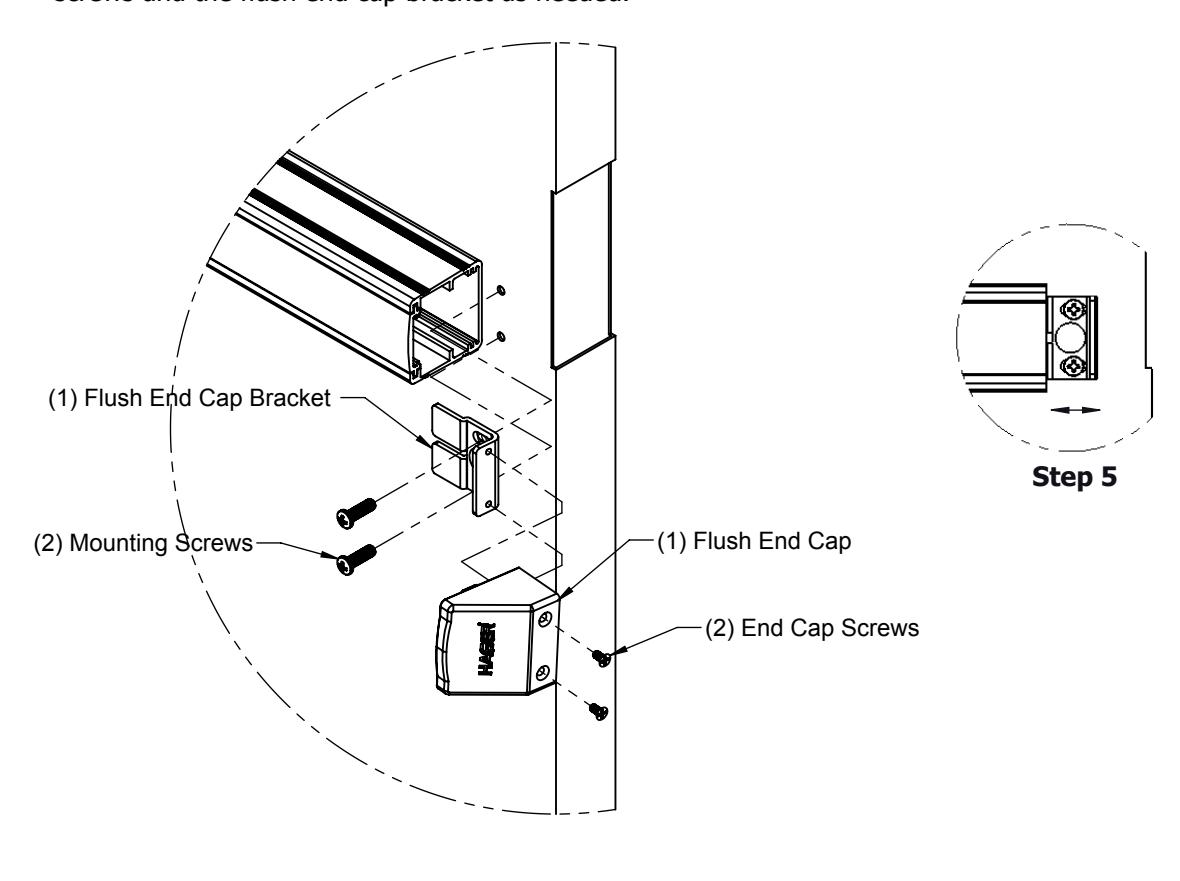
Instructions: To replace an existing end cap with a flush end cap.
- Step 1: Remove existing end cap by removing the cover screws.
- Step 2: Remove the existing end cap bracket by removing end cap bracket screws.
- Step 3: Using the existing device mounting holes install the new flush end cap bracket using the (2) mounting screws.
- Step 4: Install the flush end cap using the (2) end cap screws.
- Step 5: If the flush end cap is not flush with the exit device, remove flush end cap and adjust the mounting screws and the flush end cap bracket as needed.