2270-key-lock-operating-change-instructions-pdf
Open the original PDF document
View PDFKEYLOCK
2270 KEY LOCK
OPERATING AND CHANGING INSTRUCTIONS
Lock Operations
Open Lock
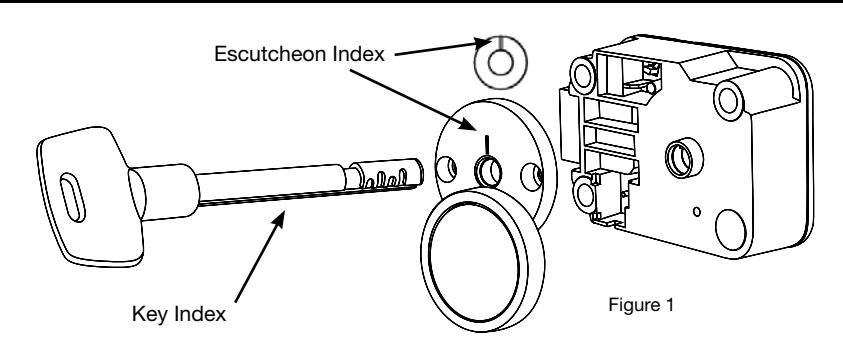
1. Insert the Setup Key (or current Operating Key) into the lock, through the keyhole Escutcheon Cover (P/N 2226) or Escutcheon Plate (P/N 2219) on the front of the safe door (Figure 1).
Caution: Never force the key into the lock. This could cause permanent damage to the Lock or the Key. Once the Key is inserted, do not apply inward or outward axial force to the Key. This could prevent the Lock from opening correctly.

2. Turn the Key to the RIGHT (CW) until it stops, and the bolt is retracted.
Note: The Key cannot be removed while the bolt is retracted.
3. Open the safe door.
Close Lock
1. Close the safe door.

2. Turn the Key to the LEFT (CCW) until it stops.
3.Remove the Key.
Set or Change Operating Key
The 2270 Keylock is shipped from LA GARD set to open with a factory Setup Key. The Lock installation should be completed prior to setting the Lock to open with an Operating Key. Refer to 2270 Keylock Installation Instructions (748.1210).
The parts listed below are needed to change the 2270 from a Setup Key to an Operating Key:
- • Setup Key (P/N 2213)
- • Change Key (P/N 1307)
- • Operating Key (P/N depends on key length)
On the Setup/Operating Keys there is a groove referred to as the Key Index. On the Escutcheon Cover or the Escutcheon Plate there is a groove referred to as the Escutcheon Index (Figure 1).
1. Insert the Setup Key (or current Operating Key) into the lock, through the keyhole Escutcheon Cover or Escutcheon Plate on the front of the safe door.
2. Slowly turn the Setup Key to the RIGHT (CW) until the Key Index is aligned with the Escutcheon Index.
Note: There is an audible "click" when the indexes align, and the lock bolt will not be retracted.
3. Insert the Change Key into the change key hole on the back of the lock (Figure 2).
Note: If the Change Key does not go in easily, then the wheels are not aligned. Turn the Setup Key to the LEFT (CCW) until it stops, and repeat steps 2 and 3.
- 4. Turn the Change Key to the RIGHT (CW) until it stops, approximately one-quarter turn. Leave the Change Key in the lock.
- 5. Turn the Setup Key to the LEFT (CCW) and remove.
- 6. Insert the new Operating Key into the lock.
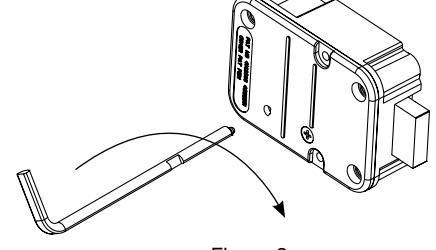
Figure 2
- 7. Slowly turn the new Operating Key to the RIGHT (CW) until it stops, and the Key Index is aligned with the Escutcheon Index.
- 8. With the new Operating Key securely held in this position, turn the Change Key to the LEFT (CCW) and remove. The Lock is now set to the New Operating Key.
- 9. With the door open , test the Lock several times by turning the Operating Key to the RIGHT (CW) until it stops and the bolt is retracted.
NOTE: Always turn the key fully to the LEFT (CCW) between opening attempts.
10. Close the safe door.
11. Turn the Operating Key to the LEFT and remove.
Caution: The Operating Key is shipped with its key code. The key code is necessary in order to receive a replacement or additional Operating Key(s); therefore, keep the key code in a secure place.