1581S Series Installation Instructions
Open the original PDF document
View PDF

801 Avenida Acaso, Camarillo, Ca. 93012 • (805) 494-0622 • www.sdcsecurity.com • E-mail: service@sdcsecurity.com
INSTALLATION INSTRUCTIONS MINI EXIT CHECK® DELAYED EGRESS EMLOCK® 1581S
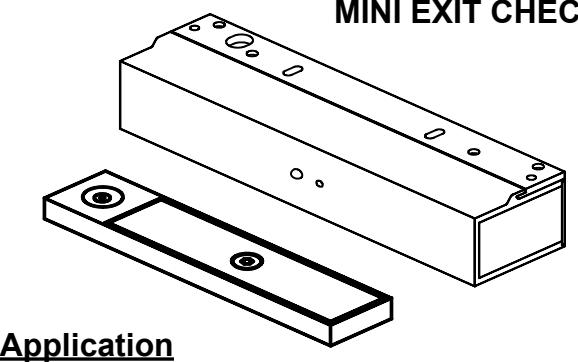
PUSH UNTIL ALARM SOUNDS. DOOR CAN BE OPENED IN 15 SECONDS.
KEEP PUSHING. THIS DOOR WILL OPEN IN 15 SECONDS. ALARM WILL SOUND.
California Building Code Compliant
When unauthorized egress is initiated, the Exit Check® delays egress through the door for a period of 15 seconds. Meanwhile, the person exiting must wait allowing personnel or security respond. The door unlocks after the 15 second delay period has elapsed, permitting egress. A signal from the fire/life safety system will release the lock immediately for uninhibited egress in an emergency.
Exit Check® applications include:
- Restricting the egress of patients for their own safety.
- Restricting the egress of commercial center patrons for minimum security application needs.
Standard Features
- Small & Compact Size
- 650 lbs. Holding Force
- 15 Second Exit Delay when activated.
- 1 Second Nuisance Delay
-
Subdued Alarm with 2 Distinct Tones:
- Alarm Activation Intermittent
- Door Release Continuous
-
Choice of Activation Trigger:
- Door Movement
- Exit Device w/ REX Switch
- Touch Sense Bar w/REX Switch
- Instant Reset from Bypass mode for interfacing with Patient Monitoring Systems.
- Vandal resistant Proximity Sensor Trigger
- Auto Sensing 12/24VDC input power
- Low Power Consumption
- 5 foot Power Cable
- Connection for Tandem Option (Pairs of Doors)
Optional Features
- 30 Second Exit Delay
- DPS Door Position Switch Output
- BAS Bond Alert Sensor Switch Output
- Tandem / Slave Cable
3' Cable – 1581S-TC3
10' Cable – 1581S-TC10
Selectable Automatic & Manual Power-Up
Auto Power-Up – Occurs when power is restored and/or the fire panel is restored (Not available on California Versions).
Manual Power-Up – This is a UBC & California Building Code Compliant Feature – Only after power restoration and fire panel reset may the lock be reset manually at the opening. A power-up reset key switch or keypad is required adjacent to the door.
Building & Fire Life Safety Code Compliant
1581SND,NA,NH,NC
IBC International Building Code
IFC International Fire Code
NFPA 101 Life Safety Code
NFPA 1, UFC , Uniform Fire Code
UBC Uniform Building Code
CBC California Building Code
SBC Standard Building Code
1581SBD,BH,BC
BOCA National Building Code compliant Chicago Building Code compliant
Only the 1581S and the 1581T have been UL listed as "Special Locking Arrangements" to UL standard 294 and NFPA 101.



GWXT/GWXT7 Auxiliary Locks FWAX Special Locking Arrangements
1581S Operational Description
The door is closed and secured by latching hardware. The model 1581S Exit Check locks the door in the secured position, and the status LED is solid green.
Activation / Alarmed Release:
Activation of the 1581S Exit Check's 15 second unlock cycle is started by releasing the door latch and applying up to 15 lbs. of pressure to the door causing slight door movement. A short nuisance delay period is then initiated, a preactivation warning tone is sounded. To prevent false alarms, re-latching the door during the nuisance delay period will silence the pre-activation warning tone and keep the door locked.
Once the nuisance delay period has been exceeded, the Exit Check continues with an irreversible door release cycle. The integral digital countdown display and voice commands continue to inform the person intending to exit of the seconds remaining until unlock and an alarm output is activated to alert personnel of an unauthorized exit. After the 15 second delay cycle has expired, the Exit Check will release the door allowing free egress.
Reset / Relock:
The Exit Check can be manually reset by authorized personnel by closing the door and activating the Reset input.
Request to Exit / Authorized Bypass:
Momentarily actuating the Request to Exit / Bypass input will initiate the request to exit cycle and unlock the 1581S Exit Check allowing free egress. After the request to exit cycle has expired or the door closes, the Exit Check will automatically relock.
By keeping the Request to Exit input continuously activated, the 1581S will remain unlocked for extended periods of time. Releasing the Request to Exit input will restart the request to exit cycle and will relock the door after the request to exit time has expired.
(NFPA-101)
The 1581S operation complies with the following building and fire codes: NFPA 101; NFPA 1-UFC; UBC; IBC; IFC; SBC; California Building Code. Listings: UL Listed: Special Locking Arrangements and Auxiliary Locks; California State Fire Marshal (CSFM) Listed.
| Option | Delay Release | Nusiance | Reset after | Lock Status on Power-Up |
|---|---|---|---|---|
| Code | Time | Time | Alarm | |
| ND |
15 sec
Fixed |
1 sec
Fixed |
Manual |
Locked or Unlocked
Selectable |
| NH |
30 sec
Fixed |
1 sec
Fixed |
Manual |
Locked or Unlocked
Selectable |
| NC | 15 sec | 1 sec | Manual | Unlocked |
| (CBC Compliant) | Fixed | Fixed | Fixed |
Per BOCA compliance, the Exit Check is manually reset by authorized personnel after an alarm by closing the door and actuating the integral reset key switch or by momentarily closing a contact connected to the remote reset terminals. In addition, reset will be automatically initiated once the door has been opened, then closed and remains closed for 30 consecutive, seconds
(BOCA/Chicago)
The 1581S operation complies with BOCA National Building Code and the Chicago Building Code: UL Listed, Special Locking Arrangements and Auxiliary Locks.
|
Option
Code |
Delay Release
Time |
Nusiance
Time |
Reset after
Alarm |
Lock Status on Power-Up |
|---|---|---|---|---|
| BD |
15 sec
Fixed |
1 sec
Fixed |
Auto/Manual |
Locked or Unlocked
Selectable |
| ВН |
30 sec
Fixed |
1 sec
Fixed |
Auto/Manual |
Locked or Unlocked
Selectable |
| ВС |
15 sec
Fixed |
0 sec
Fixed |
Auto/Manual |
Locked or Unlocked
Selectable |
1581S Specifications
Interior Applications Only Size: 10"L x 2-1/8"H x 2-3/8"D
Power/Current Requirements:
- 12 - 24VDC Auto-sensing
- 350 mA @ 24VDC
- 600 mA @ 12VDC
Lock Status Relay Rating: 1 amp @ 30V resistive
DPS Rating: 250 mA @ 30V resistive BAS Option: 250 mA @ 30V resistive
Note:
A key switch, keypad, or push button (see models below) MUST be provided and purchased separately to operate the Reset and REX Functions.
Suggested Optional Equipment
Included in Package
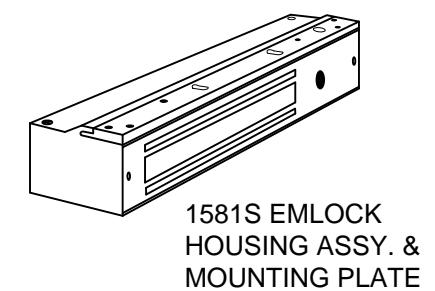
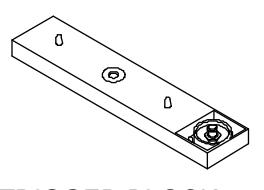
TRIGGER BLOCK ASSY 1580S-11
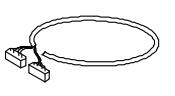
CONTROLLER CABLE ASSEMBLY CA-1581S
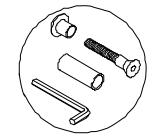
ARMATURE SCREW PACK 1580S-101-C
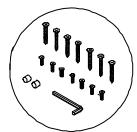
EMLOCK SCREW PACK C-1500-RF
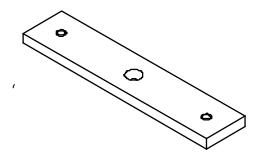
ARMATURE PLATE 1581S-10T
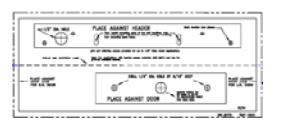
TEMPLATE TEMP-1581S
Digital Entry
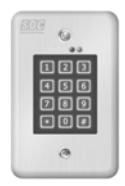
918 Digital Keypad Two relay outputs: Relay 1 -Reset; Relay 2 - Choice of momentary or sustained bypass.
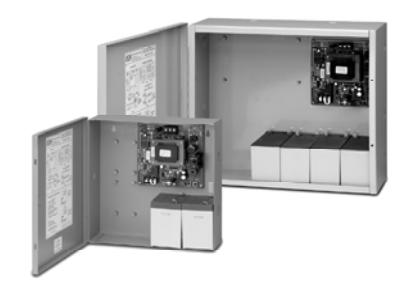
Power Supply
600 Series Power Supply
Field Selectable 12 or 24VDC modular Power Supplies with Fire/Life Safety Emergency Release. Tri-colored LED, separate PTC protected battery charger, and Class 2 Outputs.
602RF 1 Amp 631RF 1.5 Amp 632RF 2 Amp 634RF 4 Amp 636RF 6 Amp
Station Controls, Annunciator Panels, and Consoles
728U
Single station two function key switch control for alarm reset and access or sustained bypass.
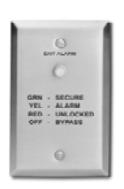
101-1A
The single station annunciator is equipped with a tricolored LED and audible alarm.
101-PAM
Visual & audible annunciation, timed access, sustained bypass and audible mute.
728UL3
Single station two function key switch control for alarm reset and access with a tricolored LED showing door condition.
101-4AM
Provides visual & audible annunciation with audible mute for up to four openings.
TCC Desk Top : Stations 4, 8, & 12
SDC Annunciator Consoles provide remote annunciation of multiple openings. Stations are specified in sets of four. Control switches are capable of both sustained bypass and timed unlocking.
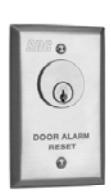
702RU
Single station one function key switch control for alarm reset.
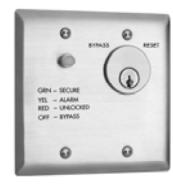
101-1AK
Visual & audible annunciation and a two function key switch for alarm reset and access or sustained bypass.
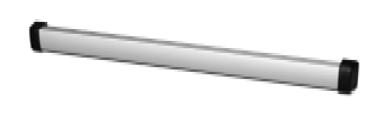
PSB560
Request-to-exit touch sense non-latching bar that will activate the Exit Check® when slight pressure is applied to the bar. For doors without latching.
Door and Frame Preparation Instructions
STEP 1. Locate the paper template and fold along the dotted line. Place the folded edge of the template against the door stop and door at the header while against the vertical stop, opposite the hinge side of the door. Tape in place at this position.
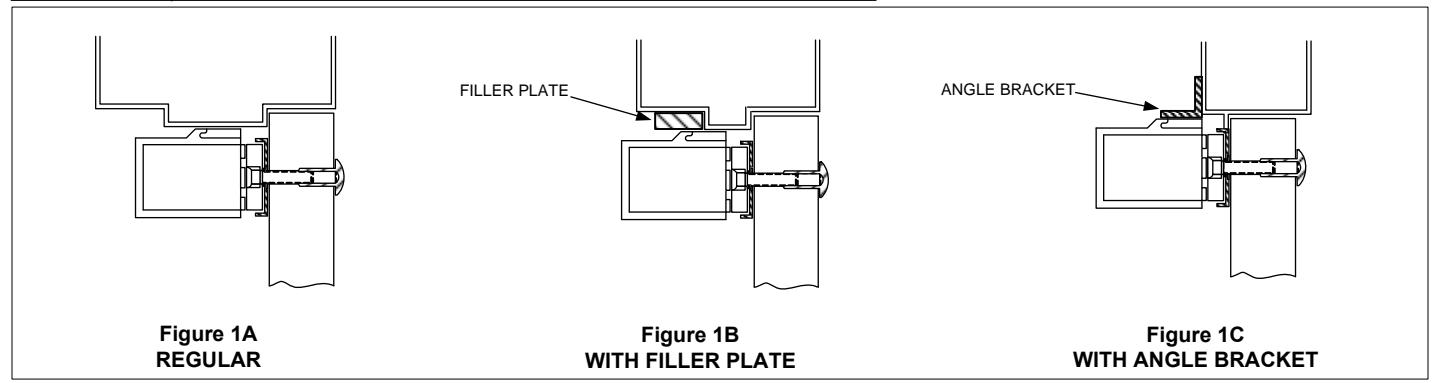
STEP 2. As indicated on the paper template, punch the designated hole locations on the frame and armature mounting holes on the door. (NOTE: PRIOR TO DRILLING, INSPECT TO SEE IF ANY OF THE HOLES CANNOT BE DRILLED DUE TO THE FRAME OR DOOR CONFIGURATION. A FILLER PLATE OR ANGLE BRACKET MAY BE REQUIRED. SEE PAGE 5.)
STEP 3. Drill and tap the two 1581S mounting holes as indicated on the paper template. (NOTE: READ NOTE ON TEMPLATE WITH REGARD TO SELECTING THE PROPER HOLE SIZE FOR ARMATURE MOUNTING BOLT.)
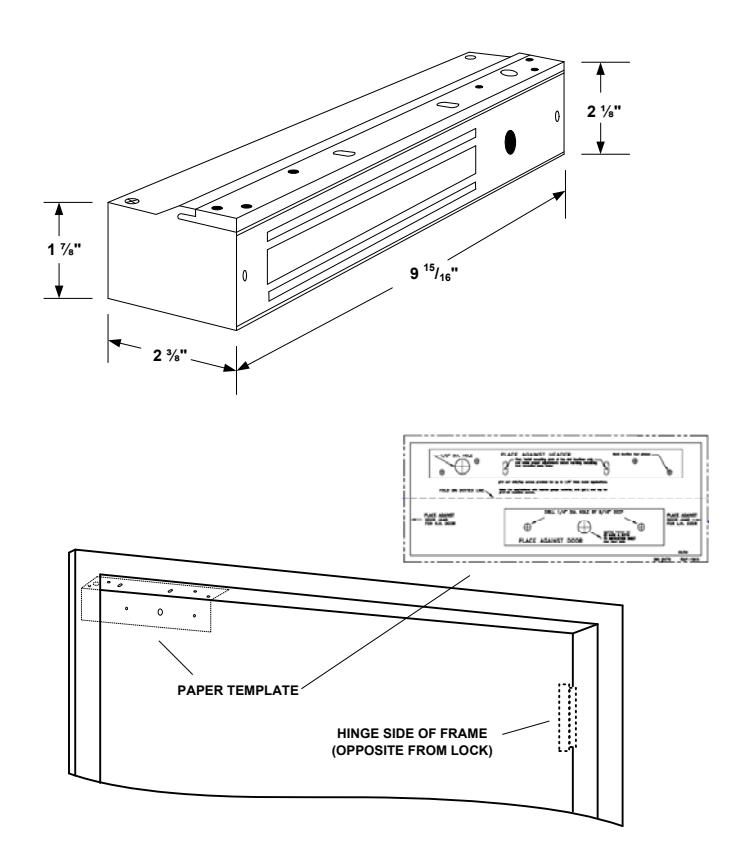
Door and Frame reference dimensions
IMPORTANT! – IT IS HIGHLY RECOMMENDED THAT YOU FIRST INSTALL THE MOUNTING PLATE AT TWO SLOT LOCATIONS ONLY. THIS WILL ALLOW YOU TO MAKE PROPER ADJUSTMENTS OF THE LOCK'S POSITION PRIOR TO MARKING, DRILLING AND TAPPING THE FOUR PERMANENT MOUNTING PLATE HOLES.
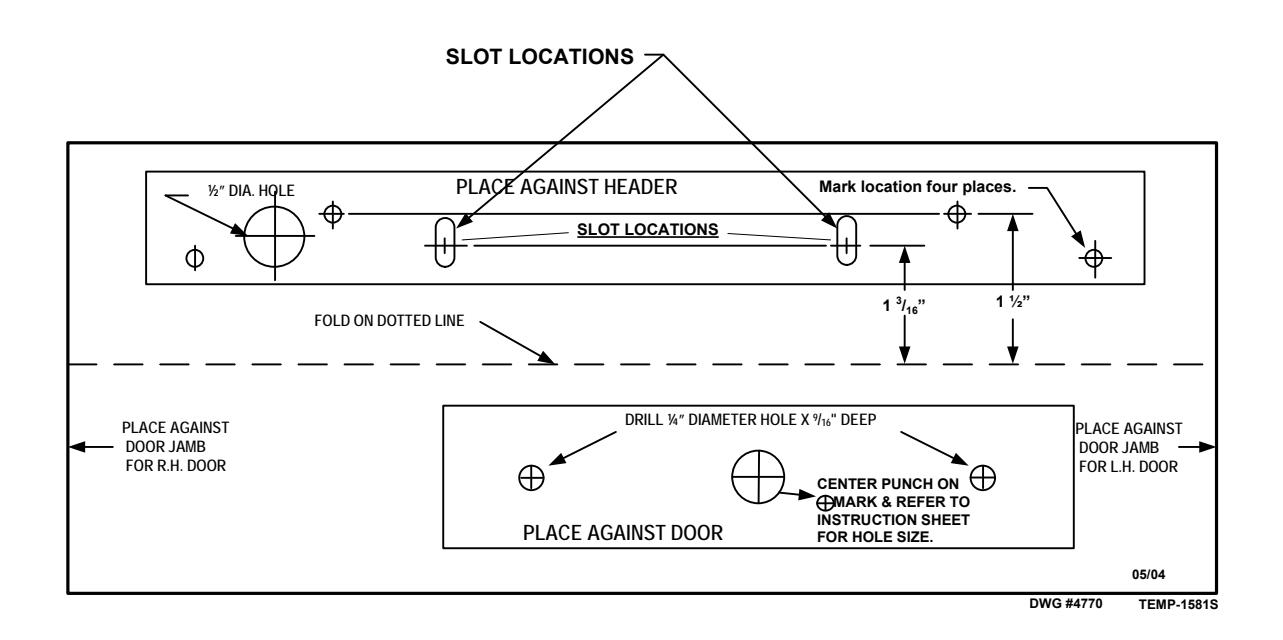
NOTES:
- #10 self drill/tap screws provided for up to 1/8" thick metal applications
- For applications with heavier gauge material, drill (#21) and tap for #10-32 machine screws.
ARMATURE MOUNTING INSTRUCTIONS
STEP 1. Mount armature to door. (See figures 2A, 2B & 2C.)
STEP 2. Install the mounting plate (filler plate and/or angle bracket if needed – see figures 1A, 1B & 1C) to header with only the two screws at the slotted hole locations at this time. Snug the screws down lightly (do not torque) so the mounting plate & lock can be repositioned later.
STEP 3. Temporarily install the lock to the mounting plate with the 1/4-20 socket head screws encased in the lock.
STEP 4. With the lock mounted, close the door so the armature just comes into contact with the face of the lock. If the door is not completely closed as the lock & armature touch, open the door and reposition the lock away from the door as described in step 2. (THIS IS TO PREVENT THE DOOR FROM USING THE LOCK AS THE DOOR STOP.)
STEP 5. Remove the lock from the mounting plate, mark & punch all remaining screw and wiring holes. Drill & tap holes as indicated on the paper template and install all screws.
STEP 6. Reinstall the lock to the mounting plate. At this point, if there is no need to remove the lock for painting or any other reason, install the anti-tamper plugs over the socket head mounting screws, using a soft hammer to avoid damage to the lock case.
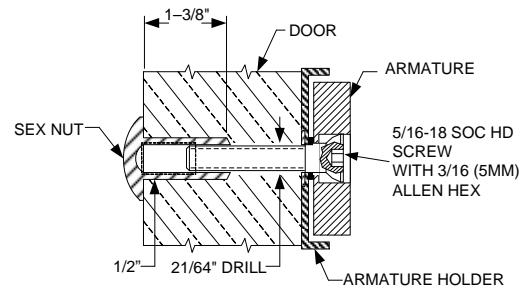
Figure 2A – SOLID DOOR
Drill exactly 3/8" through the door. From sexnut side of door, drill ½" diameter hole 1-3/8" deep. Mount armature to door with hardware provided per Figure 2A.
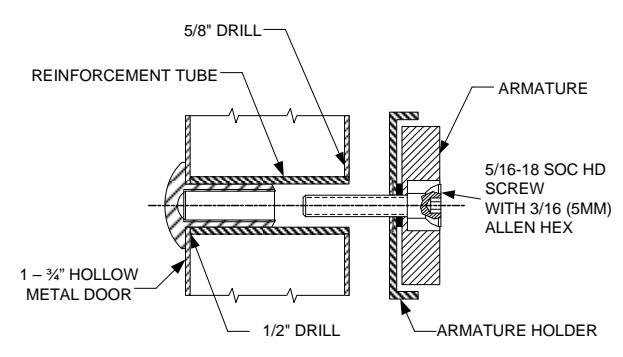
Figure 2B – HOLLOW METAL DOOR
From sexnut side of door, drill exactly 1/2" hole through one metal thickness only. From armature side of door, drill 5/8" hole to insert reinforcement tube. Press in sexnut & reinforcement tube all the way and mount armature to door using hardware provided per Figure 2B.
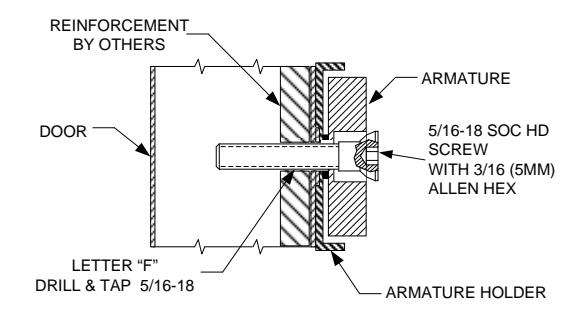
Figure 2C – REINFORCED ALUMINUM OR HOLLOW METAL DOOR
Use letter "F" drill and tap for 5/16-18 machine screw. Mount armature to door with hardware provided per Figure 2C.
REGULAR, FILLER PLATE & ANGLE BRACKET DETAILS
WIRING DETAILS & FUNCTIONS (ALL OPTIONS SHOWN)
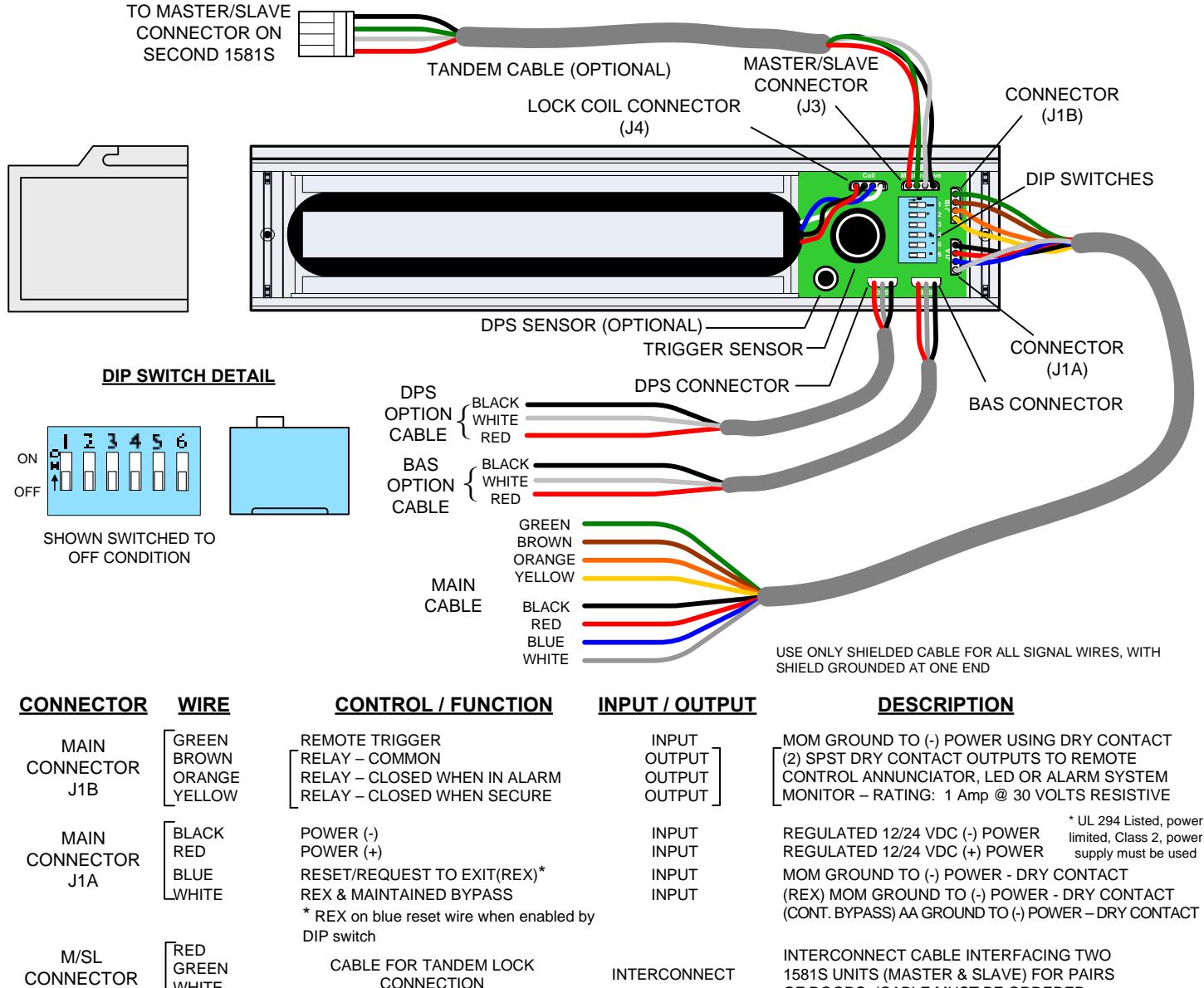
J3
DPS OPTION
CONNECTOR
BAS OPTION
CONNECTOR
WHITE BLACK
WHITE RED
WHITE RFD BLACK
BLACK
SWITCH - N/O
SWITCH - N/O
CONNECTION (OPTIONAL)
SWITCH - COMMON SWITCH - N/C
SWITCH - COMMON SWITCH - N/C
OF DOORS. (CABLE MUST BE ORDERED SEPARATELY).
RATING: .250 mA @ 30 VOLTS RESISTIVE POLARITY SHOWN WITH THE DOOR OPEN
RATING: .250 mA @ 30 VOLTS RESISTIVE POLARITY SHOWN WITH THE DOOR UNSECURE
ROCKER SWITCH SETTINGS
OUTPUT:
OUTPUT
OUTPUT
OUTPUT
OUTPUT
OUTPUT
| SWITCH# | FUNCTION | OFF | ON | DESCRIPTION |
|---|---|---|---|---|
| 1 | REX Time | 1 Second | 10 Seconds | Internal relock time delay when using REX input controls |
| 2 | Power-up Option** | Disabled | Enabled | Manual reset on power-up required when disabled; Auto reset on power-up when enabled |
| 3 | Remote Trigger | Disabled | Enabled | When enabled, remote trigger input is used for external activation; Internal sensor disabled |
| 4 | Master/Slave | Master | Slave | Designates lock as master or slave for tandem application (tandem cable required) |
| When disabled, the lock will enter alarm mode if the door is held open past the REX period. | ||||
| When enabled, no alarm will sound if the door is held open past the REX period following an | ||||
| 5 | Door Prop | Disabled | Enabled | authorized REX signal. Lock will relock and rearm upon closure of the door. |
| When disabled, the blue reset will only function as a reset wire after an alarmed release. | ||||
| When enabled and the lock is secure, momentarily shorting the blue reset wire to ground will | ||||
| 6 | REX on Reset Input | Disabled | Enabled | initiate a REX period. |
** Power up lock option not available on some versions
System Wiring – Single Door
WARNING:
APPLICATION OF VOLTAGE TO THE DRY CONTACT INPUTS OF THIS UNIT WILL CAUSE PERMANENT DAMAGE AND VOID THE WARRANTY
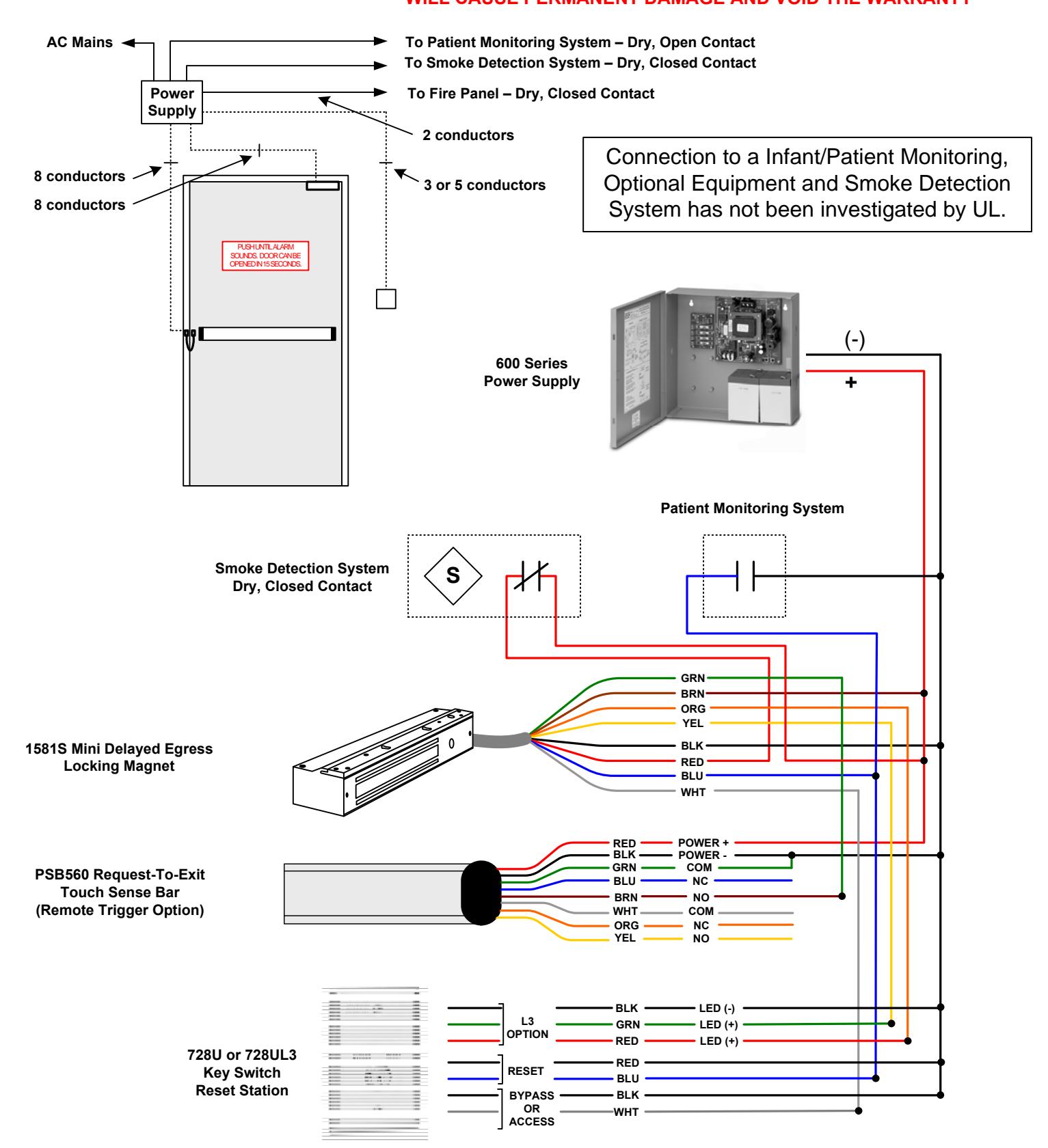
WARNING:
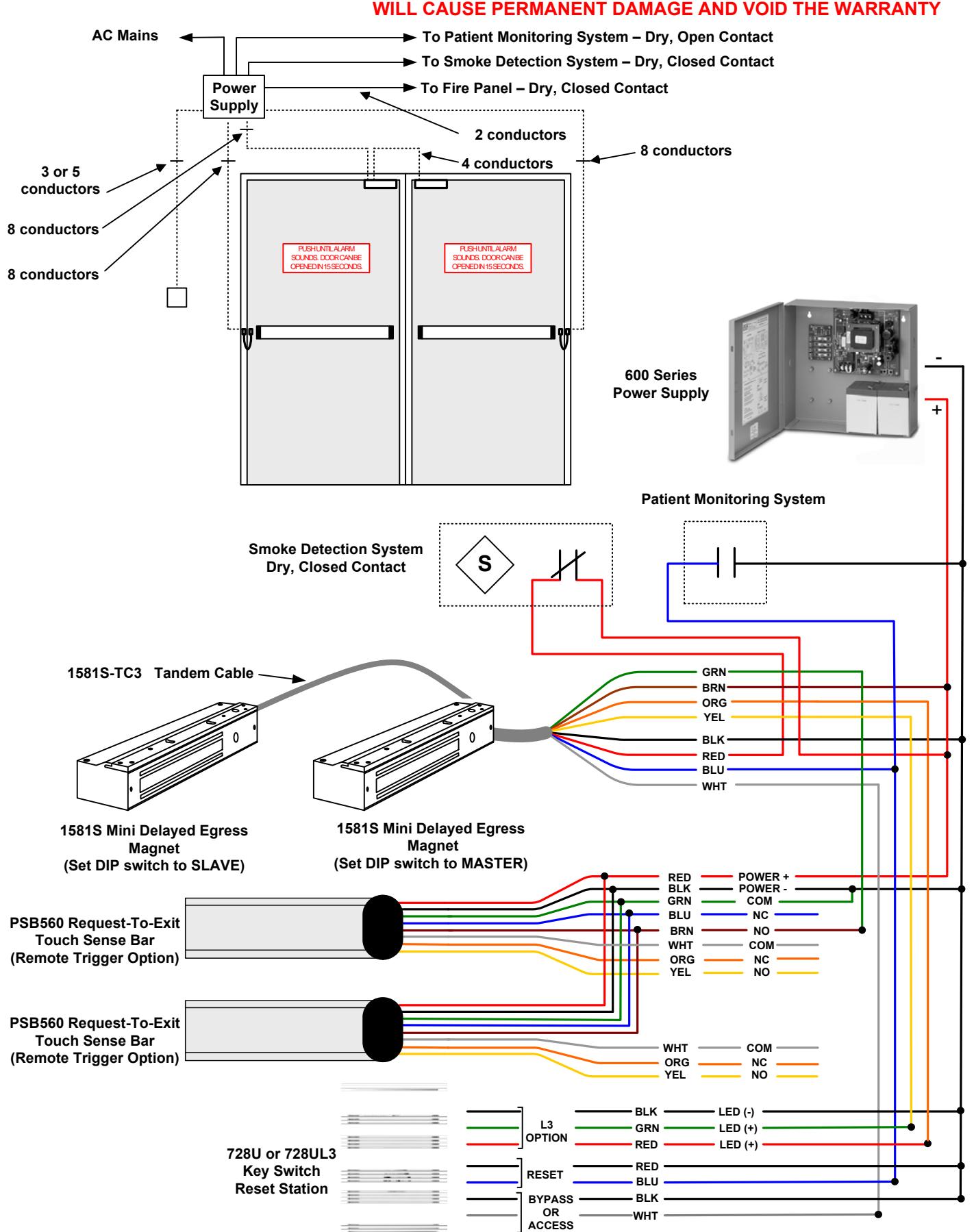
APPLICATION OF VOLTAGE TO THE DRY CONTACT INPUTS OF THIS UNIT
Lock Operation and Adjustment Instructions
- STEP 1. After the lock has been mounted to the door and frame per the provided template, make all wiring connections to the lock. At a minimum, this will be the power and reset inputs (black, red & blue conductors). It is important that the reset input (blue conductor) be connected to a normally open momentary, dry contact switch (i.e. 928 Digital Keypad or 728 Key Switch) for initial setup adjustments as well as to reset the lock to a secure status after it has been activated.
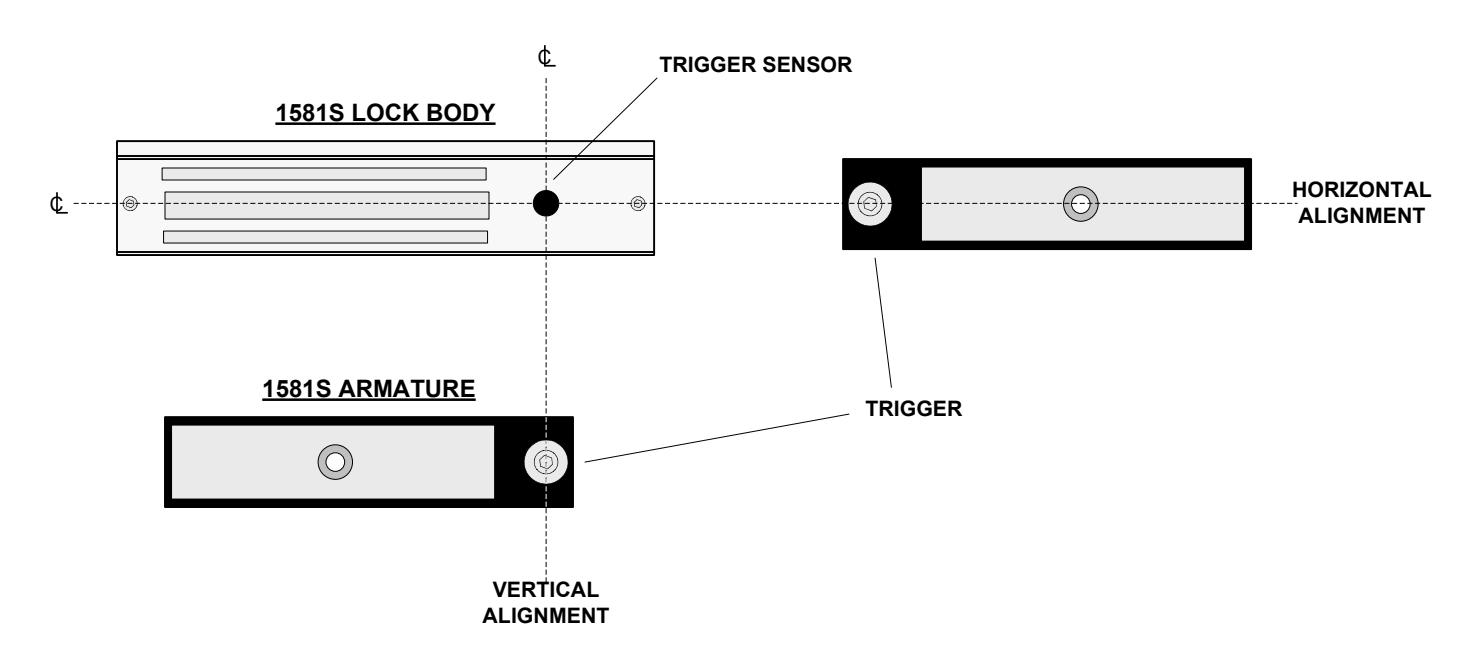
- STEP 2. With all wiring connections completed, re-install the lock cover onto the lock. Ensure that the trigger sensor is aligned with the hole in the cover. The sensor is preset at the factory to slightly project through the cover. WARNING: DO NOT ATTEMPT TO ADJUST THE TRIGGER SENSOR LENGTH. AS THIS WILL RESULT IN DAMAGE TO THE SENSOR AND VOID THE WARRANTY.
- STEP 3. Slowly swing the door closed and visually observe the position of the armature trigger as it approaches the trigger sensor on the lock. If the provided mounting template was used during the lock and armature installation, the trigger & sensor should align with one another both horizontally and vertically. IMPORTANT: CORRECT OPERATION OF THIS LOCK DEPENDS ON THE TRIGGER SENSOR BEING ABLE TO DETECT THE TRIGGER WHEN THE DOOR IS CLOSED. A PROXIMITY ADJUSTMENT CAN BE MADE TO THE TRIGGER FOR FINE TUNING. THIS IS EXPLAINED IN STEP 4.
- STEP 4. NOTE: BEFORE STARTING THIS NEXT STEP, YOU WILL NEED TO BE ABLE TO ACTIVATE THE ALARM RESET INPUT. After alignment has been verified, close the door and ensure DIP switch #2 is OFF. Apply power to the lock. Push on the door. The LED should be flashing green , indicating that the lock is in the Manual Power Up mode. Reset the lock at this time. The lock should now secure the door and the LED should be steady green . You may change the mode to Auto Power Up by setting the #2 dipswitch to the ON position. Now when you first apply power, you will see a solid green light and the door will be secure without having to reset the lock.
- STEP 5. Activation of the 1581S can be made by door movement or an external trigger. When using the door movement method, activation is achieved through the way the armature hardware is designed. When someone unlatches the door and applies up to 15 lbs. pressure, the lock will hold onto the armature while simultaneously letting the trigger/door move away from the lock/trigger sensor. Sensitivity in the detection of the trigger movement can be adjusted for optimum sensitivity & performance. This adjustment can be made by using the 5mm hex wrench provided with the lock. The center of the trigger or "target" is spring loaded and can be screwed in and out of the armature thus either decreasing or increasing the space between itself and the sensor. The "spring" feature of the target is to prevent damage from direct contact with the trigger sensor. Depending on the accuracy of the alignment, the trigger does not have to physically touch the sensor to operate correctly.
Systems Applications Reference
Activation by applying pressure to doors with latching hardware:
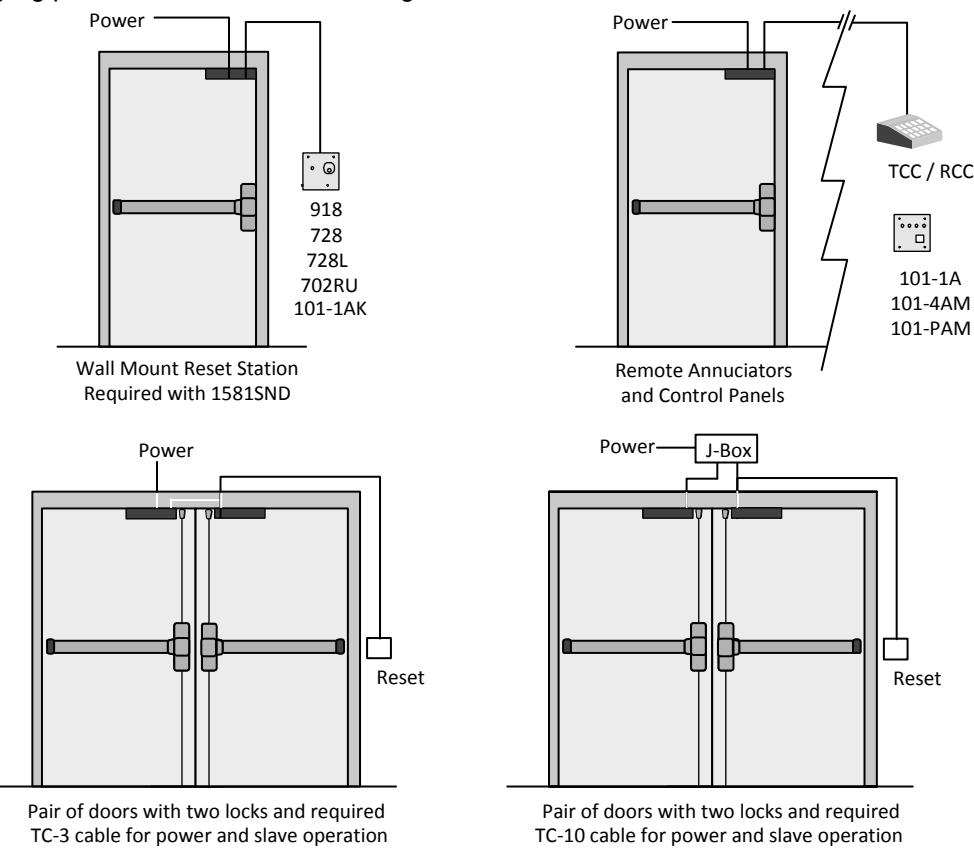
Pushing either door triggers the delayed release of both doors.
Activation by a remote trigger for doors with or without latching hardware:
Pushing either door triggers the delayed release of both doors.
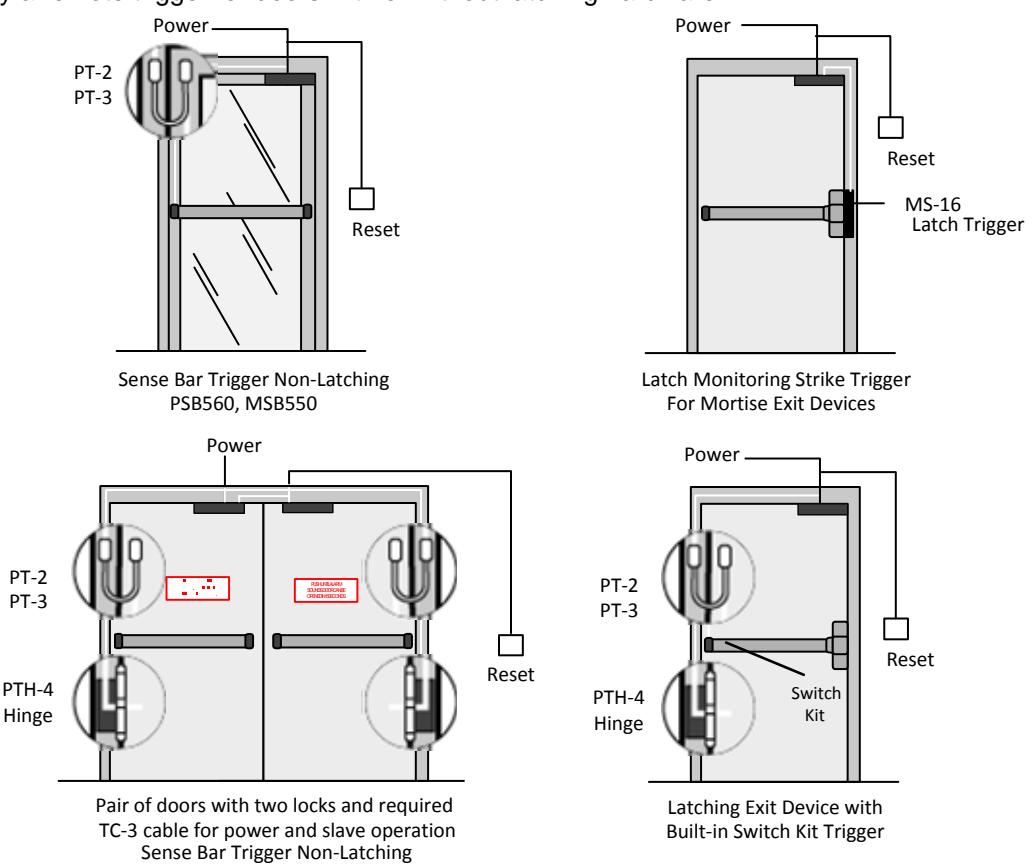
PSB560, MSB550