12-HD980 MULLION STABILIZER
Open the original PDF document
View PDFSARGENT Installation Instruction for the 12-HD980 Mullion Stabilizer
FOR ASSISTANCE CONTACT SARGENT AT 800-827-5477 OR www.sargentlock.com
ATTENTION:
Before starting the mullion stabilizer installation, make sure that:
- You have all components required;
- Doors are properly installed, and hinge screws are tight:
- The Exit device is properly installed
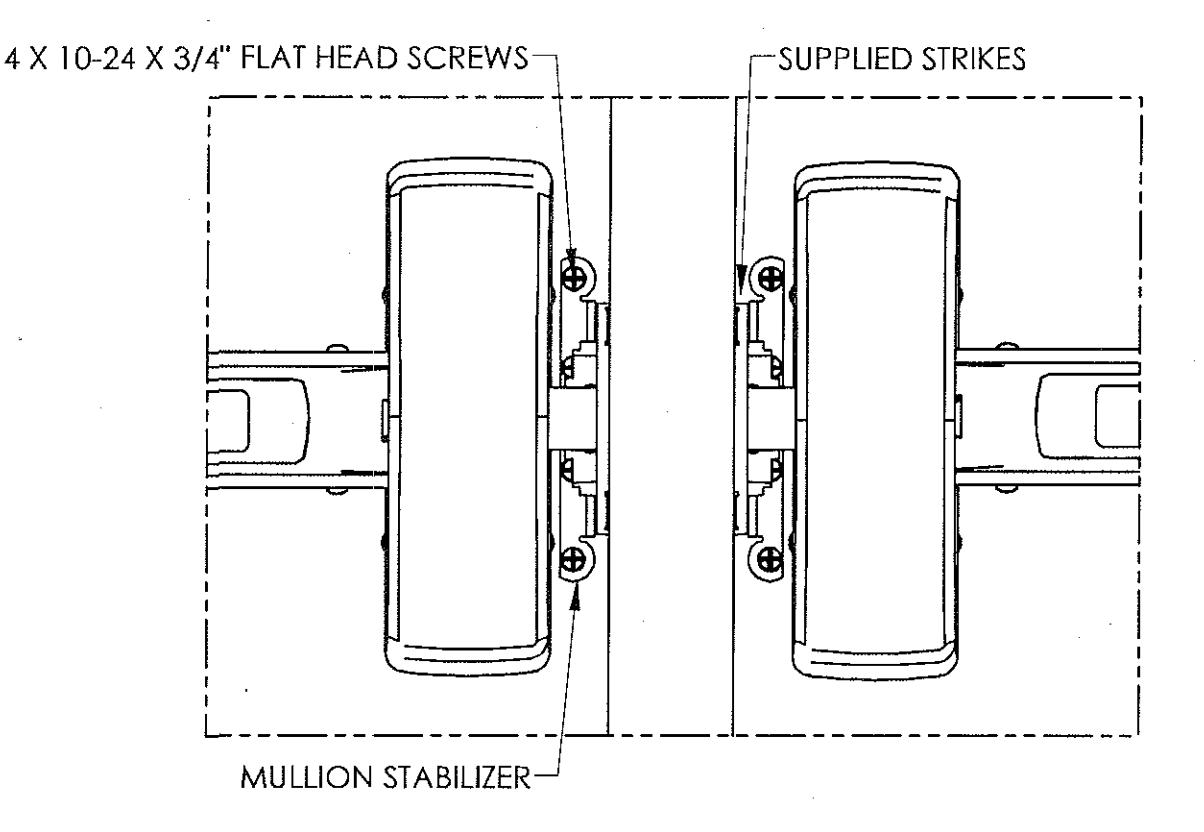
- Strikes supplied with the MULLION are installed using (4) supplied screws.
To install the Mullion Stabilizer:
- 1. With the door opened, insert the middle "tooth" of the stabilizer into the strike opening positioned as shown;
- 2. Holding the stabilizer in place close and latch the door;
- 3. Locate the stabilizer on the door and mark the hole locations;
- 4. Open the door. Drill (Use #25 drill bit), and tap (4) #10-24 holes;
- 5. Install the stabilizer in place as shown;
- 6. Close the door and check the installation;
- 7. Repeat for other door.