101-DE Series Installation Instructions
Open the original PDF document
View PDF

801 Avenida Acaso, Camarillo, Ca. 93012 • (805) 494-0622 • www.sdcsecurity.com • E-mail: service@sdcsecurity.com
INSTALLATION INSTRUCTIONS 101-DE/101-KDE
Verbal Exit Instructions or Alarm Tone Only and Digital Countdown Display
Application:
When unauthorized egress is initiated SDC Exit Check® delays egress through the door for 15 seconds (or 30 seconds). Meanwhile, the person exiting must wait while personnel or security responds. The door unlocks after 15 seconds have elapsed permitting egress. When powered by a fire control supervised power supply, the lock will release immediately in an emergency. The integral digital keypad eliminates the need to carry and locate keys for reset and bypass functions.
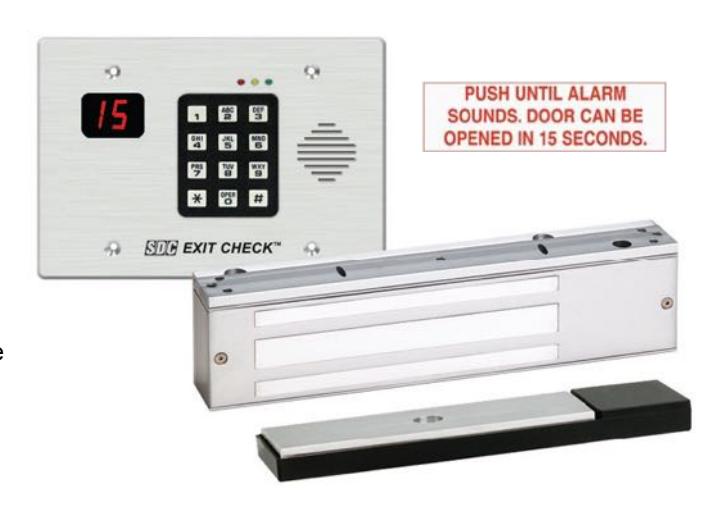
Exit Check® applications include:
- Restricting the egress of wandering patients for their own safety.
- HUGS<sup>®</sup> Infant Protection System compatibility
- Restricting the egress of commercial center patrons for security application needs.
- Controlling pedestrian traffic in transportation facilities, including airport jetways and tarmacs
- Reducing Shoplifting and Employee Theft
Features:
Egress Delay
- 15 or 30 second exit delay
- 1 or 2 second nuisance delay
Built-In 3 Function keypad
- Alarm and lock reset
- 1 to 30 second bypass
- Sustained bypass
- Additional keyswitch optional
Built-In Annunciation
- Armed mode
- Nuisance mode
- Irreversible egress mode
- Release mode
- Digital countdown mode
- Field selectable voice notification or tone
- Field selectable male voice with security message or female voice with safety message
Triggering Options
- Egress alarm triggered by door movement when used with SDC 1500DE series EMLocks.
- Trigger input from external device field selectable (N/O or N/C)
Control Inputs
- 1 to 30 second request-to-exit and bypass input with anti-tailgate and jumper selectable door prop alarm.
- Reset
Monitoring Outputs
- Armed mode
- Egress initiation status
- Released status
Optional EMLock Outputs
- Door position sensor indicates door open and door closed, commonly used to verify egress after release.
- Magnetic bond sensor indicates locked with full holding force, low holding force, unlocked and tampering.
Choice of Mounting
Recessed mounted (3 gang metal plaster ring included)
05-16 Page 1
- Surface mounted with optional 3 gang box (DEC-J)
- Optional shroud (SHD-J) to be used with DEC-J surface box.
Display Modes
15 Door armed and locked.
Alarm countdown has ended, door is unlocked and alarm sounding\nuntil reset.
Door unlocked and alarm is shunted (REX or Bypass)
Door has been opened after REX, Bypass or Alarm.
Code Compliance
- IFC International fire Code
- IBC International Building Code
- NFPA 101 Life Safety Code
- NFPA 1 Uniform Fire Code
- California Building Code
- Field selectable automatic or manual power up after emergency release or power loss. Use of manual power up complies with California Building Code (OSHPD) requirements.
Any suggestions or comments to this instruction or product are welcome. Please contact us through our website or email engineer@sdcsecurity.com
101-DE/101-KDE Operational Description
The door is closed and secured by latching hardware. The model 101-DE/101-KDE Exit Check controller sends power to the magnetic lock or Delayed Egress Panic Device to lock the door in the secured position. The integral digital display shows the unlock delay time.
Activation / Alarmed Release:
Activation of the Exit Check's trigger input initiates the 15 or 30 second unlock cycle. A pre-activation warning tone is sounded during the short nuisance delay period and the integral display starts counting down. To prevent false alarms, removing the trigger input activation during the nuisance delay period will silence the pre-activation warning tone, reset the countdown display and keep the door locked.
Once the nuisance delay period has been exceeded, the Exit Check continues to count down during an irreversible door release cycle. The integral digital countdown display and voice commands continue to inform the person intending to exit of the seconds remaining until unlock. An alarm output is activated to alert personnel of an unauthorized exit. After the 15 or 30 second delay cycle has expired, the Exit Check will remove power to the locking device, releasing the door and allowing free egress.
Reset / Relock:
The Exit Check can be manually reset by authorized personnel by closing the door and entering a code on the integral digital keypad, momentarily turning the optional reset key switch to the reset position or by momentarily activating a N/O switch connected to the remote reset terminals.
Request to Exit / Authorized Bypass:
A Request to Exit cycle is initiated by entering an authorized REX code on the integral digital keypad, momentarily turning the optional key switch to the bypass position or momentarily activating a N/O switch connected to the REX terminals. The power will be removed from the locking device allowing free egress. After the request to exit cycle has expired, the Exit Check will automatically reapply power to the locking device to re-secure the door.
Unlocking the door for extended periods of time (Authorized Bypass mode) is accomplished by entering an Authorized Bypass code on the integral keypad, momentarily turning the optional key switch to the Bypass position or placing a maintained closure across REX terminals. Releasing the closure across the REX terminals will restart the Request to Exit cycle. Entering the Reset code on the integral digital keypad, or momentarily turning optional key switch to the Reset position will immediately reapply power to the locking device to re-secure the door.
(NFPA-101)
The 101-DE/101KDE operation complies with the following building and fire codes: NFPA 101; NFPA 1-UFC; UBC; IBC; IFC; SBC; California Building Code. Listings: UL Listed: Special Locking Arrangements and Auxiliary Locks; California State Fire Marshal (CSFM) Listed.
|
Option
Code |
Delay Release
Time |
Nusiance
Time |
Reset after
Alarm |
Lock Status on
Power-Up |
|---|---|---|---|---|
| NA |
15 sec or 30 sec
Selectable |
1 sec or 2 sec
Selectable |
Manual |
Locked or Unlocked
Selectable |
| ND |
15 sec
Fixed |
0 sec or 1 sec
Selectable |
Manual |
Locked or Unlocked
Selectable |
| NH |
30 sec
Fixed |
0 sec or 1 sec
Selectable |
Manual |
Locked or Unlocked
Selectable |
|
NC
(CBC Compliant) |
15 sec
Fixed |
0 sec or 1 sec
Selectable |
Manual |
Unlocked
Fixed |
Per BOCA compliance, the Exit Check is manually reset by authorized personnel after an alarm by closing the door and actuating the integral reset key switch or by momentarily closing a contact connected to the remote reset terminals. In addition, reset will be automatically initiated once the door has been opened, then closed and remains closed for 30 consecutive seconds.
(BOCA/Chicago)
The 101-DE/101-KDE operation complies with BOCA National Building Code and the Chicago Building Code: UL Listed, Special Locking Arrangements and Auxiliary Locks.
|
Option
Code |
Delay Release
Time |
Nusiance
Time |
Reset after
Alarm |
Lock Status on
Power-Up |
|---|---|---|---|---|
| BD |
15 sec
Fixed |
0 sec or 1 sec
Selectable |
Auto/Manual |
Locked or Unlocked
Selectable |
| ВН |
30 sec
Fixed |
0 sec or 1 sec
Selectable |
Auto/MAnual |
Locked or Unlocked
Selectable |
| ВС |
15 sec
Fixed |
0 sec
Fixed |
Auto/Manual |
Locked or Unlocked
Selectable |
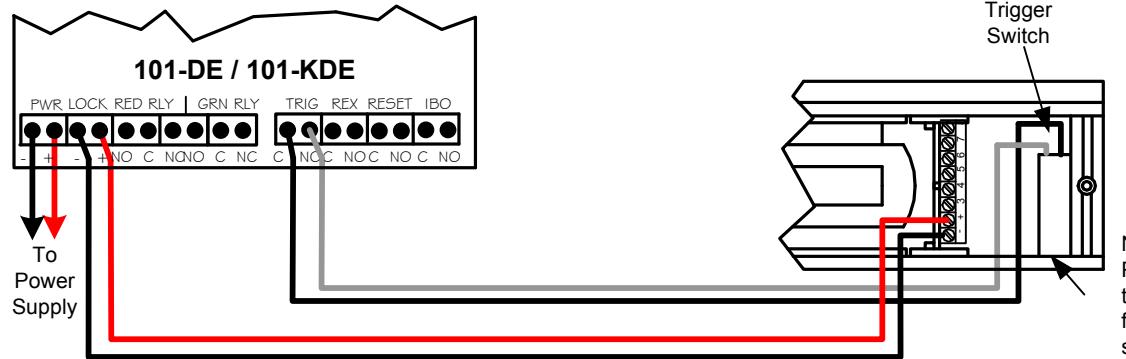
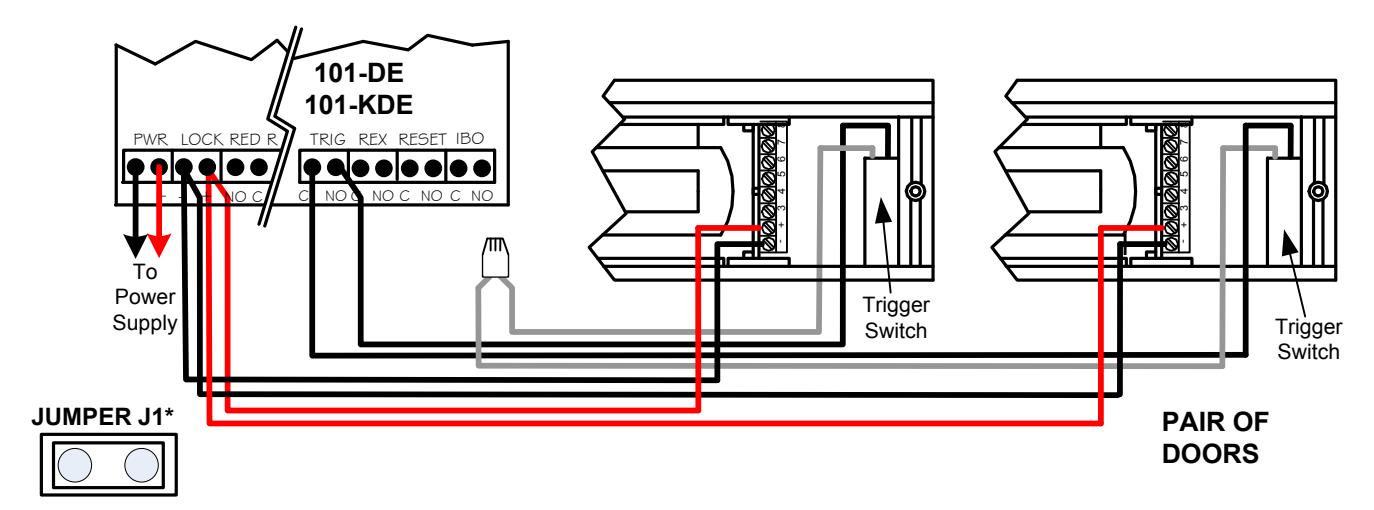
Typical System Wiring – Single Door w/ Latching Hardware
WARNING:
APPLICATION OF VOLTAGE TO THE DRY CONTACT INPUTS OF THIS UNIT WILL CAUSE PERMANENT DAMAGE AND VOID THE WARRANTY
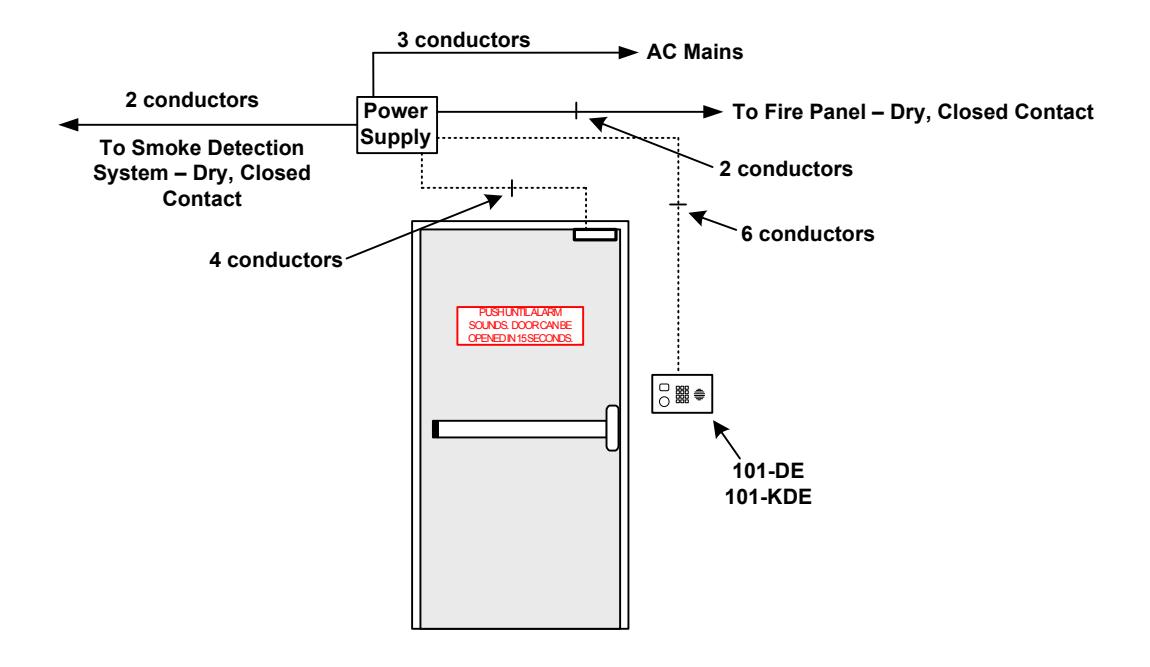
Models: 1511DE, 1571DE & 1581DE
KEY CYLINDER INSTALLATION (KDE Model Only)
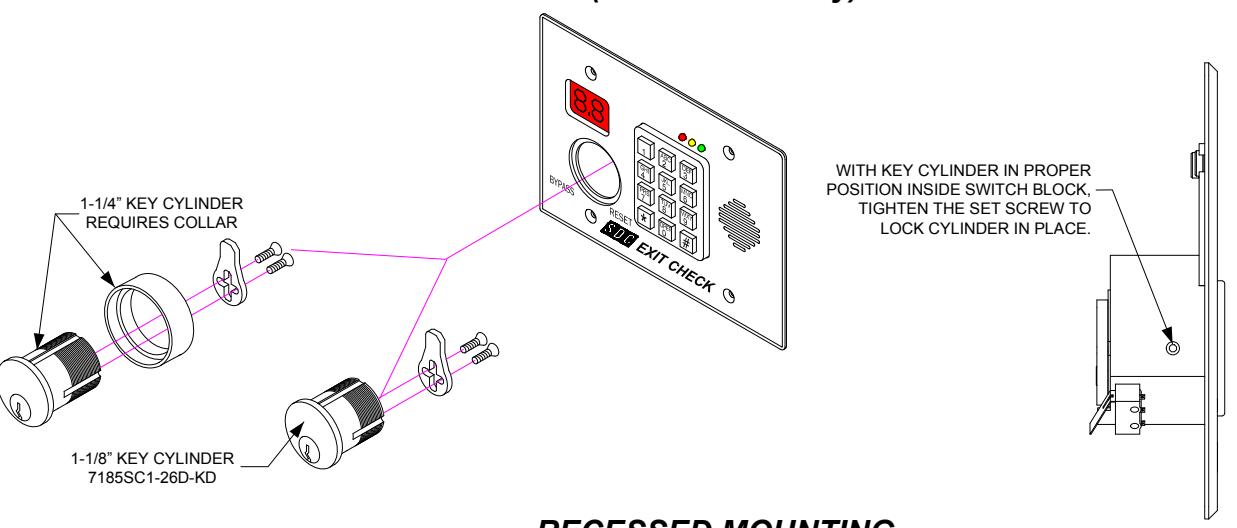
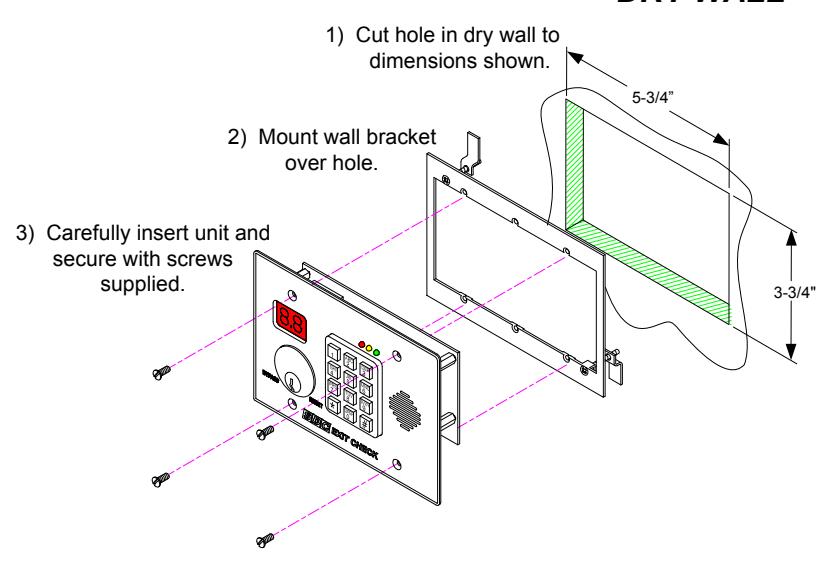
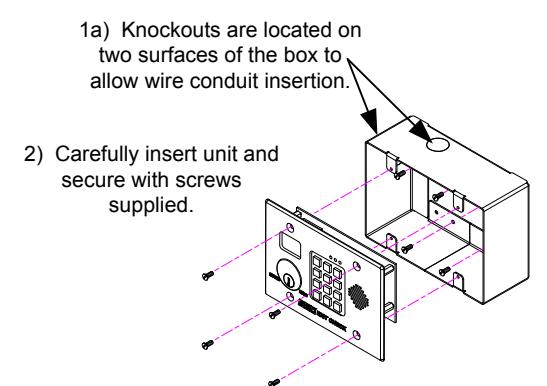
RECESSED MOUNTING DRY WALL
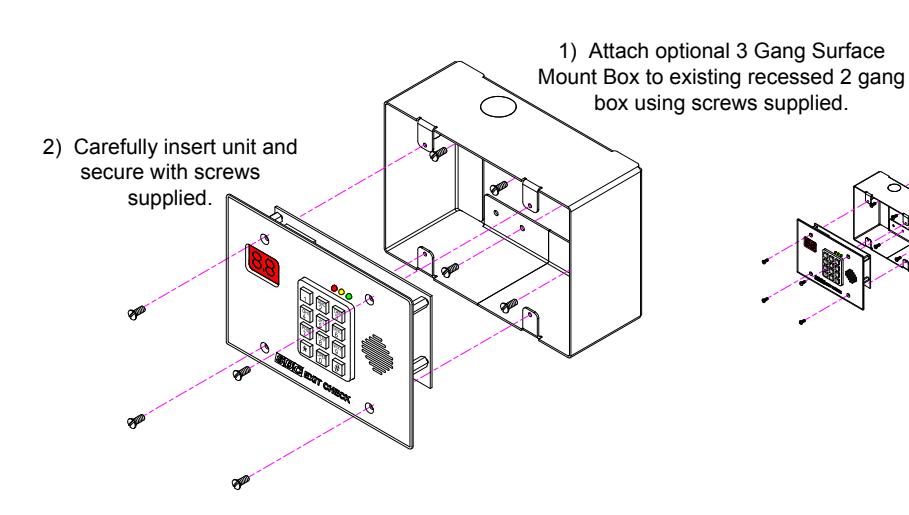
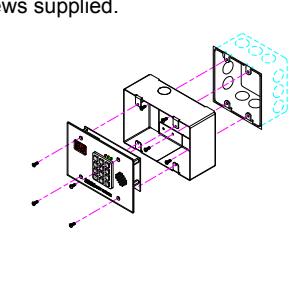
SURFACE MOUNT 3 GANG BOX OVER EXISTING RECESSED 2 GANG BOX
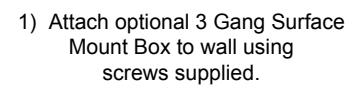
SURFACE MOUNT 3 GANG BOX TO WALL
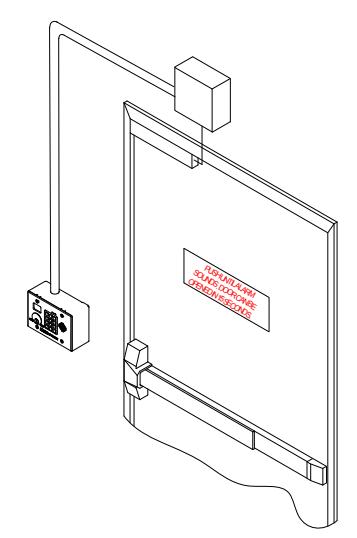
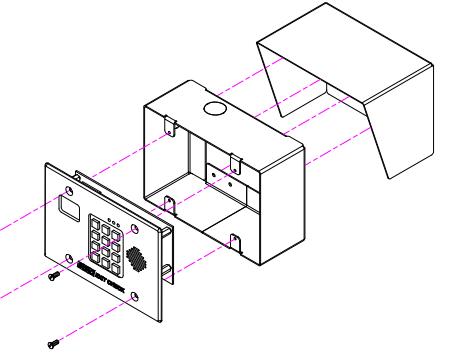
OUTSIDE WALL or POST MOUNTING with WEATHER SHROUD
- Use optional 3 Gang Box inside optional Shroud as a template to drill pilot holes through shroud and into post (or wall).
-
2) Mount 3 Gang Box and Shroud to Post with screws supplied.
- Carefully insert unit and secure with screws supplied.
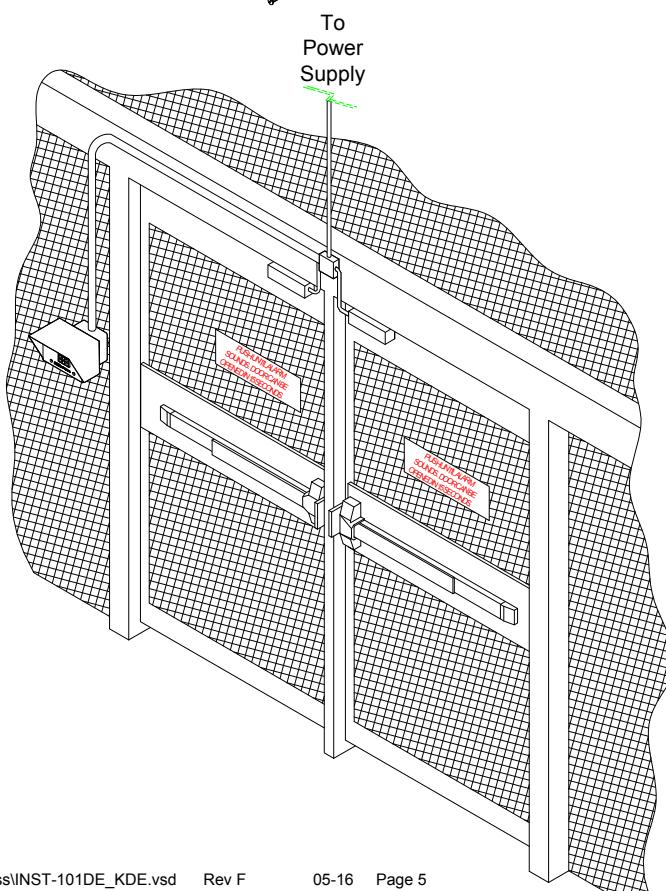
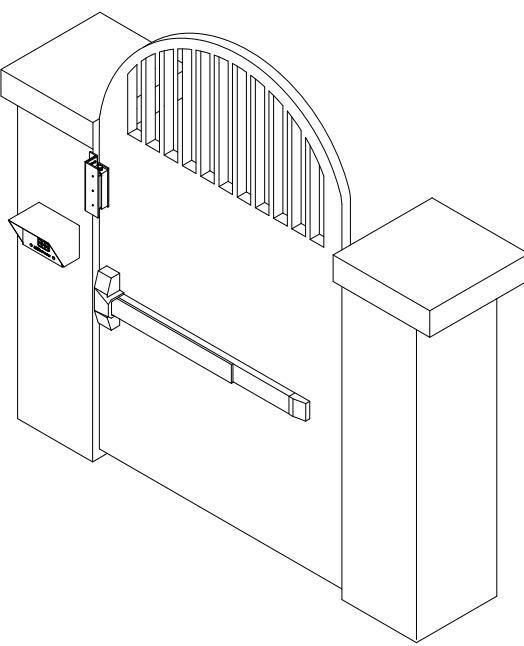
CAUTION: 101-DE CONTROLLERS ARE DESIGNED FOR INDOOR USE. UNIT IS NOT WATER PROOF
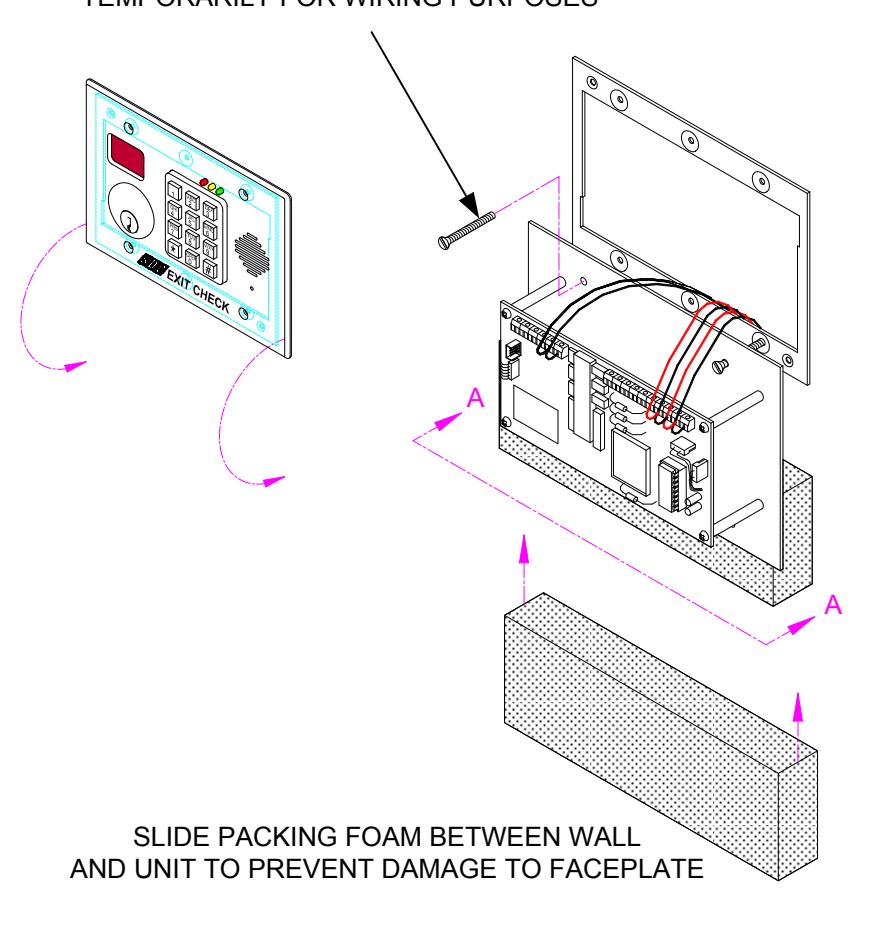
RECOMMENDED MOUNTING PROCEDURE
USE 1-1/4" SCREWS SUPPLIED WITH WALL MOUNT FRAME TO HANG UNIT TEMPORARILY FOR WIRING PURPOSES
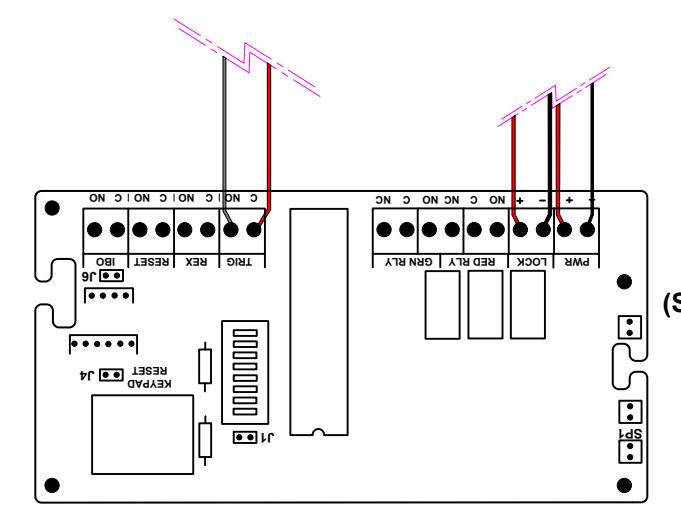
WIRE UNIT AS SHOWN (SHOWN WITH NO OPTIONS).
VIEW A-A
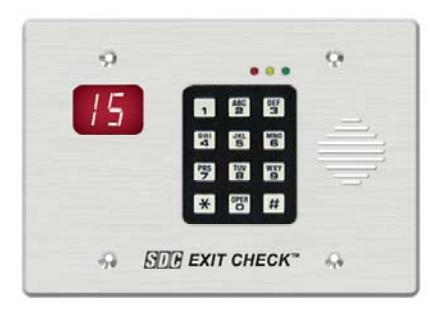
MODEL 101-DE MODEL 101-KDE
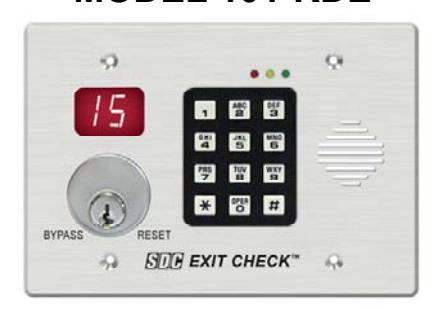
SDC MODELS
1511DE 1575DE 1571DE 1576DE 1581DE
Note for 1581DE only:
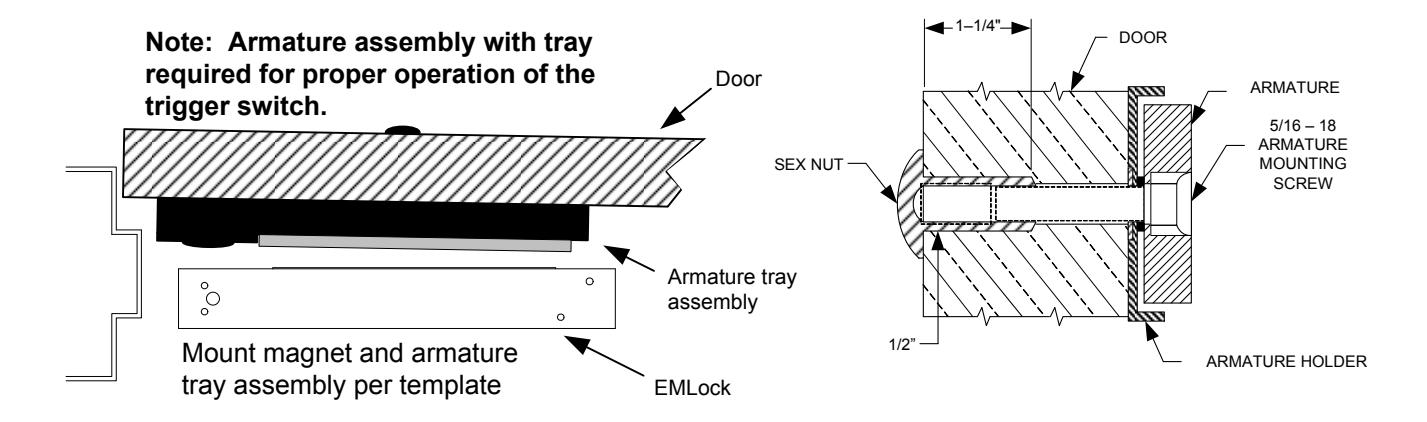
Peel double sided tape on trigger switch clip and stick flush against end-block and sidewall as shown.
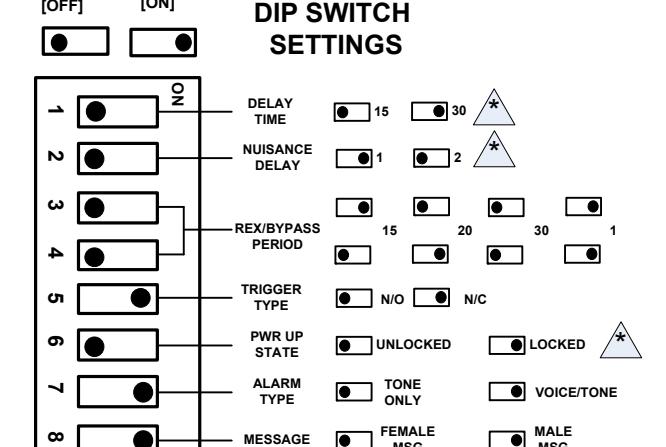
WARNING!
[ON] [OFF]
*
CONTACT THE AUTHORITY HAVING JURISDICTION FOR APPROVAL PRIOR TO SELECTING DELAY TIME OR PWR-UP SETTINGS
MSG
Functionality of the switches vary with the program option code. See Page 2 for a detailed description.
*JUMPER J1 (DOOR PROP)
INSTALLED: The 101DE/KDE will enter the alarm mode if the door is held open past the request to exit period.
REMOVED: The 101DE/KDE will remain unlocked if the door is held open past the request to exit period. No alarm will sound. The 101DE/KDE will relock and rearm upon closure of the door.
| CONTROLLER SPECIFICATIONS | |||
|---|---|---|---|
| INPUT VOLTAGE | 12 VDC OR 24 VDC | ||
|
MAX CURRENT DRAW
(CONTROLLER ONLY) |
180mA @ 12/24 VDC | ||
|
MAX CURRENT
(LOCK OUTPUT) |
1 Amp @ 12/24 VDC | ||
|
MONITOR RELAYS
CONTACT RATING |
1 Amp @ 12/24 VDC
(RESISTIVE) |
||
| TEMPERATURE | 0 C – 70 C o o | ||
MSG
System Operation
POWER-UP UNLOCKED POWER-UP LOCKED
The door is unlocked. To enter the Armed Mode, turn the keyswitch to Reset or enter the Reset Code "11*" on the keypad
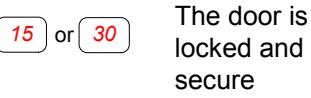
DELAYED EGRESS MODE
The door is still locked and secure. The display is counting down with audible alarm/voice instructions. Once the display reaches "00". the door will unlock.
ALARMED UNLOCKED [Alternating Display]
| 00 | The door is unlocked and the alarm is sounding. To return to Armed Mode, close the door and turn the keyswitch | 00 | The door is unlocked and has been opened |
|---|---|---|---|
| to Reset or enter the Reset Code "11★" | |||
| on the keypad |
RESET [Armed] → Keypad Code 11*
(Green LED solid)
| The door is locked and secure |
|---|
AUTHORIZED EGRESS [REX] → Keypad Code 22* (Green LED Solid)
| Door Closed | The door is unlocked until the REX timer has expired or |
|---|---|
| Door has | until the door has been opened and then closed. |
| been opened |
BYPASS [Maintained Unlock] → Keypad Code 33* (Green LED Flashing)
| Door Closed | The door is unlocked indefinitely. | To return to Armed Mode, enter the |
|---|---|---|
| Door has been opened | Reset Code "11★"on the keypad. | |
| been opened |
KDE Model Only:
KEY SWITCH BYPASS [Maintained Unlock] (Green LED Solid)
Door Closed Door has been opened The door is unlocked indefinitely. To return to Armed Mode, close the door and turn the keyswitch to RESET or enter the Reset Code "11★" on the keypad.
Keypad Programming
KEYPAD STATUS LEDS
FACTORY PROGRAMMED CODES
| GREEN Steady: Power on, No errors, No outputs are active |
User
No. |
Pin
Code |
0 |
|---|---|---|---|
| • |
Flash At least one output is active RED Steady: General error, invalid code
entered
Fast: No errors,
YELLOW Flash: For ADA requirements, it will light
each time a key is pressed
Slow: Keypad is in Programming Mode
Flash
|
User
No. |
Pin
Code |
Output
Code |
Function |
|---|---|---|---|
| 01 | 1234* | NA | Master Code (default) |
| 02 | 11* | 2 | Reset |
| 03 | 22* | 3 | Authorized Exit (Rex) |
| 04 | 33* | 4 | Bypass |
If the factory programmed codes are acceptable for your installation, no additional programming is required.
Changing the Master Code
User 1 is always used as the Master Code and is required to access keypad programming. The Factory Default Master Code is "1234". It is strongly recommended that a new Master Code is assigned after installation. WRITE DOWN THE NEW CODE. If the master code is lost, you must use the keypad reset jumper on the main circuit board to enter programming mode by using the Default Master Code.
To Change the Master Code (User 1)
- 1) Enter Programming Mode: Press 99# Master Code * .
- 2) Assign new Master Code: Press 1# 01# New Pin Code# Output Relay # * .
For example: 99# 1234* 1# 01# 3871# 0# * changes the Master code from 1234 to 3871.
3) Press ** to exit programming mode.
Entering Programming Mode
Press 99# Master Code * .
For example: 99# 1234 * Enters programming mode using the Default Master Code.
Adding a User / Changing User Pin Codes (Option 1)
Output Relay Codes
2= Reset
3= Authorized Exit
4 = Bypass
To add a user:
Press 1# User Number (2 digits)# New Pin Code# Output Relay #* .
For example: 1# 05# 55# 3#* adds user 5's pin code as one that will activate authorized exit.
Deleting a User (Option 2)
To delete a user:
Press 2# User Number (2 digits)#*. For example: 2# 05#* deletes user 5.
Erase All Users (Option 8)
To ERASE ALL USERS!!
Press 8#*.
All users are erased and the Default Master Code is reset to 1234.
Exit Programming Mode
Press **.
Returning the Keypad to Factory Default Settings
Short the Keypad Reset [J4] jumper terminal located on the main controller board.
Press 99# 1234 * 8# * .
Press 3#1#2#★. Sets the Output #1 (Reset) for 2 seconds.
Press 3#2#2#★. Sets the Output #2 (Auth Exit) for 2 seconds.
Press 3#3#0#★. Sets the Output #3 (Bypass) for latching.
Press 1#02#11#2#*. Adds user # 2 with a code of 11. [Reset] Press 1#03#22#3#*. Adds user # 3 with a code of 22. [Auth Exit] Press 1#04#33#4#*. Adds user # 4 with a code of 33. [Bypass]
Press ** to exit programming mode.
Remove the shorting jumper from the KP RST terminal.
MODELS
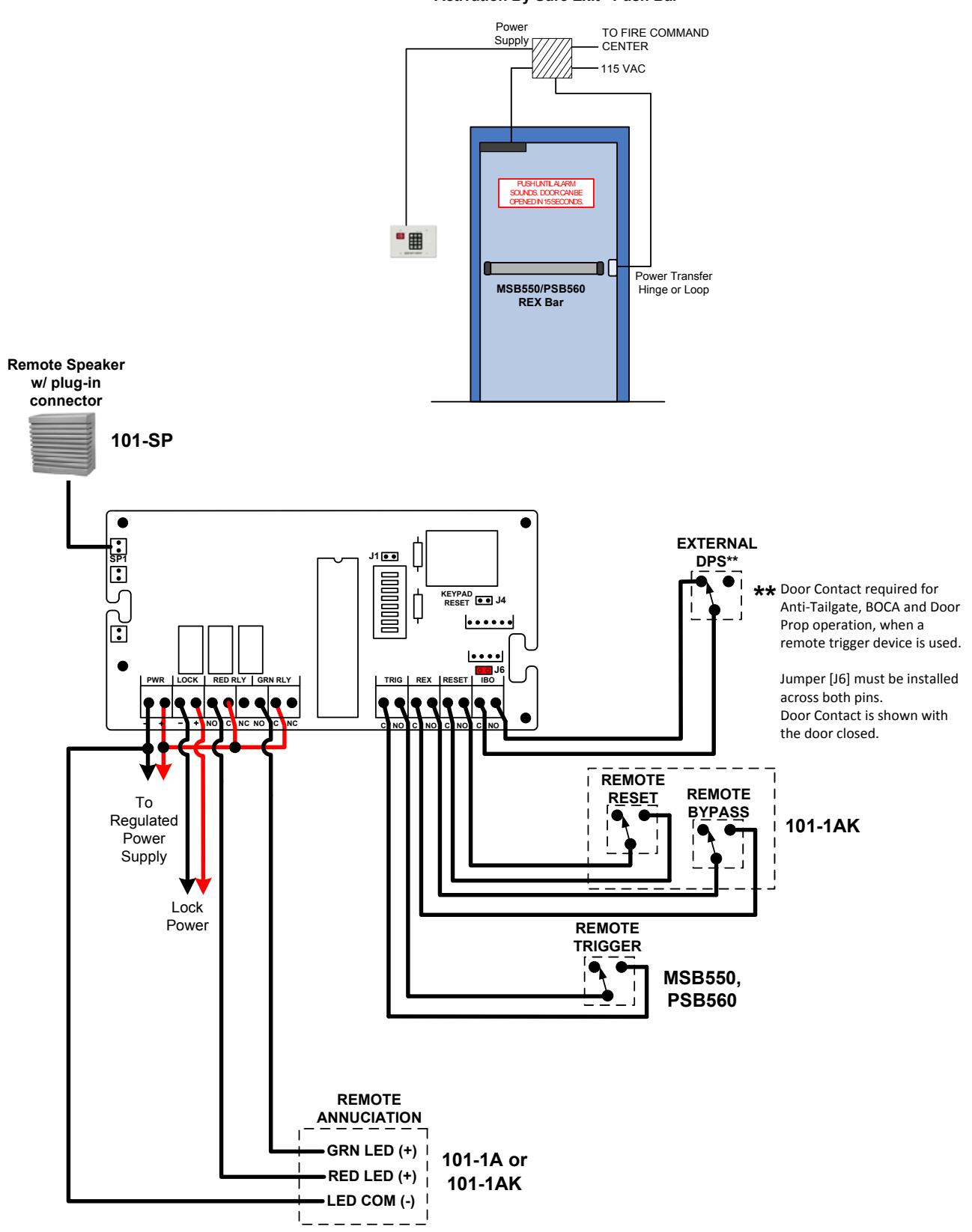
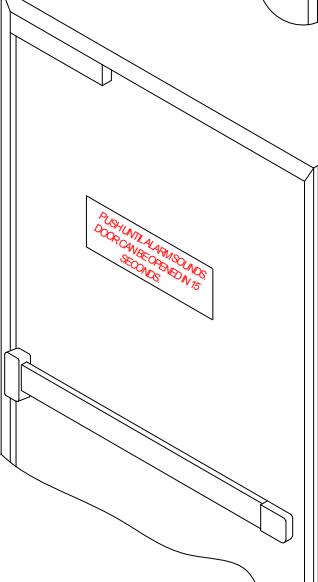
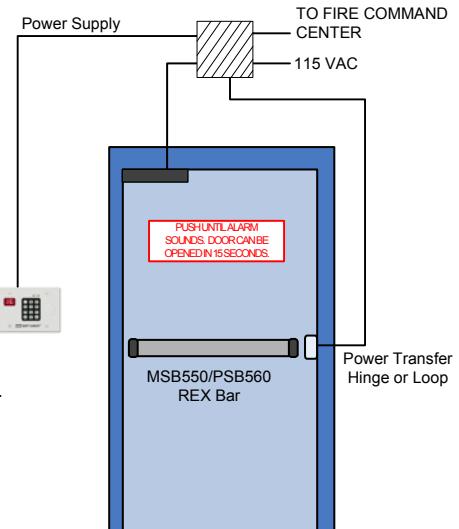
Door Without Latch Assembly Activation By Sure Exit Push Bar R
DELAYED EGRESS CONTROLLER
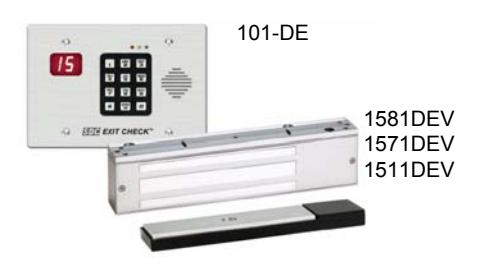
101-DE Wall mount controller with keypad control and reset, 180mA @ 12/24 VDC.
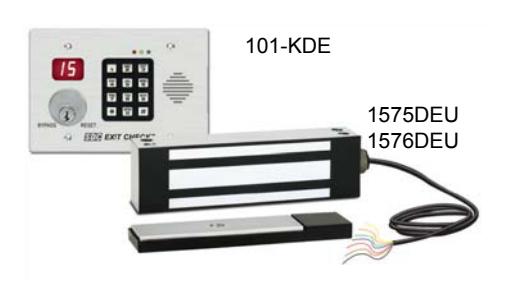
101-KDE Wall mount controller with both keypad and key switch control and reset (less cylinder).
MAGNETIC LOCK WITH INTEGRATED ACTIVATION SENSOR
Specify 2 for pair of doors.
1511DEV Single, 1650 lbs. holding force, 670/350 mA @ 12/24 VDC, 628 std
1571DEV Single, 1200 lbs. holding force Energey Saver, 250/125 mA @ 12/24 VDC, 628 std
1581DEV Single, 650 lbs. holding force, 440/220 mA @ 12/24 VDC, 628 std
Outdoor Locks.
1575DEU Single outdoor magnetic lock with bond sensor, 630
1576DEU Single face drilled outdoor magnetic lock with bond sensor, 630
Lock Finish
Not available with outdoor lock
V 628 Clear Anodized Aluminum (Std) X Dark Bronze Power Coat (313/613 equal)
Y Black Anodized
Optional Outputs
- B Magnetic Bond sensor, indicates locked with full holding force, low holding force, unlocked, tampering and obstructions (1581DEV SPST only).
- D Door position sensor, indicates door open and door closed. Commonly used to verify egress after alarm and exit delay activation. Not available with 1581DE, 1576DE or 1575DE.
- VI Spanish, or English and Spanish, or English and French verbal announcement.
- VIC Custom verbal announcement (minimum 10 piece purchase) .
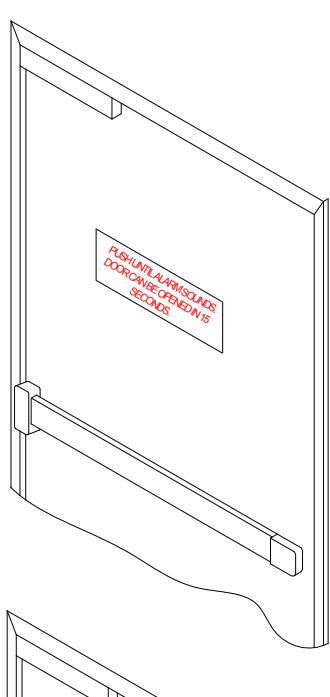
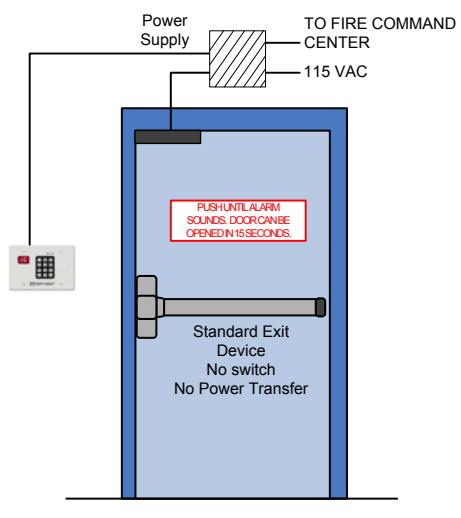
Door With Latch Assembly Activation By Door Movement
ACCESSORIES
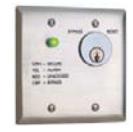
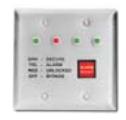
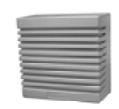
DEC-J 101-DE, DEC-J, SHD-J
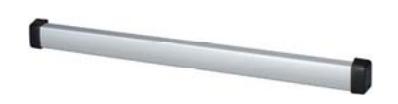
MSB550 Mechanical REX Exit bar for activation of locks on doors without latch assemblies. PSB560 Sure Exit® REX sensor bar for activation of locks on doors without latch assemblies 101-SP External 15W speaker connects directly to 101-DE for enhanced decibels on site or remote voice message annunciation.
101-4AM Four door station with LED's and alarm tone for remote annunciation (indoor use).
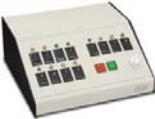
TCC Desk top console for remote control and annunciation of 4 – 12 doors.
101-1AK Outdoor reset/bypass key switch with LED and Audible annunciator. 2-gang outdoor box required. (Interior 101-DE and 1575DE or 1576DE outdoor magnetic lock required).
(Cylinder not included).
DEC-J 3-gang Interior surface mount box for 101-DE
1, 2 or 3 gang box mounted.
SHD-J Shroud for surface mount box DEC-J outdoor use
DEC-J required.
Only 101DE/KDE have been UL Listed as Special Locking Arrangements to UL standard 294 and NFPA 101.

Inputs:
Voltage input: Auto sensing 12/24 VDC
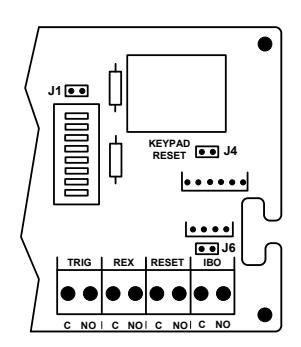
Reset input: N/O, Dry Rex input: N/O, Dry Trigger: N/C or N/O, Dry IBO input : N/O, Dry
Monitoring Outputs:
Alarm Output:
1 Amp @ 30VDC SPDT, dry
Locked Output:
1 Amp @ 30VDC SPDT, dry
Mechanical Specifications:
Controller: 6.5" x 4.5" x 1.5"
(165 x 114 x 38mm)
1581DE: 8.75" x 2.125" x 1.25"
(222 x 54 x 32mm) 1571DE/1511DE: 11" x 2.75" x 1.562"
(279 x 69.9 x 39.7mm)
1575DE/1576DE: 8.7" x 2.5" x 1.6"
(221 x 63.5 x 41mm)
Connecting to a Infant/Patient Monitoring System
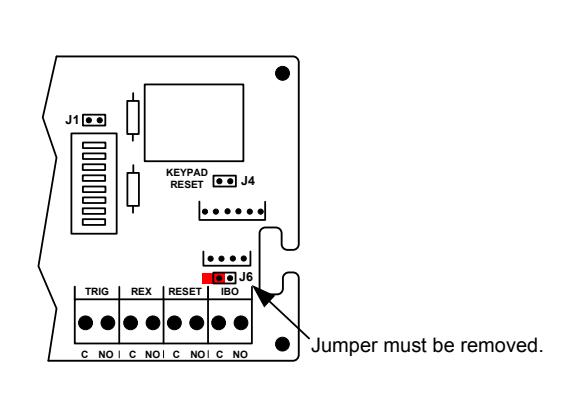
- 1. Locate jumper [J6] (above the IBO input). Verify that it is NOT installed across both pins.
- 2. Close AND hold the REX input. The 101-DE will be in Bypass Mode and will be unlocked.
- 3. Whenever the IBO input is closed AND held, the 101-DE will immediately relock and rearm. Egress is possible by activating the Exit Check's trigger input and initiating the irreversible 15 or 30 second unlock cycle.
- 4. Releasing the IBO input will return the 101-DE to the Bypass Mode.
- 5. Releasing the REX input will rearm the system.
- 6. Upon power-up, you must manually reset the lock to activate the IBO input.
Door With Latch Assembly – Activation By Door Movement
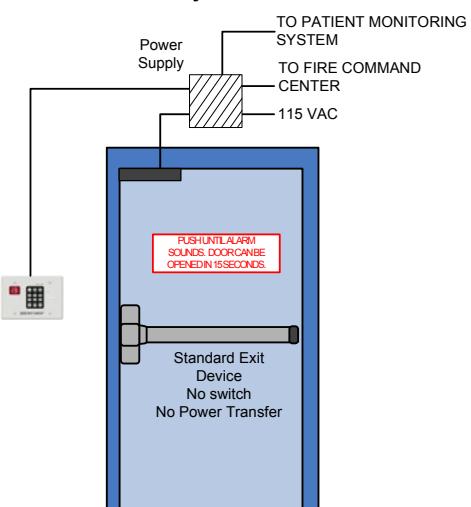
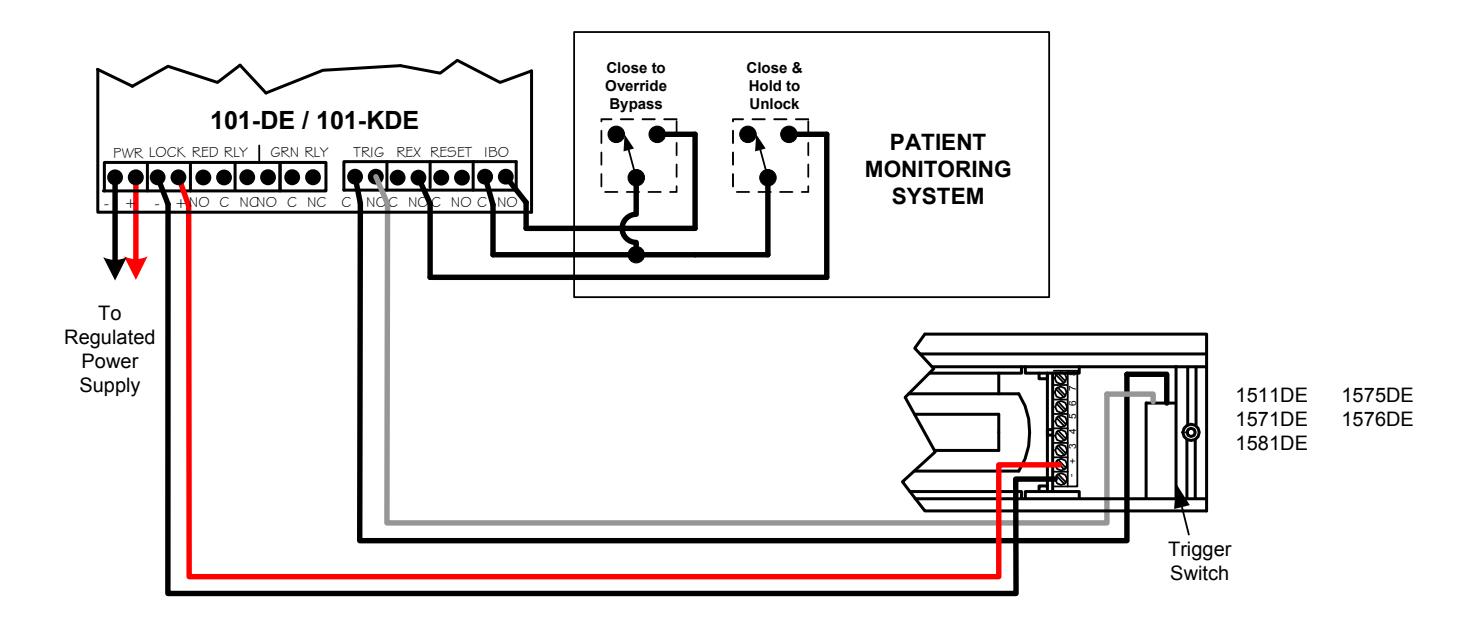
Connection to a Infant/Patient Monitoring System has not been investigated by UL.
Connecting Optional Accessories
Door Without Latch Assembly Activation By Sure Exit Push Bar R